

 hackforla
401 Status Code at Launch
Overview
Upon loading the home screen, we are hit with a POST https://dev.vrms.io/api/auth/me 401 error in the console. Please attempt to resolve.
Action Items
- [ ] Check #1323 to see if any of the completed issues resolved this one.
- [ ] Resolve the
POST https://dev.vrms.io/api/auth/me 401error.- [x] Inspect the code to see why we are getting a 401 - Unauthorized status code.
- [x] Inspect the code to see why there is a
POSThappening with no action.
- [ ] Check off your issue on #1323
Errors
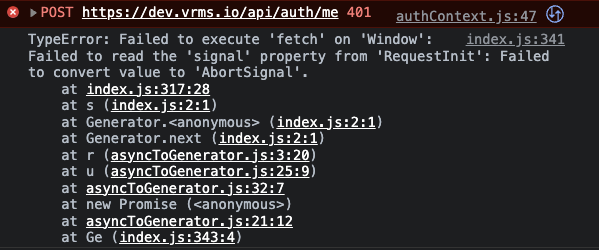
Notes
- The site container does not load in when adding a breakpoint on
fetchUser()- authContext.js in sources using the dev tools.
Resources/Instructions
- Possible helpful paths:
- Client folder:
- Path:
context/authContext.jsLine 47
- Path:
- https://developer.mozilla.org/en-US/docs/Web/HTTP/Status/401

Inspect the code to see why there is a POST happening with no action.
AuthProvider component that is wrapped around App component calls refreshAuth() which calls fetchAuth() where the Post request is triggered on initial loading of app

Inspect the code to see why we are getting a 401 - Unauthorized status code
Several files in the backend/ folder contain res.sendStatus(401)
-
app.js -
user.controller.js -
auth.middleware.js -
user.middleware.js
Used console.log() to track it down. Seems to be coming from verifyCookie function in auth.middleware.js
Will be throwing this in the questions/review column due to its complexity. It was initially thought that the error was only thrown on the home page, but it is also triggered once the user is logged in.
The fetch is what is causing the error but the user information is passed back even with the error. I did play with the middleware as well and had no luck. We can discuss this further at a future meeting.
@josiehandeveloper is no longer on the team, moving this issue back to prioritized backlog.

I think the 401 response from the backend is correct. The server is checking for an authentication cookie; however, the cookie is undefined, and in a normal authorization flow, the user is considered unauthorized. That said, an argument could be made that the response should be a 403.
// ../../backend/middleware/auth.middleware.js

function verifyCookie(req, res, next) {
  jwt.verify(req.cookies.token, CONFIG_AUTH.SECRET, (err, decoded) => {
    if (err) {
      return res.sendStatus(401);    // <-- req.cookies.token is undefined, so it will always error.
    }
    req.userId = decoded.id;
    req.role = decoded.accessLevel;

    next();
  });
}
The backend is providing an HttpOnly cookie. However, I have not been able to determine whether the cookie is making its way to the calling client. This still requires further investigation.
// ../../backend/controllers/user.controller.js

UserController.verifySignIn = async function (req, res) {
  let token = req.headers['x-access-token'] || req.headers['authorization'];
  if (token.startsWith('Bearer ')) {
    // Remove Bearer from string
    token = token.slice(7, token.length);
  }

  try {
    const payload = jwt.verify(token, CONFIG_AUTH.SECRET);
    const user = await User.findById(payload.id);
    res.cookie('token', token, { httpOnly: true });    // <-- This HttpOnly cookie is being added to the response, but it’s not clear when it is being sent.
    return res.send(user);
  } catch (err) {
    console.error(err);
    return res.status(403);
  }
};

I am still reviewing this. As I suggested last week, I think it would be best if we redesign this and create a more detailed implementation. The current implementation appears to be an incomplete implementation of JWT authentication, and there doesn’t seem to be documentation for the intended implementation.
This issue is likely going to be resolved by our of rebuild our authentication.

Closing issue as unplanned per convo with @trillium & @geolunalg. Plan is to create a new epic & issues by @geolunalg.