

 hackademix
Overflow window behavior
Description
When window size gets smaller and NoScript menu item is moved to the overflow menu, NoScript's window size is still bigger than browser window size. This leads to the toggles on the right being displayed on the far right, which is hidden on the interface.
Steps to Reproduce
This happens in Firefox (desktop and mobile). You might need to have multiple extensions installed for the overflow to kick in. (Not found in Chrome.)
Expected Behavior
Window size is the same as browser window size, and all icons are visible.
Actual Behavior
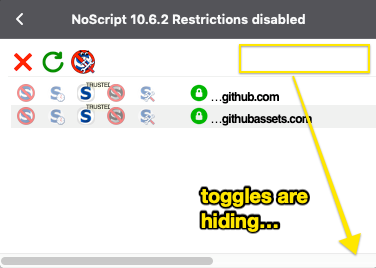

Confirming that this problem exists on nightly Firefox builds on macOS and Linux.
You can reproduce this error by right clicking the toolbar, clicking "Customize..." and dragging the NoScript icon into the Overflow Menu, and then accessing NoScript from the Overflow Menu.

I'm having the same problem in Firefox 92.
One way to work around this issue is to
- Visit the NoScript add-on options.
- Click on the Appearance tab.
- Place a check mark next to 'Show NoScript contextual menu item'
- Close the options.
- Right-click on a Firefox toolbar item and choose Customize Toolbar.
- Remove NoScript from the toolbar by dragging it to the area with the other unused items.
- Click Done to close the 'Customize Firefox' tab.
Now, when you right-click on a Web page and choose the NoScript menu item, a pop-up window will open showing a full-width menu.
Buggy Tab URL
The NoScript status bar menu can be opened in a tab. But it is clear the menu is not meant to be used in a tab because it is difficult to access and it will close as soon as it loses focus.
If you want to try, the URL will have the form:
moz-extension://[GUID]/ui/popup.html#tab[index]
where [GUID] is a string which represents your NoScript installation and [index] is an integer which represents the tab being targeted.
The GUID is randomized for each installation. So you must discover this on your own. Fortunately, the GUID is the same as when you visit the NoScript options page and can be copied from the address bar when visiting that page.
Tabs are indexed chronologically from the start of the session beginning with 1. So, if I wanted to target the eighth tab opened in this session then I would write #tab8. Closed tabs count against the total.
An example URL might be:
moz-extension://70c58ca4-ab5c-4f24-a44b-11a8f4da8001/ui/popup.html#tab8
Note I was able to discover this address by using the normal 'View Page Source' context menu option when viewing the NoScript menu in a window. This might be helpful if you want to investigate further.
Regards,
