
angular-material-components
 angular-material-components copied to clipboard
 h2qutc
Angular 13 from time to time component UI is broken - no errs in the console
From time to time some users are experiencing this issue (Mac or Windows - latest chrome versions, Angular 13)
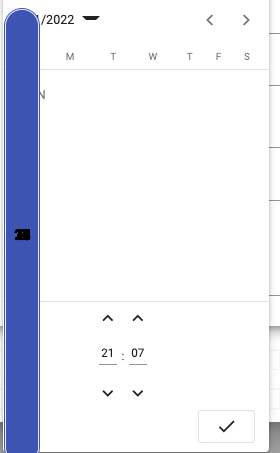
Issue dissapears after hard refresh.
Anybody experienced a similar issue, is there a workaround?


@cmester I will try to release a new version as soon as possible. Thanks to your support.


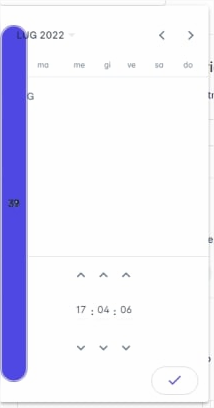

Hi
adding the proposed workaround is breaking standard
[image: image.png]
Removed the !important, and now
.mat-calendar-body-cell { position: relative; }
On Tue, Jul 26, 2022 at 9:51 PM shanu-1119 @.***> wrote:
Hi @cmester https://github.com/cmester @ni3tzsch3 https://github.com/ni3tzsch3 ,
can u try adding this css
.mat-calendar-body-cell { position: relative !important; }
— Reply to this email directly, view it on GitHub https://github.com/h2qutc/angular-material-components/issues/269#issuecomment-1195859074, or unsubscribe https://github.com/notifications/unsubscribe-auth/AARKPW26AN7HGZ3DUNM7ZEDVWAXTJANCNFSM5XT3HZJA . You are receiving this because you were mentioned.Message ID: @.***>
There are multiple style errors, caused by conflicts with the styles of the standard mat-datepicker.
I can reproduce them easily when i have a datetime picker and a standard datepicker (in the same view). When you open the datetimepicker, then the standard datepicker, you can see a problem in mat-calendar-arrow caused by borders and sizes, and then, if you open the datetimepicker again, all styles are messed up (as you guys mentioned in this issue).
I spent some time trying to fix these issues, and as a workaround, add this to your styles.scss:
.mat-calendar-arrow {
  border: none !important;
  width: 10px !important;
  height: 5px !important;
}
ngx-mat-calendar-header .mat-calendar-arrow {
  border-left: 5px solid transparent !important;
  border-right: 5px solid transparent !important;
  border-top-width: 5px !important;
  border-top-style: solid !important;
  width: 0 !important;
  height: 0 !important;
}
ngx-mat-month-view .mat-calendar-body-cell {
  position: relative !important;
}
All issues gone!
Maybe the solution is wrap the datetimepicker styles inside a class, to not mess with the native styles.
FYI @cmester @ni3tzsch3 @johnbu2 @h2qutc @kaihenzler

+1

while using both the ngx-mat-datetime-picker and mat-datepicker the angular material's mat-datepicker UI is Breaking
done a work around here
https://angular-ivy-wwze6q.stackblitz.io

@sudhagarmsd5 can you pls post your workaround here? the stackblitz is not working anymore?!
have found out a way: Wrapping @Sergiobop's solution (and some additions from me) in ngx-mat-datetime-content
.mat-calendar-body-cell {
  position: absolute; // necessary for working in Firefox
}

ngx-mat-datetime-content {
  .mat-calendar-arrow {
    border: none !important;
    width: 10px !important;
    height: 5px !important;
  }
  ngx-mat-calendar-header .mat-calendar-arrow {
    border-left: 5px solid transparent !important;
    border-right: 5px solid transparent !important;
    border-top-width: 5px !important;
    border-top-style: solid !important;
    width: 0 !important;
    height: 0 !important;
  }
  ngx-mat-month-view .mat-calendar-body-cell {
    position: relative !important;
  }
  ngx-mat-timepicker {
    input.mat-input-element {
      cursor: default;
    }
    .mat-form-field-underline,
    .mat-form-field-subscript-wrapper,
    .mat-form-field-label-wrapper {
      display: none;
    }
    .mat-form-field-appearance-legacy .mat-form-field-infix {
      padding: 0;
      border-top: 0.2rem solid white;
    }
    .mat-form-field {
      line-height: 1rem;
    }
  }
}

@jhwegener your solution was not working for me but i fixed it with reassign materials default styles to the mat-calendar body cell
mat-calendar .mat-calendar-body-cell {
  height: 100%;
  position: absolute;
}

