

 h2oai
h2oai
Uploads fail if file has no extension
Wave SDK Version, OS
0.23.0, Mac OSX
Actual behavior
Uploaded an AWS credentials file using ui.file_upload, file gets created on wave server with text "Not Found".
Logs show when I try to download the file:
2022/09/16 17:07:33 # {"error":"not found","path":"/_f/80b79c0e-5685-42df-8c2c-450a19f60689/credentials","t":"file_download"}
Expected behavior
Ability to upload files without extensions.

Thanks for opening the issue @g-eoj! Unfortunately, I am not able to repro:
# Form / File Upload
# Use a file #upload component to allow users to upload files.
# #form #file_upload
# ---
from h2o_wave import main, app, Q, ui


@app('/demo')
async def serve(q: Q):
    if 'file_upload' in q.args:
        q.client.file_upload = q.args.file_upload[0]
        q.page['example'] = ui.form_card(box='1 1 4 10', items=[
            ui.text(f'file_upload={q.args.file_upload}'),
            ui.button(name='download', label='Download'),
        ])
    elif q.args.download:
        foo = await q.site.download(q.client.file_upload, '.')
    else:
        q.page['example'] = ui.form_card(
            box='1 1 4 10',
            items=[
                ui.file_upload(name='file_upload', label='Upload!', multiple=True, max_file_size=10, max_size=15)
            ]
        )
    await q.page.save()
Can you maybe add a min repro code along side with the file you are trying to upload (with fake creds ofc).

Hi @mturoci, I tried your repro file and still got the error.
Here's a better description of the error, see the "not found" messages and file contents:
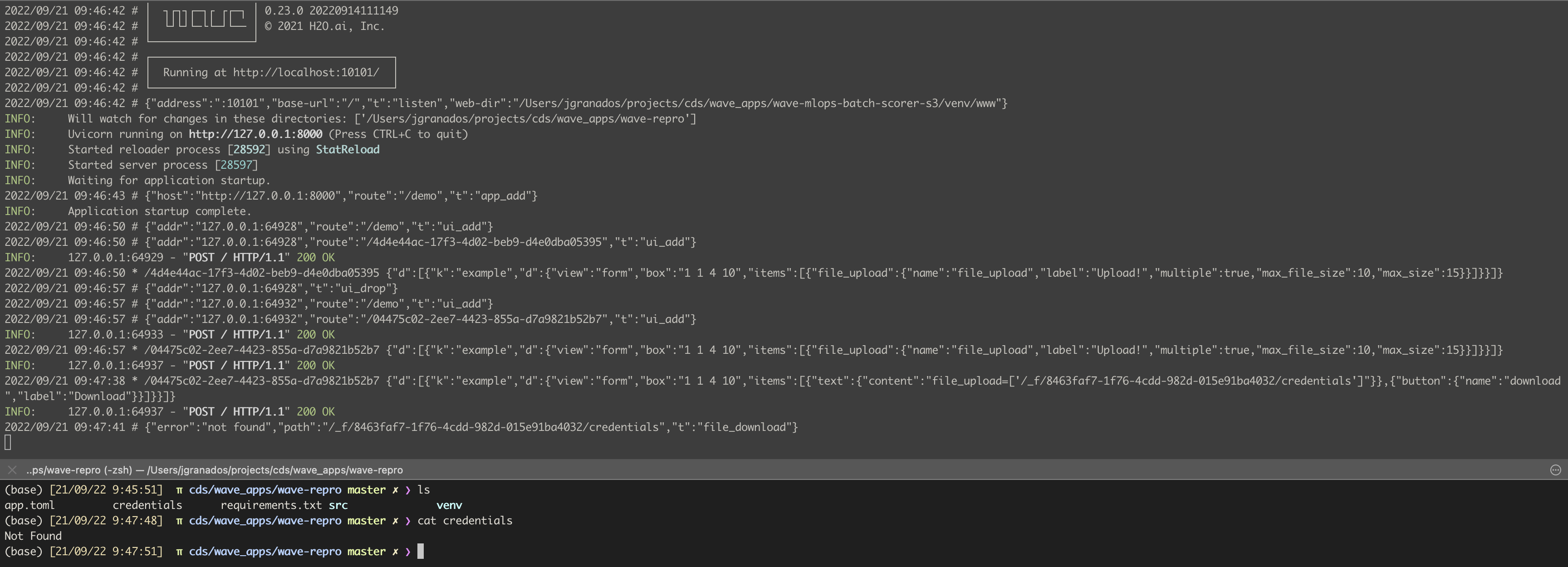
Here's the file info I reproed with (I can't upload it, probably dud to the file name):

I can repro @g-eoj 's issue with Wave v0.23.1 on MacOS using any file without an extension (content inside file doesn't matter).

Reproed. It confused me that there was no err thrown in python terminal and file got created anyway, it's just not cattable. Thanks both @g-eoj and @vopani!
After a bit of digging into the code it seems like we do not support ext-less files on purpose. @lo5 maybe extensionless files could be handy in some scenarios? Adding the functionality shouldn't be that hard either - just a check if the extensionless file is present on the disk. Wdyt?
Will also add a proper err handling to the py download function so that the err is obvious.