

 h2non
h2non
Nocrop with resize no longer working
I've recently upgraded from Imaginary 1.0.7 and noticing that the nocrop option isn't working anymore when resizing. Testing via the official docker images this seems to have changed in v1.0.8
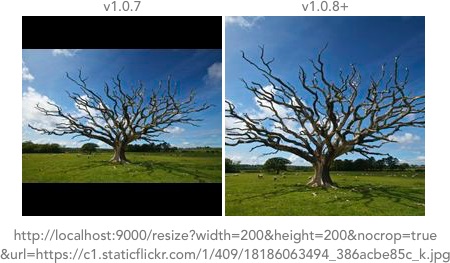
To get the above results I'm starting the server like so
docker run --rm -p 9000:9000 h2non/imaginary:1.0.7 -enable-url-source
or
docker run --rm -p 9000:9000 h2non/imaginary:1.0.8 -enable-url-source
before running
http://localhost:9000/resize?width=200&height=200&nocrop=true&url=https://c1.staticflickr.com/1/409/18186063494_386acbe85c_k.jpg

Nothing relevant changed in imaginary, so I guess this is a behavioral change in bimg. Would need to investigate this.

@h2non I've had a look into this and think I've traced the regression in bimg back to a change here
https://github.com/h2non/bimg/blob/master/resizer.go#L456
Currently it's
factor = math.Min(xfactor, yfactor)
Previously it was
if o.Crop {
  factor = math.Min(xfactor, yfactor)
} else {
  factor = math.Max(xfactor, yfactor)
}
If i revert this change then things seem to work again, but I get one failing test in TestResizeVerticalImage stating "shrinkh: image has shrunk to nothing"
I was going to open a PR but worried I'm not fully over this so could be introducing a different regression. Let me know if you want that PR, otherwise hopefully this is of some use.
I would prefer maintaining the current behavior since it's more predictable and fits better in the majority of use cases. That being said, you can get similar outputs by playing with force=true|false and embed=true|false params.
I have tested changing the "force" and "embed" parameters but that does not seem to solve this. I also tried the new "fit" operation which seemed like it might do a similar thing but that does not seem to help with padding out the image.

@hnon There are definitely usecases where you are in the need of the returned image's dimension to fit what you requested for with and height and the aspect ratio is not changed I would call it inner fit with paddings added.
Currently I'm also unable to get such a behavior on any endpoint as far as I can see
Maybe a new endpoint would be an option? E.g., fill or pad At least then it would be obvious what to expect.
On the other hand I also thought that maybe embed / extend would offer something into that direction, but couldn't figure out how to get those working...

Folks, feel free to investigate and provide a fix for this and I will review it asap. Honestly, I'm pretty busy and I don't have enough motivation for spending my free time fixing issues.
Hi @h2non I would be happy to provide a fix, or an evolution, I would just like to do it as it make the more sense on the both repository (that both belong to you if I'm correct :) ).
For me, the change in bimg make the imaginary parameter extend useless (at least I was not able to find out how to replicate a similar behaviour, "the edges of an image are extended")
I see several options here in order to get this behaviour back :
- Change bimg method like @mikestead found (maybe check also with @greut why it was a fixes for him : https://github.com/h2non/bimg/commit/e7d6d147eeb9e53dd4351c5e2da52ddd0981564d#diff-e2d75d285d6ec44674c6ac3035cd47f7L449)
- Add the "old" behaviour into bimg only if extend parameter is defined
- Change imaginary method to replicate the previous behaviour in order to get back to "expected" behaviour
- Create a new dedicated endpoint on imaginary like @gwildu proposed in order to give this behaviour back
Main question for me is, as bimg aims to provide a wrapper around vips it make more sense for me to create a fix inside bimg in order to provide to every consumer the ability to use this behaviour (not only imaginary).
Let me know if I should create an issue into bimg as this seems mostly related to a change done there, not inside the imaginary repository.
Let me think what are your thoughts on that @mikestead @claws-se @h2non

@luphaz Hi there
Main question for me is, as bimg aims to provide a wrapper around vips it make more sense for me to create a fix inside bimg in order to provide to every consumer the ability to use this behaviour (not only imaginary).
Me and @claws-se are sitting here and are in agreement that it would be a good idea to open the issue on bimg; but a fix that's local to imaginary would for our purposes just as fine! The biggest problem for us is that we can't upgrade to the latest and greatest.
