Git References & Cheatsheet
References
常用 Git 命令清单 - 阮一峰
Ref-0
Git 参考手册
Git 简明指南
Learn Git Branching
Git Magic
Git Book
Git Flow
Pro Git
Common Sense
Machanism
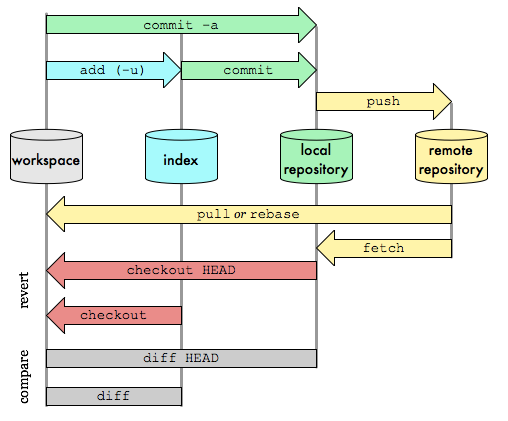
Basics
Areas
- Workspace
- Index / Stage
- Repository (local/remote)
- Remote
Config
| command |
description |
| git config —global user.name |
修改全局 user.name |
| git config —global user.email |
修改全局 user.email |
| git config user.name |
修改 repo user.name |
| git config user.email |
修改 repo user.email |
Commit message
type
- "feat"
- "fix"
- "docs"
- "style"
- "refactor"
- "perf"
- "test"
- "chore"
- "revert"
- "deps"
- "merge"
- "release"
Workflow
1. Create
| command |
description |
| git init |
创建 repo |
| git clone |
克隆 repo 到本地 |
2. Browse
| command |
description |
| git status |
当前变更文件 |
|
|
| git log |
当前分支历史 |
| git log —pretty=online/short |
显示模式 |
| git log —graph |
图形化显示 |
| git log - |
倒数第几条 log |
| git log —state |
显示 commit 历史,每次 commit 发生变更的文件 |
| git log —follow |
显示某个文件的历史,包括文件改名 |
| git log -p |
显示指定文件每次 diff |
| git log HEAD --pretty=format:%s |
显示某个commit之后的所有变动,每个commit占据一行 |
|
|
| git blame |
文件被什么人,什么时间修改过 |
|
|
| git diff |
显示暂存区和工作区的差异 |
| git diff —state |
查看简单的 diff 结果 |
| git diff |
查看指定文件的差异 |
| git diff —cached |
显示暂存区和上一个 commit 的差异 |
| git diff HEAD |
显示工作区与当前分支最新 commit 之间的差异 |
| git diff |
比较 work dir和 branch 之间的差异 |
| git diff <branch-A> <branch-B> |
比较分支之间的差异 |
| git diff <commit-A> <commit-B> |
比较两次提交之间的差异 |
| git diff —shortstatoe "{0 day age}" |
显示今天改变了多少代码 |
|
|
| git reflog |
当前分支最近的几次提交 |
3. Revert
| command |
description |
| git reset [commit id] |
staged snapshot 重置,work dir 不变 |
| git reset —soft |
staged snapshot 和 work dir 未被改变 |
| git reset —hard [commit id] |
staged snapshot 和 work dir 都会退回到 commit-id 前 |
|
|
| git checkout |
恢复指定文件到 work dir |
| git checkout . |
恢复 stage 所有文件到 work dir |
| git checkou <branch|tag|commit> |
恢复指定 branch,tag,commit 下的文件到 work dir |
|
|
| git revert HEAD |
撤销前一次 commit |
| git revert HEAD~ |
撤销前前一次 commit |
| git revert HEAD~n |
撤销前 n 次 commit |
| git revert commit |
撤销指定 commit |
|
|
| git clean -n |
show what will be deleted |
| git clean -f |
Remove untracked files from the working tree |
| ... |
|
4. Update
| command |
description |
| git fetch |
获取当前分支最新 commits,不合并 |
| git pull |
获取当前分支最新 commits,合并,并产生新的 merge commit (fetch + merge) |
| git merge |
把 branch 与当前分支合并 |
|
|
| git rebase |
变基 branch 到当前分支 |
| git rebase —abort |
放弃 rebase 操作 |
| git rebase --continue |
继续进行 rebase 操作 |
| git rebase -i |
交互模式 |
| git rebase --skip |
跳 |
| git rebase |
rebase 当前分支,从 commit-id 以后的开始提交 |
| ... |
|
5. Branching/Tagging
| command |
description |
| git branch |
列出所有本地分支 |
| git branch -r |
列出远程所有分支 |
| git branch -a |
列出本地+远程所有分支 |
| git branch |
新建分支 |
| git branch <branch|commit|tag> |
指定 branch、commit、tag 拉出新的 branch |
| git branch -m |
重命名分支 |
| git branch -d |
删除本地分支 |
| git branch -dr |
删除本地和远程分支 |
| git push —delete |
删除远程分支 |
|
|
| git checkout |
切换到分支 |
| git checkout - |
切换到上一个分支 |
| git checkout -b |
切换到分支,如果没有便创建 |
|
|
| git tag |
列出所有标签 |
| git tag |
新建标签 |
| git tag -a -m |
新建带标注标签 |
| git checkout |
切换到标签 |
| git push |
推送标签到仓库 |
| git push —tags |
推送所有标签到仓库 |
| git tag -d |
删除本地分支 |
| git push :refs/tags/ |
删除远程分支 |
| ... |
|
6. Commit
| command |
description |
| git commit |
提交更新 |
| git commit -m [message] |
备注 |
| git commit —amend |
修改 HEAD 的 commit 信息,产生新的 commit-id |
| git commit … -m |
提交 stage 区置顶文件到 repo |
| ... |
|
7. Push
| commands |
description |
| git push |
推送 到代码仓库 |
| git push -f |
—force 强制推送当前分支到远程仓库,忽略 conflicts |
| git push —all |
推送所有分支 |
| git push : |
删除远程特定分支 |
| git push —delete |
删除远程特定分支 |
| ... |
|
Others
Stash
| commands |
description |
| git stash |
保存 staged snapshot 状态 |
| git stash list |
列出所有保存的 staged snapshot |
| git stash apply |
启用某个 stash |
| git stash drop |
删除某个 stash |
| ... |
|
Remote
| command |
description |
| git remote add |
添加源 |
| git remote |
显示全部源 |
| git remote -v |
显示全部源 + 全部信息 |
| git remote rename |
重命名 |
| git remote rm |
删除指定 name |
| git remote show |
查看指定 name 所有信息 |
| ... |
|
Add/Remove
| command |
description |
| git add . |
添加所有文件到 staged snapshot |
| git add |
添加某些文件到 staged snapshot |
| git add |
添加某目录和其子目录到 staged snapsshot |
|
|
| git rm |
删除 work dir 下文件,把这次删除放入 staged snapshot |
| git rm —cached |
停止追踪,保留文件在 work dir |
| git mv |
改变命名,并放到 staged snapshot |
| ... |
|

 git-references copied to clipboard
 gztchan
 gztchan