

 gtjoseph
crash during an active print...
how can I hide or disable menus that are not needed during an active print. In basically, during an active print i only need the first menu (Print) to monitor and pause or cancel and resume the print.

I have already integrated some security queries (print active - yes/no) into macros, but this is only possible to a limited extent. I would like to eliminate the possibility that an action is triggered by accidentally touching the touchscreen while a print is running.
Thanks! wbr, Karl

Should be easy. Take a look at the "atx_power" button definition. It has a "state" object that looks like this...
"state": {
	"states": [
		{ "state": false, "classes": "btn-danger", "value": "ATX is<br>Off",
			"actions": {"type": "gcode", "gcode": "M80", "message": "Power ON"}
		},
		{ "state": true, "classes": "btn-success", "value": "ATX is<br>On",
			"actions": {"type": "gcode", "gcode": "M81", "message": "Power OFF"}
		}
	],
	"field": "${state.state.atxPower}"
},
That causes DueUI to look at the "state.atxPower" field in the object state model and if it's "false", it sets the button class to "btn-danger" (which turns the button background red), sets the text to "ATX is Off", and if it's pushed in this state, sends the "M80" command to the printer to turn it on.
In your case, you could do something like...
"state": {
	"states": [
		{ "state": true, "classes": "btn-secondary",
			"actions": {"type": "log", "value": "This function is disabled while printing"}
		},
		{ "state": false, "classes": "btn-success",
			/* You'd make this action do whatever the purpose of the button is */
			"actions": {"type": "gcode", "gcode": "M81", "message": "Power OFF"}
		}
	],
	"field": "${state.state.status == 'processing'}"
},
Now, when the "status" field of the object state model is "processing", the "true" action will be run which changes the button's class to "btn-secondary". If you press the button in this state, a message will logged. If the status isn't "processing" the "false" action will be executed which changes the class to "btn-primary" and if you press the button in this state, it should execute the command you want.

Thank you for the information. Since this method did not work with all actions (event, setting), I implemented the security checks in the macros, such as:
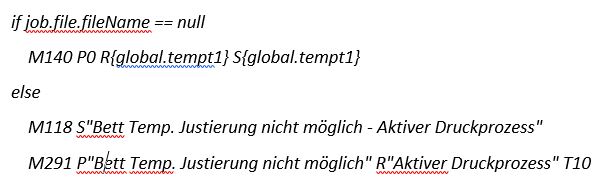
This was a little more effort, but it works quite well. The display of the temp. status I have also rewritten and adapted to the Prusaslicer output (state.job.timesLeft.slicer), also a indicator correction of the print progress.
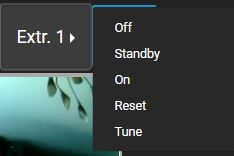
Currently, I'm just struggling with increasing the font size of a dropdown field. I have already tested all sorts of things, but I can't get any further. For a 7" touchscreen it is very advantageous to be able to adjust the size of all fonts.
Thank you again for your efforts 👍
wbr, Karl
I thought I answered your question about the dropdown font size earlier in the week but I guess I forgot. Sorry!
You currently can't change the styles of those items but I'll add the ability to do that in the upcoming release, hopefully by the end of next week.