

 grpc
grpc
Unable to connect to gRPC Server (ASP.Net Core) hosted in Kestrel from gRPC-Web client in different machine
Hi,
I have a gRPC Server hosted in Kestrel with gRPC Web enabled. It uses the default certificate.
public void ConfigureServices(IServiceCollection services)
        {
            services.AddGrpc();
            services.AddCors(o => o.AddPolicy("AllowAll", builder =>
            {
                builder.AllowAnyOrigin()
                    .AllowAnyMethod()
                    .AllowAnyHeader()
                    .WithExposedHeaders("Grpc-Status", "Grpc-Message", "Grpc-Encoding", "Grpc-Accept-Encoding");
            }));
        }
        public void Configure(IApplicationBuilder app, IWebHostEnvironment env)
        {
            app.UseRouting();
            app.UseGrpcWeb(new GrpcWebOptions { DefaultEnabled = true });
            app.UseCors();

            app.UseEndpoints(endpoints =>
            {
                endpoints.MapGrpcService<GreeterService>().EnableGrpcWeb()
                    .RequireCors("AllowAll");
            });
        }
I have a gRPC Web Client running in Javascript.
var client = new GreeterClient('https://localhost:5001');
var request = new HelloRequest();
request.setName('World');

client.sayHello(request, {}, (err, response) => {
  console.log(response.getMessage());
});
If I am trying to connect from same machine using localhost connection works fine. No error call returned successfully. But when I try to connect from a different machine (after changing ip address) in the same LAN (connected to same router) I am not able to connect.
With the addresses https://192.168.1.102:5001, now connecting from same machine also failed. Do I need to create a certificate specifically for "192.168.1.102"?
Please let us know if any sample which shows connecting to certificate specified gRPC Server(ASP.Net Kestrel) from JavaScript client from different machine in same LAN.
Thanks Basanth

Hi Basanth, Create server url with https://192.168.1.102:5001 instead of localhost:5001 then it will connect

@Balasahebpmule
Not really I started server with ip address still giving error.
And this is the error - net::ERR_CONNECTION_REFUSED
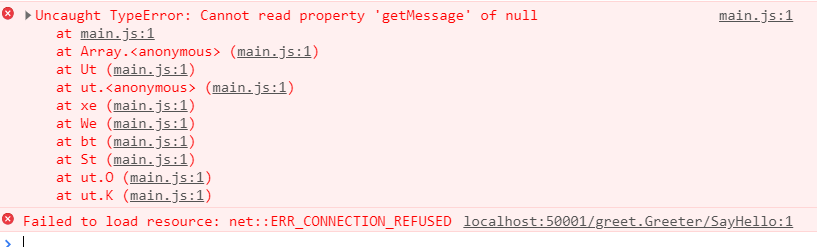
Please check port.. I think port is 5001 but you are trying with 50001
@Balasahebpmule
That I was trying with 50001 both the sides. Error is related to certificate - net::ERR_CERT_COMMON_NAME_INVALID, if you have matching port
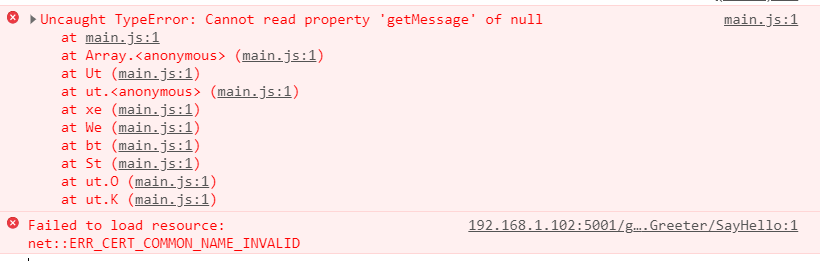
@Balasahebpmule Now I tried creating a certificate and added it.
dotnet dev-certs https -ep $env:USERPROFILE\.aspnet\https\myservice.pfx -p crypticpassword
This I used in the Kestrel configuration,
{
  "AllowedHosts": "*",
  "Kestrel": {
    "EndpointDefaults": {
      "Protocols": "Http2"
    },
    "EndPoints": {
      "Https": {
        "Url": "https://*:5002",
        "Certificate": {
          "Path": "C:\\Certificates\\myservice.pfx",
          "Password": "crypticpassword"
        }
      }
    }
  }
}
With this in the browser I am getting certificate error "net::ERR_CERT_AUTHORITY_INVALID".
Hi,
I was lucky to find this, now I managed to get the request working temporarily by commenting out the UseKestrel part until i manage to install the certificate. Although I got an "response.getMessage is not a function"
Maybe a page about this in the documentation would be good since not everyone will find this.
