
gridjs
 gridjs copied to clipboard
 grid-js
Example data for 'rowspan'
Hey there,
I am aware of #252 and tried to implement rowspan in a shift planning tool - every day (eg 'Monday') spans two rows, resembling different shifts, each being assigned to someone:
<!DOCTYPE html>
<html>
    <head>
        <link href="https://unpkg.com/gridjs/dist/theme/mermaid.min.css" rel="stylesheet" />
        <script type="module">
            import { Grid, html } from "https://unpkg.com/gridjs?module";

            const grid = new Grid({
                columns: [
                    {
                        name: 'Date',
                        attributes: {
                            'rowspan':  2
                        }
                    },
                    {
                        name: 'Weekday',
                        attributes: {
                            'rowspan':  2
                        }
                    },
                    'Shift',
                    'Assigned'
                ],
                data: [
                    {
                        date: '20.12.2022',
                        weekday: 'Monday',
                        shift: 'morning',
                        assigned: 'some1, some3',
                    },
                    {
                        shift: 'afternoon',
                        assigned: 'some1, some2',
                    },
                    {
                        date: '21.11.2022',
                        weekday: 'Tuesday',
                        shift: 'morning',
                        assigned: 'some1, some2',
                    },
                    {
                        shift: 'afternoon',
                        assigned: 'some2',
                    },
                ],
            }).render(document.getElementById('wrapper'));
        </script>
    </head>
    <body>
        <div id="wrapper"></div>
    </body>
</html>
Now, when adding my data, using a data attribute rowspan works, but the data is being partly displayed outside the table:

I tried using arrays of various kinds as data for fields date and weekday, but nothing worked :disappointed: Looking for something in your source, the only usable thing is a jest snapshot, which renders like this (= same problem):
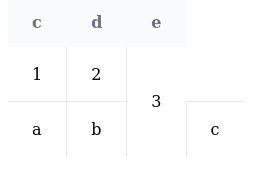
Could you add an example showing the use of colspan/rowspan? As this doesn't seem intuitive, it could also serve as an 'example' in the docs - I could provide a PR if only I knew how it's done 😅
Cheers S1SYPHOS
PS: I also found #893 - but it wasn't answered ..

Hey @S1SYPHOS
Thank you for reporting the issue.
I will have a dig in this as soon as possible.
Feel free to poke around the source code and let me know if you find any clue about theorigin of the bug :)

This issue has been automatically marked as stale because it has not had recent activity. It will be closed if no further activity occurs. Thank you for your contributions.
![stale[bot] avatar](https://avatars.githubusercontent.com/in/1724?v=4 "Published by a pub.dev verified publisher")
Well, not being able to reproduce HTML table properties makes this library somewhat of a no-go ..
This issue has been automatically marked as stale because it has not had recent activity. It will be closed if no further activity occurs. Thank you for your contributions.
@S1SYPHOS, I haven't tested your issue but it seems that gridjs renders 4 cells in every row even when you provide only 2 data values. If this is the case maybe there is a workaround to render unneeded cells with style="display: none", using cell attributes callback function: https://gridjs.io/docs/examples/cell-attributes (maybe in the callback function you can check the row value if it has empty cells, in which case return attribute "style": "display: none".
I haven't tested this with gridjs but I have tested on a static HTML table that rowspan in combination with hidden
