
teip
 teip copied to clipboard
 greymd
Masking tape to help commands "do one thing well"

Highly efficient "Masking tape" for Shell




TL;DR
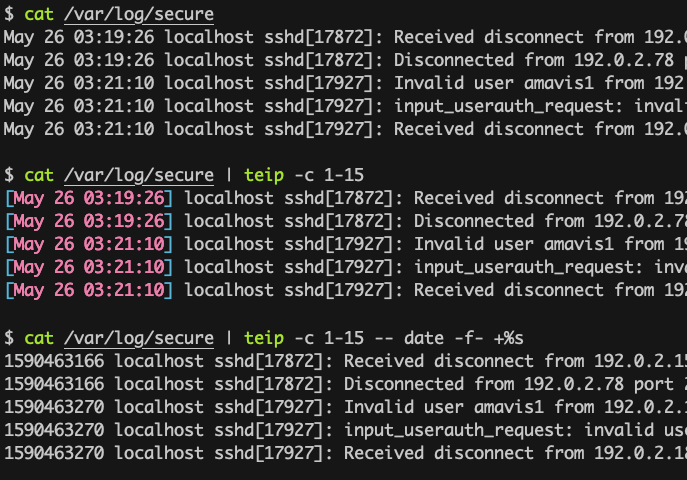
- Edit 4th and 6th columns in the CSV file
$ cat file.csv | teip -d, -f 4,6 -- sed 's/./@/g'
- Convert timestamps in /var/log/secure to UNIX time
$ cat /var/log/secure | teip -c 1-15 -- date -f- +%s
- Edit the line containing 'hello' and the three lines before and after it
$ cat access.log | teip -e 'grep -n -C 3 hello' -- sed 's/./@/g'
Performance enhancement
teip allows a command to focus on its own task.
Here is the comparison of processing time to replace approx 761,000 IP addresses with dummy ones in 100 MiB text file.
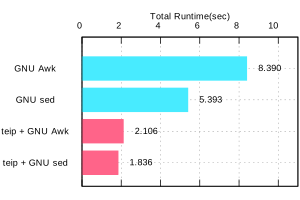
See detail on wiki > Benchmark.
Features
-
Bypassing a partial range of standard input to any command whatever you want
- The targeted command just handles bypassed parts of the standard input
- Flexible methods for selecting a range (Select like AWK,
cutorgrep)
-
High performer
- The targeted command's standard input/output are intercepted by multiple
teip's threads asynchronously. - If general UNIX commands on your environment can process a few hundred MB files in a few seconds, then
teipcan do the same or better performance.
- The targeted command's standard input/output are intercepted by multiple
Installation
On macOS (x86_64)
Using Homebrew
$ brew install greymd/tools/teip
With dpkg on Ubuntu, Debian, etc (x86_64)
$ wget https://github.com/greymd/teip/releases/download/v2.0.0/teip-2.0.0.x86_64-unknown-linux-musl.deb
$ sudo dpkg -i ./teip*.deb
With dnf on Fedora, CentOS, RHEL, etc (x86_64)
$ sudo dnf install https://github.com/greymd/teip/releases/download/v2.0.0/teip-2.0.0.x86_64-unknown-linux-musl.rpm
With yum on CentOS7, RHEL7, etc (x86_64)
$ sudo yum install https://github.com/greymd/teip/releases/download/v2.0.0/teip-2.0.0.x86_64-unknown-linux-musl.rpm
On Windows (x86_64)
teip command will be available on PowerShell after installing with the executable file distributed from below URL.
https://github.com/greymd/teip/releases/download/v2.0.0/teip_installer-2.0.0-x86_64-pc-windows-msvc.exe
SHA256: 93548BBF27826803900ACFEFCEBDB65392D6BDCAF68BBA2D64C151A485B3A483Attention:
You may get some warning messages during the installation because this installer is not signed.
Please verify manually by comparing the above hash value and one given by Get-FileHash <FileName> -Algorithm SHA256 for secure installation.
Also, using teip on Windows requires some technical knowledge. See Wiki > Use on Windows.
On other UNIX or other architectures (i686, ARM, etc..)
Pre-built binary for other architectures (i686, ARM, etc..) is not prepared for now. Please build from source.
From source
With Rust's package manager cargo, you can install teip via:
$ cargo install teip
To enable Oniguruma regular expression (-G option), build with --features oniguruma option.
Please make sure libclang shared library is on your environment in advance.
### Example for Ubuntu
$ sudo apt install cargo clang
$ cargo install teip --features oniguruma
### Example for RHEL
$ sudo dnf install cargo clang
$ cargo install teip --features oniguruma
### Example for Windows (PowerShell) and choco (chocolatey.org)
PS C:\> choco install llvm
PS C:\> cargo install teip --features oniguruma
Usage
USAGE:
  teip -g <pattern> [-oGsvz] [--] [<command>...]
  teip -f <list> [-d <delimiter> | -D <pattern>] [-svz] [--] [<command>...]
  teip -c <list> [-svz] [--] [<command>...]
  teip -l <list> [-svz] [--] [<command>...]
  teip -e <string> [-svz] [--] [<command>...]

OPTIONS:
    -c <list>        Bypassing these characters
    -d <delimiter>   Use <delimiter> for field delimiter of -f
    -D <pattern>     Use regular expression <pattern> for field delimiter of -f
    -e <string>      Execute <string> on another process that will receive identical
                     standard input as the teip, and numbers given by the result
                     are used as line numbers for bypassing
    -l <list>        Bypassing these lines
    -f <list>        Bypassing these white-space separated fields
    -g <pattern>     Bypassing lines that match the regular expression <pattern>

FLAGS:
    -h, --help       Prints help information
    -v               Invert the range of bypassing
    -G               -g adopts Oniguruma regular expressions
    -o               -g bypasses only matched parts
    -s               Execute new command for each bypassed part
    -V, --version    Prints version information
    -z               Line delimiter is NUL instead of a newline
Getting Started
Try this at first.
$ echo "100 200 300 400" | teip -f 3
The result is almost the same as the input but "300" is highlighted and surrounded by [...].
Because -f 3 selects the 3rd field of space-separated input.
100 200 [300] 400
Understand that the area enclosed in [...] is like a hole on the masking-tape.

Next, put the sed and its arguments at the end.
$ echo "100 200 300 400" | teip -f 3 sed 's/./@/g'
The result is as below.
Highlight and [...] is gone then.
100 200 @@@ 400
As you can see, the sed only processed the input in the "hole" and ignores masked parts.
Technically, teip passes only highlighted part to the sed and replaces it with the result of the sed.
Off-course, any command whatever you like can be specified. It is called the targeted command in this article.
Let's try the cut as the targeted command to extract the first character only.
$ echo "100 200 300 400" | teip -f 3 cut -c 1
teip: Invalid arguments.
Oops? Why is it failed?
This is because the cut uses the -c option.
The option of the same name is also provided by teip, which is confusing.
When entering a targeted command with teip, it is better to enter it after --.
Then, teip interprets the arguments after -- as the targeted command and its argument.
$ echo "100 200 300 400" | teip -f 3 -- cut -c 1
100 200 3 400
Great, the first character 3 is extracted from 300!
Although -- is not always necessary, it is always better to be used.
So, -- is used in all the examples from here.
Now let's double this number with the awk.
The command looks like the following (Note that the variable to be doubled is not $3).
$ echo "100 200 300 400" | teip -f 3 -- awk '{print $1*2}'
100 200 600 400
OK, the result went from 300 to 600.
Now, let's change -f 3 to -f 3,4 and run it.
$ echo "100 200 300 400" | teip -f 3,4 -- awk '{print $1*2}'
100 200 600 800
The numbers in the 3rd and 4th were doubled!
As some of you may have noticed, the argument of -f is compatible with the LIST of cut.
Let's see how it works with cut --help.
$ echo "100 200 300 400" | teip -f -3 -- sed 's/./@/g'
@@@ @@@ @@@ 400

$ echo "100 200 300 400" | teip -f 2-4 -- sed 's/./@/g'
100 @@@ @@@ @@@

$ echo "100 200 300 400" | teip -f 1- -- sed 's/./@/g'
@@@ @@@ @@@ @@@
Select range by character
The -c option allows you to select a range by character-base.
The below example is selecting 1st, 3rd, 5th, 7th characters and apply the sed command to them.
$ echo ABCDEFG | teip -c 1,3,5,7
[A]B[C]D[E]F[G]

$ echo ABCDEFG | teip -c 1,3,5,7 -- sed 's/./@/'
@B@D@F@
As same as -f, -c's argument is compatible with cut's LIST.
Processing delimited text like CSV, TSV
The -f option recognizes delimited fields like awk by default.
The continuous white spaces (all forms of whitespace categorized by Unicode) is interpreted as a single delimiter.
$ printf "A       B \t\t\t\   C \t D" | teip -f 3 -- sed s/./@@@@/
A       B                       @@@@   C         D
This behavior might be inconvenient for the processing of CSV and TSV.
However, the -d option in conjunction with the -f can be used to specify a delimiter.
Now you can process the CSV file like this.
$ echo "100,200,300,400" | teip -f 3 -d , -- sed 's/./@/g'
100,200,@@@,400
In order to process TSV, the TAB character need to be typed.
If you are using Bash, type $'\t' which is one of ANSI-C Quoting.
$ printf "100\t200\t300\t400\n" | teip -f 3 -d $'\t' -- sed 's/./@/g'
100     200     @@@     400
teip also provides -D option to specify an extended regular expression as the delimiter.
This is useful when you want to ignore consecutive delimiters, or when there are multiple types of delimiters.
$ echo 'A,,,,,B,,,,C' | teip -f 2 -D ',+'
A,,,,,[B],,,,C
$ echo "1970-01-02 03:04:05" | teip -f 2-5 -D '[-: ]'
1970-[01]-[02] [03]:[04]:05
The regular expression of TAB character (\t) can also be specified with the -D option, but -d has slightly better performance.
Regarding available notations of the regular expression, refer to regular expression of Rust.
Matching with Regular Expression
You can also select particular lines that match a regular expression with -g.
$ echo -e "ABC1\nEFG2\nHIJ3" | teip -g '[GJ]\d'
ABC1
[EFG2]
[HIJ3]
By default, whole the line including the given pattern is selected like the grep command.
With -o option, only matched parts are selected.
$ echo -e "ABC1\nEFG2\nHIJ3" | teip -og '[GJ]\d'
ABC1
EF[G2]
HI[J3]
Note that -og is one of the useful idiom and frequently used in this manual.
Here is an example of using \d which matches numbers.
$ echo ABC100EFG200 | teip -og '\d+'
ABC[100]EFG[200]

$ echo ABC100EFG200 | teip -og '\d+' -- sed 's/.*/@@@/g'
ABC@@@EFG@@@
This feature is quite versatile and can be useful for handling the file that has no fixed form like logs, markdown, etc.
However, you should pay attention to use it.
The below example is almost the same as above one but \d+ is replaced with \d.
$ echo ABC100EFG200 | teip -og '\d' -- sed 's/.*/@@@/g'
ABC@@@@@@@@@EFG@@@@@@@@@
Although the selected characters are the same, the result is different.
It is necessary to know how teip organizes "chunks" in order to understand this behavior.
Chunking
teip divides the standard input into multiple chunks.
A chunk that does not match the pattern will be displayed on the standard output as it is. On the other hand, the matched chunk is passed to the standard input of a targeted command.
After that, the matched chunk is replaced with the result of the targeted command.
In the next example, the standard input is divided into four chunks as follows.
echo ABC100EFG200 | teip -og '\d+' -- sed 's/.*/@@@/g'
ABC => Chunk(1)
100 => Chunk(2) -- Matched
EFG => Chunk(3)
200 => Chunk(4) -- Matched
By default, the matched chunks are combined by line breaks and used as the new standard input for the targeted command.
Imagine that teip executes the following command in its process.
$ printf "100\n200\n" | sed 's/.*/@@@/g'
@@@ # => Result of Chunk(2)
@@@ # => Result of Chunk(4)
(It is not technically accurate but you can now see why $1 is used not $3 in one of the examples in "Getting Started")
After that, matched chunks are replaced with each line of result.
ABC => Chunk(1)
@@@ => Chunk(2) -- Replaced
EFG => Chunk(3)
@@@ => Chunk(4) -- Replaced
Finally, all the chunks are concatenated and the following result is printed.
ABC@@@EFG@@@
Practically, the above process is performed asynchronously. Chunks being printed sequentially as they become available.
Back to the story, the reason why a lot of @ are printed in the example below is that the input is broken up into many chunks.
$ echo ABC100EFG200 | teip -og '\d'
ABC[1][0][0]EFG[2][0][0]
teip recognizes input matched with the entire regular expression as a single chunk.
\d matches a single digit, and it results in many chunks.
ABC => Chunk(1)
1   => Chunk(2) -- Matched
0   => Chunk(3) -- Matched
0   => Chunk(4) -- Matched
EFG => Chunk(5)
2   => Chunk(6) -- Matched
0   => Chunk(7) -- Matched
0   => Chunk(8) -- Matched
Therefore, sed loads many newline characters.
$ printf "1\n0\n0\n2\n0\n0\n" | sed 's/.*/@@@/g'
@@@ # => Result of Chunk(2)
@@@ # => Result of Chunk(3)
@@@ # => Result of Chunk(4)
@@@ # => Result of Chunk(6)
@@@ # => Result of Chunk(7)
@@@ # => Result of Chunk(8)
The chunks of the final form are like the following.
ABC => Chunk(1)
@@@ => Chunk(2) -- Replaced
@@@ => Chunk(3) -- Replaced
@@@ => Chunk(4) -- Replaced
EFG => Chunk(5)
@@@ => Chunk(6) -- Replaced
@@@ => Chunk(7) -- Replaced
@@@ => Chunk(8) -- Replaced
And, here is the final result.
ABC@@@@@@@@@EFG@@@@@@@@@
The concept of chunking is also used for other options.
For example, if you use -f to specify a range of A-B, each field will be a separate chunk.
Also, the field delimiter is always an unmatched chunk.
$ echo "AA,BB,CC" | teip -f 2-3 -d,
AA,[BB],[CC]
With the -c option, adjacent characters are treated as the same chunk even if they are separated by ,.
$ echo "ABCDEFGHI" | teip -c1,2,3,7-9
[ABC]DEF[GHI]
What command can be used?
As explained, teip replaces chunks on a row-by-row basis.
Therefore, a targeted command must follow the below rule.
- A targeted command must print a single line of result for each line of input.
In the simplest example, the cat command always succeeds.
Because the cat prints the same number of lines against the input.
$ echo ABCDEF | teip -og . -- cat
ABCDEF
If the above rule is not satisfied, the result will be inconsistent.
For example, grep may fail.
Here is an example.
$ echo ABCDEF | teip -og .
[A][B][C][D][E][F]

$ echo ABCDEF | teip -og . -- grep '[ABC]'
ABC
teip: Output of given command is exhausted

$ echo $?
1
teip could not get the result corresponding to the chunk of D, E, and F.
That is why the above example fails.
If an inconsistency occurs, teip will exit with the error message.
Also, the exit status will be 1.
Advanced usage
Solid mode
If you want to use a command that does not satisfy the condition, "A targeted command must print a single line of result for each line of input", enable "Solid mode" which is available with the -s option.
Solid mode spawns the targeted command for each matched chunk and executes it each time.
$ echo ABCDEF | teip -s -og . -- grep '[ABC]'
In the above example, understand the following commands are executed in teip's procedure.
$ echo A | grep '[ABC]' # => A
$ echo B | grep '[ABC]' # => B
$ echo C | grep '[ABC]' # => C
$ echo D | grep '[ABC]' # => Empty
$ echo E | grep '[ABC]' # => Empty
$ echo F | grep '[ABC]' # => Empty
The empty result is replaced with an empty string. Therefore, D, E, and F chunks are replaced with empty as expected.
$ echo ABCDEF | teip -s -og . -- grep '[ABC]'
ABC

$ echo $?
0
However, this option is not suitable for processing a large file because it may significantly degrade performance instead of consolidating the results.
Overlay teips
Any command can be used with teip, surprisingly, even if it is teip itself.
$ echo "AAA@@@@@AAA@@@@@AAA" | teip -og '@.*@'
AAA[@@@@@AAA@@@@@]AAA

$ echo "AAA@@@@@AAA@@@@@AAA" | teip -og '@.*@' -- teip -og 'A+'
AAA@@@@@[AAA]@@@@@AAA

$ echo "AAA@@@@@AAA@@@@@AAA" | teip -og '@.*@' -- teip -og 'A+' -- tr A _
AAA@@@@@___@@@@@AAA
In other words, you can connect the multiple features of teip with AND conditions for more complex range selection.
Furthermore, it works asynchronously and in multi-processes, similar to the shell pipeline.
It will hardly degrade performance unless the machine faces the limits of parallelism.
Oniguruma regular expressior (-G)
If -G option is given together with -g, the regular expressin is interpreted as Oniguruma regular expression. For example, "keep" and "look-ahead" syntax can be used.
$ echo 'ABC123DEF456' | teip -G -og 'DEF\K\d+'
ABC123DEF[456]

$ echo 'ABC123DEF456' | teip -G -og '\d+(?=D)'
ABC[123]DEF456
Those techniques are helpful to reduce the number of "Overlay".
Empty chunk
If a blank field exists when the -f option is used, the blank is not ignored and treated as an empty chunk.
$ echo ',,,' | teip -d , -f 1-
[],[],[],[]
Therefore, the following command can work (Note that * matches empty as well).
$ echo ',,,' | teip -f 1- -d, sed 's/.*/@@@/'
@@@,@@@,@@@,@@@
In the above example, the sed loads four newline characters and prints @@@ four times.
Invert match (-v)
The -v option allows you to invert the selected range.
When the -f or -c option is used, the complement of the selected field is selected instead.
$ echo 1 2 3 4 5 | teip -v -f 1,3,5 -- sed 's/./_/'
1 _ 3 _ 5
Of course, it can also be used for the -og option.
$ printf 'AAA\n123\nBBB\n' | teip -vr '\d+' -- sed 's/./@/g'
@@@
123
@@@
External execution for match offloading (-e)
-e is the option to use external commands for pattern matching.
Until the above, you had to use teip's own functions, such as -c or -g, to control the position of the holes on the masking tape.
With -e, however, you can use the external commands you are familiar with to specify the range of holes.
-e allows you to specify the shell pipeline as a string.
On UNIX-like OS, this pipeline is executed in /bin/sh, on Windows in cmd.exe.
For example, with a pipeline echo 3 that outputs 3, then only the third line will be bypassed.
$ echo -e 'AAA\nBBB\nCCC' | teip -e 'echo 3'
AAA
BBB
[CCC]
It works even if the output is somewhat 'dirty'. For example, if any spaces or tab characters are included at the beginning of a line, they are ignored. Also, once a number is given, it does not matter if there are non-numerical characters to the right of the number.
$ echo -e 'AAA\nBBB\nCCC' | teip -e 'echo " 3"'
AAA
BBB
[CCC]
$ echo -e 'AAA\nBBB\nCCC' | teip -e 'echo " 3:testtest"'
AAA
BBB
[CCC]
Technically, the first captured group in the regular expression ^\s*([0-9]+) is interpreted as a line number.
-e will also recognize multiple numbers if the pipeline provides multiple lines of numbers.
For example, the seq command to display only odd numbers up to 10 is.
$ seq 1 2 10
1
3
5
7
9
This means that only odd-numbered rows can be bypassed by specifying the following.
$ echo -e 'AAA\nBBB\nCCC\nDDD\nEEE\nFFF' | teip -e 'seq 1 2 10' -- sed 's/. /@/g'
@@@
BBB
@@@
DDD
@@@
FFF
Note that the order of the numbers must be in ascending order.
Now, on its own, this looks like a feature that is just a slight development of the -l option.
However, the breakthrough of this feature is that the pipeline obtains identical standard input as teip.
Thus, it can output any number using not only seq and echo, but also commands such as grep, sed, and awk, which process the standard input.
Let's look at a more concrete example.
The following command is a grep command that prints the line numbers of the line containing the string "CCC" and the two lines after it.
$ echo -e 'AAA\nBBB\nCCC\nDDD\nEEE\nFFF' | grep -n -A 2 CCC
3:CCC
4-DDD
5-EEE
If you give this command to -e, you can punch holes in the line containing the string "CCC" and the two lines after it!
$ echo -e 'AAA\nBBB\nCCC\nDDD\nEEE\nFFF' | teip -e 'grep -n -A 2 CCC'
AAA
BBB
[CCC]
[DDD]
[EEE]
FFF
grep is not the only one.
GNU sed has =, which prints the line number being processed.
Below is an example of how to drill from the line containing "BBB" to the line containing "EEE".
$ echo -e 'AAA\nBBB\nCCC\nDDD\nEEE\nFFF' | teip -e 'sed -n "/BBB/,/EEE/="'
AAA
[BBB]
[CCC]
[DDD]
[EEE]
FFF
Of course, similar operations can also be done with awk.
$ echo -e 'AAA\nBBB\nCCC\nDDD\nEEE\nFFF' | teip -e 'awk "/BBB/,/EEE/{print NR}"'
The following is an example of combining the commands nl and tail.
You can only make holes in the last three lines of input!
$ echo -e 'AAA\nBBB\nCCC\nDDD\nEEE\nFFF' | teip -e 'nl -ba | tail -n 3'
AAA
BBB
CCC
[DDD]
[EEE]
[FFF]
The -e argument is a single string.
Therefore, pipe | and other symbols can be used as it is.
NUL as line delimiter (-z)
If you want to process the data in a more flexible way, the -z option may be useful.
This option allows you to use the NUL character (the ASCII NUL character) instead of the newline character.
It behaves like -z provided by GNU sed or GNU grep, or -0 option provided by xargs.
$ printf '111,\n222,33\n3\0\n444,55\n5,666\n' | teip -z -f3 -d,
111,
222,[33
3]
444,55
5,[666]
With this option, the standard input is interpreted per a NUL character rather than per a newline character.
You should also pay attention to that matched chunks are concatenated with the NUL character instead of a newline character in teip's procedure.
In other words, if you use a targeted command that cannot handle NUL characters (and cannot print NUL-separated results), the final result can be unintended.
$ printf '111,\n222,33\n3\0\n444,55\n5,666\n' | teip -z -f3 -d, -- sed -z 's/.*/@@@/g'
111,
222,@@@
444,55
5,@@@

$ printf '111,\n222,33\n3\0\n444,55\n5,666\n' | teip -z -f3 -d, -- sed 's/.*/@@@/g'
111,
222,@@@
@@@
444,55
5,teip: Output of given command is exhausted
Specifying from one line to another is a typical use case for this option.
$ cat test.html | teip -z -og '<body>.*</body>'
<html>
<head>
  <title>AAA</title>
</head>
[<body>
  <div>AAA</div>
  <div>BBB</div>
  <div>CCC</div>
</body>]
</html>

$ cat test.html | teip -z -og '<body>.*</body>' -- grep -a BBB
<html>
<head>
  <title>AAA</title>
</head>
  <div>BBB</div>
</html>
Environment variables
teip refers to the following environment variables.
Add the statement to your default shell's startup file (i.e .bashrc, .zshrc) to change them as you like.
TEIP_HIGHLIGHT
DEFAULT VALUE: \x1b[36m[\x1b[0m\x1b[01;31m{}\x1b[0m\x1b[36m]\x1b[0m
The default format for highlighting matched chunk.
It must include at least one {} as a placeholder.
Example:
$ export TEIP_HIGHLIGHT="<<<{}>>>"
$ echo ABAB | teip -og A
<<<A>>>B<<<A>>>B

$ export TEIP_HIGHLIGHT=$'\x1b[01;31m{}\x1b[0m'
$ echo ABAB | teip -og A
ABAB  ### Same color as grep
ANSI Escape Sequences and ANSI-C Quoting are helpful to customize this value.
Background
Why made it?
See this post.
Why "teip"?
- tee + in-place.
- And it sounds similar to Masking-"tape".
License
Modules imported from other repositories
Thank you so much for helpful modules!
- ./src/list/ranges.rs
- One of the module used in
cutcommand of uutils/coreutils - Original souce codes are distributed under MIT license
- The license file is on the same directory
- One of the module used in
Source code
The scripts are available as open source under the terms of the MIT License.
Logo

The logo of teip is licensed under a Creative Commons Attribution-NonCommercial 4.0 International License.
 greymd