

 gregberge
Website broken in MacOS Chrome browser
🐛 Bug Report
There is a flash of content before render breaks in Chrome on MacOS
Console log:
react-dom.production.min.js:189 Error: Minified React error #130; visit https://reactjs.org/docs/error-decoder.html?invariant=130&args[]=undefined&args[]= for the full message or use the non-minified dev environment for full errors and additional helpful warnings.
    at Ms (react-dom.production.min.js:303:64)
    at e (react-dom.production.min.js:161:400)
    at wu (react-dom.production.min.js:192:323)
    at xi (react-dom.production.min.js:294:9)
    at bs (react-dom.production.min.js:280:389)
    at gs (react-dom.production.min.js:280:320)
    at vs (react-dom.production.min.js:280:180)
    at as (react-dom.production.min.js:271:88)
    at is (react-dom.production.min.js:273:300)
    at jl (react-dom.production.min.js:127:105)
du @ react-dom.production.min.js:189
react-dom.production.min.js:127 Uncaught Error: Minified React error #130; visit https://reactjs.org/docs/error-decoder.html?invariant=130&args[]=undefined&args[]= for the full message or use the non-minified dev environment for full errors and additional helpful warnings.
    at Ms (react-dom.production.min.js:303:64)
    at e (react-dom.production.min.js:161:400)
    at wu (react-dom.production.min.js:192:323)
    at xi (react-dom.production.min.js:294:9)
    at bs (react-dom.production.min.js:280:389)
    at gs (react-dom.production.min.js:280:320)
    at vs (react-dom.production.min.js:280:180)
    at as (react-dom.production.min.js:271:88)
    at is (react-dom.production.min.js:273:300)
    at jl (react-dom.production.min.js:127:105)
To Reproduce
Navigate to https://react-svgr.com/ in Chrome on MacOS

Seems to be fine for me? Loads fine in Chrome 115, Brave, Safari, and Firefox

Chrome Version 115.0.5790.170 (Official Build) (arm64)
Website still errors to white screen here, have also switched off all extensions.
It does work on Safari though.
I had the same error, I fixed it by cleaning the site data (Using DevTools)

I had the same error, I fixed it by cleaning the site data (Using DevTools)
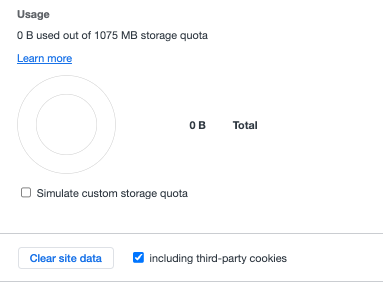
Yep this worked for me too
