
node-graphql-server
 node-graphql-server copied to clipboard
 graphql-boilerplates
chore(deps): update dependency prisma to v6
This PR contains the following updates:
| Package | Change | Age | Adoption | Passing | Confidence |
|---|---|---|---|---|---|
| prisma (source) | 1.34.12 -> 6.10.1 |
Release Notes
prisma/prisma (prisma)
v6.10.1
Today, we are issuing a 6.10.1 patch release.
Bug fixes
In Prisma ORM version 6.10.0, we shipped a bug fix for Prisma Migrate that ensured we always gracefully closed PostgreSQL connections by sending the Terminate message and not just abruptly closing the TCP connection. This fix was incomplete because it didn't work on Windows, which is now fixed. We highly recommend upgrading to version 6.10.1 if you are using Windows.
We also recommend upgrading to this version if you are currently using local Prisma Postgres via the prisma dev command with an ORM version older than 6.10.x.
Performance improvements
The queryCompiler preview feature recently introduced a performance regression related to in-memory joins in TypeScript-based query execution (users who use the queryCompiler and the relationJoins preview features together were not affected, unless using relationLoadStrategy: "query"). This has now been fixed, leading to significant performance improvements: in our Query Compiler benchmarks, we are seeing up to 500x performance improvement compared to the previous implementation in the TypeScript-based query executor, or up to 10–20x performance improvement compared to the Rust-based Query Engine.
Other news
Please see the release notes for Prisma ORM 6.10.0 for other recent news and announcements.
v6.10.0
Today, we are excited to share the 6.10.0 stable release 🎉
🌟 Help us spread the word about Prisma by starring the repo ☝️ or posting on X about the release.
Highlights
No Rust engines for MS SQL Server & PlanetScale (Preview)
We are in the process of removing the Rust engines from Prisma ORM. If you want to try this, you can configure your generator like this:
generator client {
  provider        = "prisma-client-js" // or `prisma-client`
  output          = "../generated/prisma"
  previewFeatures = ["queryCompiler", "driverAdapters"]
}
In this release, we are excited to move the queryCompiler (which enables using Prisma ORM without Rust engines) into Preview for MS SQL Server and PlanetScale (via the new @prisma/adapter-mssql and existing @prisma/adapter-planetscale driver adapters).
📚Learn more in the docs.
Manage local Prisma Postgres instances in VS Code
We recently released a database management UI as part of the Prisma VS Code extension to enable visual database management workflows for Prisma Postgres. In this release, we added new functionality to it: You can now manage multiple local Prisma Postgres instances via the same UI. To try it, find the Prisma logo in VS Code’s sidebar and start managing your local Prisma Postgres instances (no Docker required).
📚 Learn more in the docs.
Performance improvements for prisma migrate dev
We improved the prisma migrate dev command by optimizing the interactions with the shadow database. Our measurements show a 2x improvement in speed for some databases!
"Push to Cloud": Easily deploy a local Prisma Postgres instance in VS Code
Local Prisma Postgres instances are perfect for development, but how do you go from local to remote once you’re ready to deploy?
The database management UI in VS Code now has a Push to Cloud button that makes it easy to deploy your local Prisma Postgres so that you can connect to it from your deployed applications.
📚 Learn more in the docs.
Support for shard keys on PlanetScale (Preview)
Sharding is a popular technique to scale up when database load grows. As of this release, Prisma ORM supports sharding on PlanetScale natively via the new @shardKey and @@​shardKey attributes in the Prisma schema which you can apply to the fields in your models that should serve as shard keys in your database setup:
// Single-column shard key
model User {
  id     String @​default(uuid())
  region String @​shardKey
}

// Multi-column shard key
model User {
  id         String @​default(uuid())
  country    String
  customerId String
  @​@​shardKey([country, customerId])
}
Note that this requires you to set the shardKeys Preview feature flag on your generator definition:
generator client {
  provider        = "prisma-client-js" // or `prisma-client`
  output          = "../generated/prisma"
  previewFeatures = ["shardKeys"]
}
📚 Learn more in the docs.
Other changes
- We deprecated the
pg-workerpackage. It's not needed any more, you can simply usepgwhen using Prisma ORM in Cloudflare Workers. - Entrypoint for new
prisma-clientgenerator changed. Learn how this affects imports in the docs.
More news
Local Prisma Postgres now works with any ORM & tool (Early Access)
We recently released direct connections for remote Prisma Postgres so that you can now use it with your favorite ORM or database tool. As of this release, this is also possible for your local Prisma Postgres instances. To try it, run the prisma dev command and use the direct connection string starting with postgres:// in order to connect from any tool.
📚 Learn more in the docs.
Let your favorite AI tool manage Prisma Postgres via remote MCP
We just released a new remote MCP server that helps you manage Prisma Postgres instances! It enables your AI tools to help with these workflows:
- Managing databases and connection strings
- Creating and re-instantiating backups
- Querying databases via plain SQL
- Introspecting database schemas
You can start it using the npx -y mcp-remote https://mcp.prisma.io/mcp command.
📚 Learn more in the docs.
v6.9.0
Today, we are excited to share the 6.9.0 stable release 🎉
🌟 Help us spread the word about Prisma by starring the repo ☝️ or posting on X about the release.
Highlights
Prisma ORM without Rust engines for PostgreSQL & SQLite (Preview)
If you've been excited about our work of removing the Rust engines from Prisma ORM but hesitated trying it out because it was in an Early Access (EA) phase, now is a great time for you to get your hands on the Rust-free Prisma ORM version.
This major architectural change has moved from EA into Preview in this release, meaning there are no more know major issues. If you want to try it out, add the queryCompiler and driverAdapters preview feature flags to your generator, install the driver adapter for your database, and get going:
generator client {
  provider        = "prisma-client-js"
  previewFeatures = ["queryCompiler", "driverAdapters"]
  output          = "../generated/prisma"
}
Now run prisma generate to re-generate Prisma Client. If you didn't use a driver adapter before, you'll need to install, e.g. the one for PostgreSQL:
npm install @​prisma/adapter-pg
Once installed, you can instantiate PrismaClient as follows:
import { PrismaClient } from './generated/prisma'
import { PrismaPg } from '@​prisma/adapter-pg'

const adapter = new PrismaPg({ connectionString: env.DATABASE_URL })
const prisma = new PrismaClient({ adapter })
No more hassle with query engines, binary targets and an even smoother experience in serverless and edge environments!
📚 Learn more in the docs.
Major improvements for local Prisma Postgres (Preview)
In the last release, we enabled you to spin up a Prisma Postgres instance locally via the new prisma dev command. Local Prisma Postgres uses PGlite under the hood and gives you an identical experience as you get with a remote Prisma Postgres instance.
This release brings major improvements to this feature:
- Persists your databases across
prisma devinvocations. - Enables you to have multiple local Prisma Postgres instances running at the same time.
- Running
prisma initnow uses local Prisma Postgres by default.
Try it out and let us know what you think!
📚 Learn more in the docs.
More news
Connect to Prisma Postgres with any ORM (Preview)
Since its GA release, you could only interact with Prisma Postgres using Prisma ORM via a custom connection string.
This has changed now: When setting up a new Prisma Postgres instance, you receive a regular PostgreSQL direct TCP connection string (starting with postgres://...) that lets you connect to it using your favorite tool or database library, including Drizzle, Kysely, TypeORM, and others.
If you want to access Prisma Postgres from a serverless environment, you can also use our new serverless driver (Early Access).
📚 Learn more in the docs.
Automated backup & restore
Prisma Postgres' backup and restore mechanism has seen a major upgrade recently: You can now easily restore any previous backup via the UI in the Prisma Console. Find the new Backups tab when viewing your database and select any backup from the list to restore its state to a previous point in time.
📚 Learn more in the docs.
Prisma's VS Code extension now has a UI to manage Prisma Postgres
If you're using Prisma ORM, chances are that you're using our VS Code extension too. In its latest release, we've added a major new capability to it: A UI for managing databases.
With this new UI, you can:
- Authenticate with the Prisma Console
- Create and delete remote Prisma Postgres instances
- View local Prisma Postgres instances
- View and edit data via an embedded Prisma Studio
- Visualize your database schema
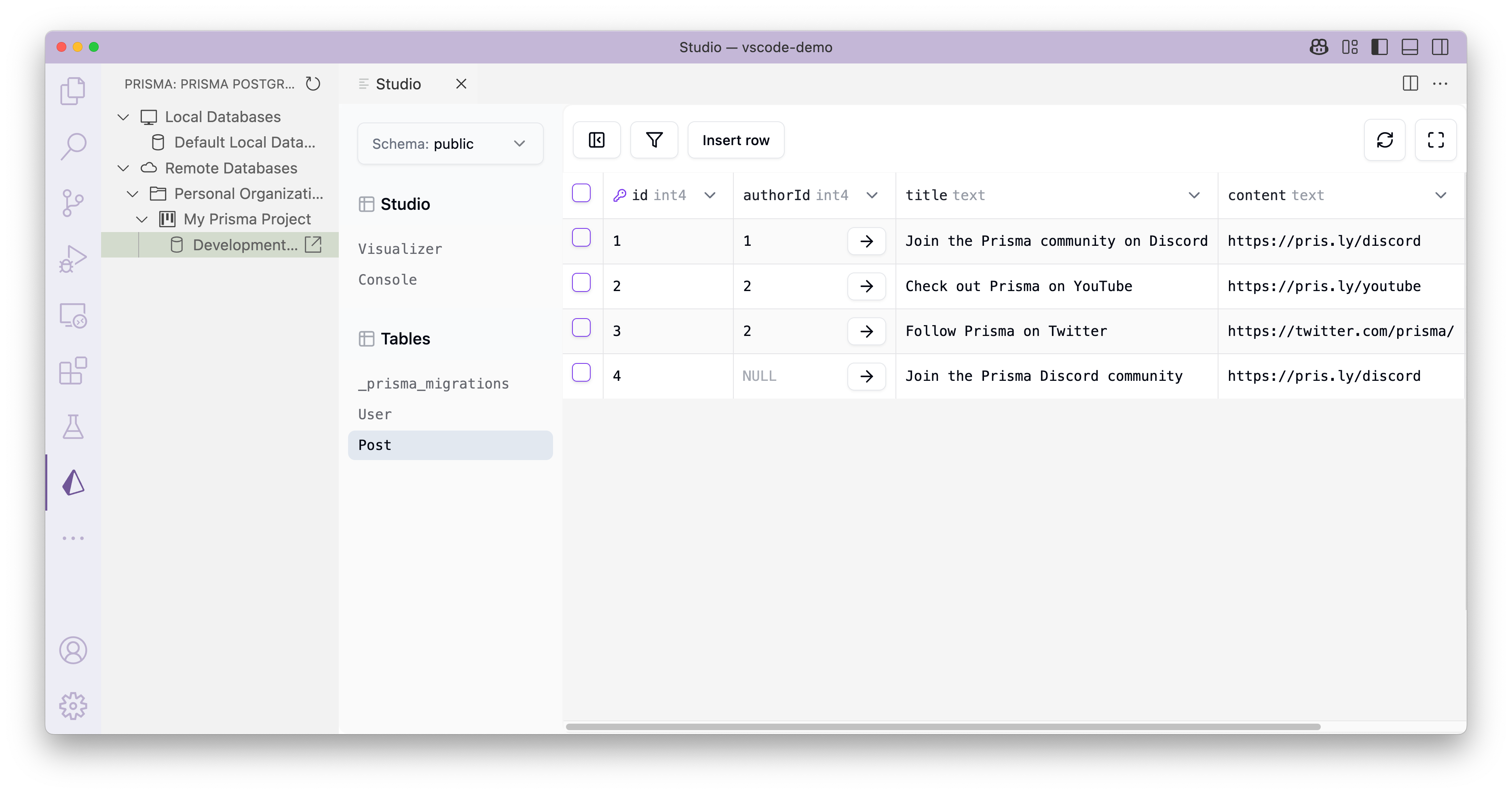
To use the new features, make sure to have the latest version of the Prisma VS Code extension installed and look out for the new Prisma logo in VS Code's Activity Bar.
📚 Learn more in the docs.
New region for Prisma Postgres: San Francisco (us-west-1)
We keep expanding Prisma Postgres availability across the globe! After having added Singapore just a few weeks ago, we're now adding San Francisco based on another poll we ran on X. Here are all the regions where you can spin up Prisma Postgres instances today:
us-west-1: San Francisco (new!)us-east-1: North Virginiaeu-west-3: Parisap-northeast-1: Tokyoap-southeast-1: Singapore
Keep an eye on our X account to take part in the poll and vote for the next availability zone of Prisma Postgres!
v6.8.2
Today, we are issuing the 6.8.2 patch release. It fully resolves an issue with the prisma init and prisma dev commands for some Windows users who were still facing problems after the previous incomplete fix in version 6.8.1.
Fixes:
v6.8.1
Today, we are issuing the 6.8.1 patch release. It fixes an issue with the prisma init and prisma dev commands on Windows.
Fixes
v6.8.0
Today, we are excited to share the 6.8.0 stable release 🎉
🌟 Help us spread the word about Prisma by starring the repo ☝️ or posting on X about the release.
Highlights
Local development with Prisma Postgres via prisma dev (Early Access)
In this release, we're releasing a way to develop against Prisma Postgres locally — no Docker required!
To get started, run the new prisma dev command:
npx prisma dev # starts a local Prisma Postgres server
This command spins up a local Prisma Postgres instance and prints the connection URL that you'll need to set as the url of your datasource block to point to a local Prisma Postgres instance. It looks similar to this:
datasource db {
  provider = "postgresql"
  url      = "prisma+postgres://localhost:51213/?api_key=ey..."
}
You can then run migrations and execute queries against this local Prisma Postgres instance as with any remote one. Note that you need to keep the prisma dev process running in order to interact with the local Prisma Postgres instance.
📚 Learn more in the docs.
Native Deno support in prisma-client generator (Preview)
In this release, we're removing the deno Preview feature from the prisma-client-js generator. If you want to use Prisma ORM with Deno, you can now do so with the new prisma-client generator:
generator client {
  provider = "prisma-client"
  output   = "../src/generated/prisma"
  runtime = "deno"
}
📚 Learn more in the docs.
VS Code Agent Mode: AI support with your database workflows
Have you tried agent mode in VS Code already?
"The agent acts as an autonomous pair programmer that performs multi-step coding tasks at your command, such as analyzing your codebase, proposing file edits, and running terminal commands."
As of this release, your agent is capable of supporting you with your database workflows more than ever! If you're using VS Code and have the Prisma VS Code extension installed, your agent now is able to help you with your database workflows, such as:
- checking the status of your migrations (e.g. telling you if migrations haven't been applied)
- creating and running schema migrations for you
- authenticating you with the Prisma Console
- provisioning new Prisma Postgres instances so you can start coding right away
All you need to do is make sure you're using the latest version of Prisma's VS Code extension and your agent is ready to go 🚀
📚 Learn more in the docs.
Other news
You voted, we acted: New Singapore region for Prisma Postgres
We recently ran a poll where we asked you which region you'd like to see next for Prisma Postgres. The majority vote went to Asia Pacific (Singapore), so as of today, you're able to spin up new Prisma Postgres instances in the ap-southeast-1 region.
We're not stopping here — keep an eye out on X for another poll asking for your favorite regions that we should add!
v6.7.0
Today, we are excited to share the 6.7.0 stable release 🎉
🌟 Help us spread the word about Prisma by starring the repo ☝️ or posting on X about the release.
Highlights
Prisma ORM without Rust engines (Early Access)
If you're a regular visitor of our company blog, you may already know that we're currently working on moving the core of Prisma from Rust to TypeScript. We have written extensively about why we're moving away from Rust and already shared the first measurements of performance boosts we saw from the re-write.
This re-write is not just a move from one programming language to another. It fundamentally improves the architecture of Prisma ORM and replaces the Query Engine (which is written in Rust and deployed as a standalone binary) with a much leaner and more efficient approach that we call Query Compiler.
In this release, we're excited to give you Early Access to the new Query Compiler for PostgreSQL and SQLite database 🥳 Support for more database will follow very soon!
To use the new "Rust-free" version of Prisma ORM, add the queryCompiler (new) and driverAdapters feature flags to your client generator:
generator client {
  provider        = "prisma-client-js"
  previewFeatures = ["queryCompiler", "driverAdapters"]
  output          = "../generated/prisma"
}
Now run prisma generate to re-generate Prisma Client. If you didn't use a driver adapter before, you'll need to install one. For example, the one for PostgreSQL:
npm install @​prisma/adapter-pg
Once installed, you can instantiate PrismaClient as follows:
import { PrismaPg } from '@​prisma/adapter-pg'
import { PrismaClient } from './generated/prisma'

const adapter = new PrismaPg({ connectionString: process.env.DATABASE_URL })
const prisma = new PrismaClient({ adapter })
This version of PrismaClient doesn't have a Query Engine binary and you can use it in the exact same way as before.
📚 Learn more in the docs.
Support for better-sqlite3 JavaScript driver (Preview)
Driver adapters are Prisma ORM's way of letting you use JS-native drivers (like pg) to interact with your database. In this release, we're introducing a new driver adapter for using the better-sqlite3 package, so you can now interact with SQLite database in a JS-native way.
To use it, first enable the driverAdapters Preview feature flag in on your client generator, then install these libraries:
npm install @​prisma/adapter-better-sqlite3
Now you can instantiate Prisma Client as follows:
import { PrismaBetterSQLite3 } from '@​prisma/adapter-better-sqlite3';
import { PrismaClient } from './generated/prisma';

const adapter = new PrismaBetterSQLite3({
  url: "file:./prisma/dev.db"
});
const prisma = new PrismaClient({ adapter });
📚 Learn more in the docs.
Multi-file Prisma schemas are now production-ready
The prismaSchemaFolder Preview feature is moving into General Availability 🎉 With that change, Prisma ORM now by default supports splitting your Prisma schema file and e.g. lets you organize your schema as follows:
prisma/schema.prisma → defines data source and generator
datasource db {
  provider = "postgresql"
  url      = env("DATABASE_URL")
}

generator client {
  provider = "prisma-client-js"
}
prisma/models/posts.prisma → defines Post model
model Post {
  id        Int     @​id @​default(autoincrement())
  title     String
  content   String?
  published Boolean @​default(false)
  author    User?   @​relation(fields: [authorId], references: [id])
  authorId  Int?
}
prisma/models/users.prisma → defines User model
model User {
  id    Int     @​id @​default(autoincrement())
  email String  @​unique
  name  String?
  posts Post[]
}
⚠️ Note that there have been breaking changes to the prismaSchemaFolder Preview feature in the last 6.6.0 release. If you've been using this feature to split your Prisma schema, make sure to read the release notes and update your project accordingly.
📚 Learn more in the docs.
Splitting generated output with new prisma-client generator (Preview)
With the prisma-client-js generator, the generated Prisma Client library is put into a single index.d.ts file. This sometimes led to issues with large schemas where the size of the generated output could slow down code editors and breaking auto-complete.
As of this release, our new prisma-client generator (that was released in 6.6.0) now splits the generated Prisma Client library into multiple files and thus avoids the problems of a single, large output file.
Also: As a bonus, we now ensure that generated files do not raise any ESLint and TypeScript errors!
Before
generated/
└── prisma
    ├── client.ts
    ├── index.ts # -> this is split into multiple files in 6.7.0
    └── libquery_engine-darwin.dylib.node
After
generated/
└── prisma
    ├── client.ts
    ├── commonInputTypes.ts
    ├── enums.ts
    ├── index.ts
    ├── internal
    │   ├── class.ts
    │   └── prismaNamespace.ts
    ├── libquery_engine-darwin.dylib.node
    ├── models
    │   ├── Post.ts
    │   └── User.ts
    └── models.ts
📚 Learn more in the docs.
Company news
Our team has been busy shipping more than just the ORM! Check out these articles to learn what else we've been up to recently:
- Announcing: Prisma Postgres Integration for Vercel Marketplace
- Securely Access Prisma Postgres from the Frontend (Early Access)
- Announcing Prisma's MCP Server: Vibe Code with Prisma Postgres
v6.6.0
Today, we are excited to share the 6.6.0 stable release 🎉 This version comes packed with exciting features, we can't wait to see what you're going to build with it! Read our announcement blog post for more details: Prisma ORM 6.6.0: ESM Support, D1 Migrations & MCP Server
🌟 Help us spread the word about Prisma by starring the repo ☝️ or posting on X about the release. 🌟
Highlights
ESM support with more flexible prisma-client generator (Early Access)
We are excited to introduce a new prisma-client generator that's more flexible, comes with ESM support and removes any magic behaviours that may cause friction with the current prisma-client-js generator.
Note: The
prisma-clientgenerator is currently in Early Access and will likely have some breaking changes in the next releases.
Here are the main differences:
- Requires an
outputpath; no “magic” generation intonode_modulesany more - Supports ESM and CommonJS via the
moduleFormatfield - Outputs plain TypeScript that's bundled just like the rest of your application code
Here's how you can use the new prisma-client generator in your Prisma schema:
// prisma/schema.prisma
generator client {
  provider     = "prisma-client"           // no `-js` at the end
  output       = "../src/generated/prisma" // `output` is required
  moduleFormat = "esm"                     // or `"cjs"` for CommonJS
}
In your application, you can then import the PrismaClient constructor (and anything else) from the generated folder:
// src/index.ts
import { PrismaClient } from './generated/prisma/client'
⚠️ Important: We recommend that you add the output path to .gitignore so that the query engine that's part of the generated Prisma Client is kept out of version control:
##### .gitignore
./src/generated/prisma
📚 Learn more in the docs.
Cloudflare D1 & Turso/LibSQL migrations (Early Access)
Cloudflare D1 and Turso are popular database providers that are both based on SQLite. While you can query them using the respective driver adapter for D1 or Turso, previous versions of Prisma ORM weren't able to make schema changes against these databases.
With today's release, we're sharing the first Early Access version of native D1 migration support for the following commands:
prisma db push: Updates the schema of the remote database based on your Prisma schemaprisma db pull: Introspects the schema of the remote database and updates your local Prisma schemaprisma migrate diff: Outputs the difference between the schema of the remote database and your local Prisma schema
Note: Support for
prisma migrate devandprisma migrate deploywill come very soon!
To use these commands, you need to connect the Prisma CLI to your D1 or Turso instance by using the driver adapter in your prisma.config.ts file. Here is an example for D1:
import path from 'node:path'
import type { PrismaConfig } from 'prisma'
import { PrismaD1HTTP } from '@​prisma/adapter-d1'

// import your .env file
import 'dotenv/config'

type Env = {
  CLOUDFLARE_D1_TOKEN: string
  CLOUDFLARE_ACCOUNT_ID: string
  CLOUDFLARE_DATABASE_ID: string
}

export default {
  earlyAccess: true,
  schema: path.join('prisma', 'schema.prisma'),

  migrate: {
    async adapter(env) {
      return new PrismaD1HTTP({
        CLOUDFLARE_D1_TOKEN: env.CLOUDFLARE_D1_TOKEN,
        CLOUDFLARE_ACCOUNT_ID: env.CLOUDFLARE_ACCOUNT_ID,
        CLOUDFLARE_DATABASE_ID: env.CLOUDFLARE_DATABASE_ID,
      })
    },
  },
} satisfies PrismaConfig<Env>
With that setup, you can now execute schema changes against your D1 instance by running:
npx prisma db push
📚 Learn more in the docs:
MCP server to manage Prisma Postgres via LLMs (Preview)
Prisma Postgres is the first serverless database without cold starts. Designed for optimal efficiency and high performance, it's the perfect database to be used alongside AI tools like Cursor, Windsurf, Lovable or co.dev. In this ORM release, we're adding a command to start a Prisma MCP server that you can integrate in your AI development environment. Thanks to that MCP server, you can now:
- tell your AI agent to create new DB instances
- design your data model
- chat through a database migration
… and much more.
To get started, add this snippet to the MCP configuration of your favorite AI tool and get started:
{
  "mcpServers": {
    "Prisma": {
      "command": "npx",
      "args": ["-y", "prisma", "mcp"]
    }
  }
}
📚 Learn more in the docs.
New --prompt option on prisma init
You can now pass a --prompt option to the prisma init command to have it scaffold a Prisma schema for you and deploy it to a fresh Prisma Postgres instance:
npx prisma init --prompt "Simple habit tracker application"
For everyone, following social media trends, we also created an alias called --vibe for you 😉
npx prisma init --vibe "Cat meme generator"
Improved API for using driver adapters
In this release, we are introducing a nice DX improvement for driver adapters. Driver adapters let you access your database using JS-native drivers with Prisma ORM.
Before 6.6.0
Earlier versions of Prisma ORM required you to first instantiate the driver itself, and then use that instance to create the Prisma driver adapter. Here is an example using the @libsql/client driver for LibSQL:
import { createClient } from '@​libsql/client'
import { PrismaLibSQL } from '@​prisma/adapter-libsql'
import { PrismaClient } from '@​prisma/client'

// Old way of using driver adapters (before 6.6.0)
const driver = createClient({
  url: env.LIBSQL_DATABASE_URL,
  authToken: env.LIBSQL_DATABASE_TOKEN,
})
const adapter = new PrismaLibSQL(driver)

const prisma = new PrismaClient({ adapter })
6.6.0 and later
As of this release, you instantiate the driver adapter directly with the options of your preferred JS-native driver.:
import { PrismaLibSQL } from '@​prisma/adapter-libsql'
import { PrismaClient } from '../prisma/prisma-client'

const adapter = new PrismaLibSQL({
  url: env.LIBSQL_DATABASE_URL,
  authToken: env.LIBSQL_DATABASE_TOKEN,
})

const prisma = new PrismaClient({ adapter })
Other changes
prismaSchemaFolder breaking changes
If you are using the prismaSchemaFolder Preview feature to split your Prisma schema into multiple files, you may encounter some breaking changes in this version.
Explicit declaration of schema folder location
You now must always provide the path to the schema folder explicitly. You can do this in either of three ways:
- pass the the
--schemaoption to your Prisma CLI command (e.g.prisma migrate dev --schema ./prisma/schema) - set the
prisma.schemafield inpackage.json:// package.json { "prisma": { "schema": "./schema" } } - set the
schemaproperty inprisma.config.ts:import path from 'node:path' import type { PrismaConfig } from 'prisma' export default { earlyAccess: true, schema: path.join('prisma', 'schema'), } satisfies PrismaConfig<Env>
migrations folder must live next to .prisma file with datasource block
Your migrations directory must live next to the .prisma file that defines your datasource blog. If you relied on the implicit schema folder location of ./prisma/schema make sure to move your migrations folder from ./prisma/migrations to ./prisma/schema/migrations.
Assuming schema.prisma defines the datasource in this example, here's how how need to place the migrations folder:
##### `migrations` and `schema.prisma` are on the same level
.
├── migrations
├── models
│   ├── posts.prisma
│   └── users.prisma
└── schema.prisma
See this PR for more details.
No more Bun issues if Node.js is not installed
Bun users reported an issue that prisma generate would hang if Node.js installed on their machine. This is now fixed and Bun users can generate Prisma Client without issues.
Company news
Enterprise support
Prisma offers an enterprise support plan for Prisma ORM. Get direct help from our team and a joint slack channel! With Prisma ORM 7 on the horizon, this is a great time to upgrade your support today.
We are hiring: Developer Support Engineer
If you care about making developers successful, join us as a Developer Support Engineer.
v6.5.0
Today, we are excited to share the 6.5.0 stable release 🎉
🌟 Help us spread the word about Prisma by starring the repo ☝️ or tweeting about the release. 🌟
Highlights
Databases can only be reset manually and explicitly
In previous versions, if Prisma ORM determined that a migrate command could not be applied cleanly to the underlying database, you would get a message like this one:
? We need to reset the "public" schema at "db.url.com:5432"
Do you want to continue? All data will be lost. (y/N)
While "no" was the default, we've determined that having this prompt in the first place was a mistake. In this version we're removing the prompt entirely and instead exiting with an appropriate error message.
To get the previous behavior, you will need to run prisma migrate reset directly.
Support for prisma.config.ts in Prisma Studio
We've expanded support for our prisma.config.ts file to include Prisma Studio!
To use the new config file, including the ability to connect to driver adapter enabled databases with Prisma Studio, add a studio block to your prisma.config.ts file:
import path from 'node:path'
import type { PrismaConfig } from 'prisma'
import { PrismaLibSQL } from '@​prisma/adapter-libsql'
import { createClient } from '@​libsql/client'

export default {
  earlyAccess: true,
  schema: {
    kind: 'single',
    filePath: './prisma/schema.prisma',
  },
  studio: {
    adapter: async (env: unknown) => {
      const connectionString = `file:./dev.db'
      const libsql = createClient({
        url: connectionString,
      })
      return new PrismaLibSQL(libsql)
    },
  },
} satisfies PrismaConfig
Notice how this looks a little different from last release! Instead of an @prisma/config package there’s now two different options:
- Using the
defineConfighelper exported byprisma/config. - Using the
PrismaConfigutility type exported byPrisma.
All the relevant info for the prisma.config.ts file, including these new ways of defining your config, can be found in our docs.
Allow for chaining $on and $extends.
In previous versions of Prisma ORM, the return type of the $on client method was void. This did not allow for chaining $on() and $extends() calls, as $on is not available on extended clients.
In this version we've resolved this issue and $on will now return the modified Prisma Client.
Community fixes
We have a number of community-submitted fixes that improve Prisma ORM:
- Allow for binaries to be loaded from local network. Thank you @RaHehl!
- Enhance type safety of the AtLeast utility type. Thank you @de-novo!
- Resolve a race condition in the NextJS monorepo plugin. Thank you @toniopelo!
- allow for filtering out spans with PrismaInstrumentation. Thank you @overbit!
Prisma is hiring
Join us at Prisma and work on our TypeScript ORM (now faster than ever) and our Cloud products like Prisma Postgres (now in GA!)
We currently have two open roles in our Engineering team:
If these don’t fit, you can still check out our jobs page and send a general application.
Enterprise support
Prisma offers an enterprise support plan for Prisma ORM. Get direct help from our team and a joint slack channel! With Prisma ORM 7 on the horizon this is a great time to upgrade your support today.
Credits
Thank you to @overbit, @RaHehl, @toniopelo, and @de-novo for your contributions to this release!
v6.4.1
Today, we are issuing the 6.4.1 patch release. It fixes a few issues with the NPS survey and makes it respect the --no-hints CLI flag.
Fixes
Prisma CLI
v6.4.0
Today, we are excited to share the 6.4.0 stable release 🎉
🌟 Help us spread the word about Prisma by starring the repo ☝️ or tweeting about the release. 🌟
Highlights
TypeScript-based configuration with prisma.config.ts (Early Access)
In this release, we're introducing an Early Access version of a TypeScript-based configuration file for Prisma ORM: prisma.config.ts.
This file will serve as a central configuration point for Prisma ORM:
import path from 'node:path'

export default {
  earlyAccess: true, // required while in Early Access

  schema: {
    kind: 'single', // use 'multi' if you're using the `prismaSchemaFolder` preview feature
    filePath: path.join('custom', 'prisma', 'schema.prisma')
  }

})
With this file you are able to run any arbitrary code needed to get values required by Prisma ORM, such as database URLs from a secret store or fine-grained control of settings. It needs to live in the current working directory from where you're executing Prisma CLI commands (typically, the root of your project).
Note: If you're using
prisma.config.ts, the Prisma CLI will not load environment variables from.envfiles. If you want to use a.envfile withprisma.config.ts, you'll need to load the environment variables manually using thedotenvpackage (see here).
Learn more about the new prisma.config.ts file in the docs.
Case-insensitive mode in JSON filters
You can now do case-insensitive filtering on JSON data.
Just use the new mode option when filtering using string_contains, string_starts_with or string_ends_with in a JSON object and set it to "insensitive":
await prisma.user.findMany({
  where: {
    pets: {
      path: ['favorites', 'catBreed'],
      string_contains: 'Van',
      mode: "insensitive",
    },
  },
});
The above query returns all users where the favorites.catBreed value contains "Van" or "van".
Thanks to @lubosmato who implemented this feature 🎉
Improved CockroachDB migration speed
In this release we found some inefficiencies in our migration engine that was impacting CockroachDB migrations. In 6.4.0, CockroachDB migrations should be significantly faster.
Calling all devs: Give us your feedback!
Prisma ORM's community keeps us going. To make sure that we're focused on what the community needs, we would like to get your feedback via our online feedback form.
Credits
Huge thanks to @lubosmato, @notomo, @Mayureshd-18, @mydea, @omar-dulaimi and @Hazmi35 for helping out with this release!
v6.3.1
This patch releases introduces improvements to the prisma init output when invoked to with the --db option.
Run npx prisma@latest init --db to get an instant Prisma Postgres database.
v6.3.0
Today, we are excited to share the 6.3.0 stable release 🎉
🌟 Help us spread the word about Prisma by starring the repo ☝️ or tweeting about the release. 🌟
Highlights
A brand new Prisma Studio
In this release we've included several great improvements to Prisma Studio's developer experience. You can learn all about the changes we've made in our release blog post, but here's a short list:
Prisma Studio is back in the Console
Fans of Prisma Data Browser rejoice! The new Prisma Studio is now in the Prisma Console and is available for all PostgreSQL and MySQL databases.
A new model viewer
Previously, switching from model to model in Prisma Studio would require backing all the way out to the model view, then digging in again. With our new UI, it's easy to switch from model to model while keeping your place.
A new editing experience
If you're trying to edit a given field in a model, Prisma Studio made it quite easy. However, if you're trying to edit every field in a given row, it could get quite annoying to keep scrolling left to right. Our new edit sidebar resolves that with the ability to edit all fields for a given row at once.
Clean up at the click of a button
When editing a number of models, it can get difficult to get back to a clean slate. In the new Prisma Studio, we've added a "Close all" button that puts you back to a fresh start.
Add limit to updateMany() and deleteMany()
Previously, limit has not existed as a valid option in top level updateMany() and deleteMany() queries. In 6.3.0 limit is now available in these queries, bringing their features more in line with other query types.
You can use limit like the following:
await prisma.user.deleteMany({
  where: { column: 'value' },
  limit: 100,
});
This will limit the number of deleted users to 100 at maximum.
Sort generator fields deterministically
In previous version of Prisma ORM, the fields inside of a generator block in your Prisma Schema were not deterministically sorted. This could lead to cases where prisma db pull could lead to re-ordering of fields.
In 6.3.0, the sorting of fields in this block is now deterministic. You may see re-ordering on the first prisma db pull after you upgrade, but it will remain consistent afterwards.
Replace NOT IN with NOT EXISTS for PostgreSQL relation filters
In previous versions of Prisma ORM, when using the none or some relation filters, the SQL queries generated used NOT IN. In many cases this lead to performance issues as the size of the related table grew. In 6.3.0, we’ve replaced these usages of IN with EXISTS in order to improve query performance.
A special thank you
We'd like to extend our heartfelt thanks to @loren and his team for the collaboration and trust in our enterprise support plan. Working closely with them allowed us to address important issues like #19249 and #17303. Their insights and partnership have been invaluable in improving our product.
If your team could benefit from dedicated support and tailored solutions, learn more about our enterprise support plan.
Fixes and improvements
Prisma Client
Prisma
- Prisma interactive transaction ignores DB exception on commit (with triggers)
prisma db pullnon-deterministically sorts generator fieldsno entry found for keyerror on views<->model relations- Adding
onUpdatedata to the DMMF in@prisma/generator-helper
Credits
Huge thanks to @WhyAsh5114 for their contributions to this release!
v6.2.1
Today we are releasing the 6.2.1 patch release to address an issue with some of the omitApi preview feature checks having been accidentally omitted when making the feature GA. Now it is fully functional without the preview feature flag.
Changes
v6.2.0
Today we're releasing Prisma ORM version 6.2.0 🎉
🌟 Help us spread the word about Prisma by starring the repo or tweeting about the release. 🌟
We have a number of new features in this version, including support for json and enum fields in SQLite, a new updateManyAndReturn function, support for ULID values, as well as the promotion of the omit feature from Preview to Generally Availability.
Highlights
Excluding fields via omit is now production-ready
Our number one requested feature is out of Preview and Generally Available. In 6.2.0, you no longer need to add omitApi to your list of Preview features:
generator client {
  provider        = "prisma-client-js"
- previewFeatures = ["omitApi"]
}
As a refresher: omit allows you to exclude certain fields from being returned in the results of your Prisma Client queries.
You can either do this locally, on a per-query level:
const result = await prisma.user.findMany({
  omit: {
    password: true,
  },
});
Or globally, to ensure a field is excluded from all queries of a certain model:
const prisma = new PrismaClient({
  omit: {
    user: {
      password: true
    }
  }
})

// The password field is excluded in all queries, including this one
const user = await prisma.user.findUnique({ where: { id: 1 } })
For more information on omit, be sure to check our documentation.
json and enum fields in SQLite
Previous to this version, you could not define json and enum fields in your Prisma schema when using SQLite. The respective GitHub issues have been among the most popular ones in our repo, so with our new approach to open-source governance, we finally got to work and implemented these.
Working with JSON and Enum fields works similarly to other database providers, here’s an example:
datasource db {
  provider = "sqlite"
  url      = "file:./dev.db"
}

model User {
  id   Int    @​id @​default(autoincrement())
  name String
  role Role
  data Json
}

enum Role {
  Customer
  Admin
}
Support for auto-generated ULID values
Similar to cuid2 support released in ORM version 6.0.0, we are now adding support for Universally Unique Lexicographically Sortable Identifiers (or short: ULIDs 😄) in version 6.2.0. A ULID value is a 26-character alphanumeric string, e.g. 01GZ0GZ3XARH8ZP44A7TQ2W4ZD.
With this new feature, you can now create records with auto-generated ULID values for String fields:
model User {
  id String @​id @​default(ulid())
}
New batch function: updateManyAndReturn
updateMany allows you to update many records in your database, but it only returns the count of the affected rows, not the resulting rows themselves. With updateManyAndReturn you are now able to achieve this:
const users = await prisma.user.updateManyAndReturn({
  where: {
    email: {
      contains: 'prisma.io',
    }
  },
  data: {
    role: 'ADMIN'
  }
})
This call to updateManyAndReturn will now return the actual records that have been updated in the query:
[{
  id: 22,
  name: 'Alice',
  email: '[email protected]',
  profileViews: 0,
  role: 'ADMIN',
  coinflips: []
}, {
  id: 23,
  name: 'Bob',
  email: '[email protected]',
  profileViews: 0,
  role: 'ADMIN',
  coinflips: []
}]
Please note that like createManyAndReturn, updateManyAndReturn is only supported in PostgreSQL, CockroachDB, and SQLite.
Fixed runtime error in Node.js v23
While not officially supported, we understand that a lot of you like to be on the latest Node.js version — so we fixed an error that only occurred on Node.js 23. Happy coding ✌️
Prisma is hiring 🤝
Join us at Prisma to work on the most popular TypeScript ORM and other exciting products like the first serverless database built on unikernels!
We currently have two open roles in our Engineering team:
If these don’t fit, you can still check out our jobs page and send a general application.
v6.1.0
Today we're releasing Prisma ORM version 6.1.0
In this version our tracing Preview feature is being graduated to GA!
Highlights
Tracing goes GA
The tracing Preview feature is now stable. You now no longer have to include tracing in your set of enabled preview features.
generator client {
   provider        = "prisma-client-js"
-  previewFeatures = ["tracing"]
}
We have also changed some of the spans generated by Prisma Client. Previously, a trace would report the following spans:
prisma:client:operation
prisma:client:serialize
prisma:engine
prisma:engine:connection
prisma:engine:db_query
prisma:engine:serialize
Now, the following are reported:
prisma:client:operation
prisma:client:serialize
prisma:engine:query
prisma:engine:connection
prisma:engine:db_query
prisma:engine:serialize
prisma:engine:response_json_serialization
Additionally, we have made a few changes to our dependencies:
@opentelemetry/apiis now a peer dependency instead of a regular dependencyregisterInstrumentationsin@opentelemetry/instrumentationis now re-exported by@prisma/instrumentation
After upgrading to Prisma ORM 6.1.0 you will need to add @opentelemetry/api to your dependencies if you haven't already:
npm install @​opentelemetry/api
You will also no longer need to have @opentelemetry/instrumentation if you only use registerInstrumentations. In this case you can import registerInstrumentations from @prisma/instrumentation
- import { PrismaInstrumentation } from '@​prisma/instrumentation'
+ import { PrismaInstrumentation, registerInstrumentations } from '@​prisma/instrumentation'
Mutli-line comments in Prisma Schema Language (PSL)
Comments can now be defined as multi-line in your Prisma schema! Comments can use the existing format:
// this i

</details>

---

### Configuration

📅 **Schedule**: Branch creation - At any time (no schedule defined), Automerge - At any time (no schedule defined).

🚦 **Automerge**: Disabled by config. Please merge this manually once you are satisfied.

♻ **Rebasing**: Whenever PR becomes conflicted, or you tick the rebase/retry checkbox.

🔕 **Ignore**: Close this PR and you won't be reminded about this update again.

---

 - [ ] <!-- rebase-check -->If you want to rebase/retry this PR, check this box

---

This PR was generated by [Mend Renovate](https://mend.io/renovate/). View the [repository job log](https://developer.mend.io/github/graphql-boilerplates/node-graphql-server).
<!--renovate-debug:eyJjcmVhdGVkSW5WZXIiOiIzMi4yMDIuNCIsInVwZGF0ZWRJblZlciI6IjQwLjYwLjEiLCJ0YXJnZXRCcmFuY2giOiJtYXN0ZXIifQ==-->
![renovate[bot] avatar](https://avatars.githubusercontent.com/in/2740?v=4 "Published by a pub.dev verified publisher")