

 graphicore
Affinity Publisher Designer Photo EAN 13 issue
Hi, the popular apps from Serif / Affinity doe not work correctly. Tested with current release 1.10.4.1197 (retail) and 1.10.5.1127 (beta) in all 3 apps (Publisher, Designer, Photo).
Affinity claims its software supports calt, and calt is actually activated by default. Never the less, the rendering gets wrong in "Standrad Input Mode". Fallback and Compatible work, but with the known undesired collateral damage of requiring pre-processing.
Any EAN 13 code entered will be mis-interpreted as 5-digit (last 5 digits).
Entered: 012345678912? Result: see image.
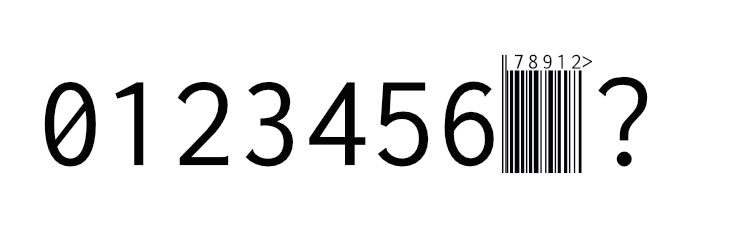
Any help highly appreciated.

Hi, thanks for reporting.
Unfortunately I don't think I can help much, but maybe someone else from the community has any pointers.
Will Affinity let you file issues? It looks like their shaper-engine is not doing it right. It's fascinating though that it produces a 5 digit add on preceded by a wrong guard pattern.
It's not surprising that this font shows the shortcomings of some shapers, its features are rather complex and very uncommon.

I filed a bug report there, too: https://forum.affinity.serif.com/index.php?/topic/155629-opentype-calt-ean-13-bar-code-renders-incorrect/&tab=comments#comment-877971
Unfortunately, Affinity is less then stellar in fixing bugs on their side. Assume they probably use a standard library (not OS-specific, probably cross platform MacOS / Windows / iPadOS).
Assume they probably use a standard library
No they wrote their own shaper. This was discussed in the Affinity forum quite awhile ago. So issues like this are not uncommon.

No they wrote their own shaper.
They should at least optionally support Harfbuzz. :1st_place_medal:
No they wrote their own shaper.
They should at least optionally support Harfbuzz. 🥇
Yes, this has been requested in the forum quite a few times in discussions about issues (bugs) like this, but mostly when discussing the lack of support for complex scripts (Indic, etc.), RTL, etc. But they have not shown any intent/interest to do so.