minted

minted copied to clipboard
 gpoore
Ignore or drop language option
Hello I'm trying to use a language named plaintuml, that not has minted lexer. So i think if i can set in a way to in that case the transformation to pdf must be in plain code block? There is a opcion to do that?

A quick workaround:
\documentclass{article}
\usepackage{minted}

\makeatletter
% backup \\minted@pygmentize
\expandafter\let\expandafter\minted@pygmentize@old\expandafter=\csname\string\minted@pygmentize\endcsname

\renewcommand\minted@pygmentize[2][\minted@outputdir\[email protected]]{%
  \edef\@tempa{\noexpand\in@{#2}}%
  \expandafter\@tempa\expandafter{\minted@unsupported@language}%
  \ifin@
    \minted@pygmentize@old[#1]{text}%
  \else
    \minted@pygmentize@old[#1]{#2}%
  \fi
}

\newcommand*{\mintedUnsupportedLanguage}[1]{%
  \def\minted@unsupported@language{#1}%
}

\let\minted@unsupported@language\@empty
\makeatother

% user interface
\mintedUnsupportedLanguage{unsupported,unsupported2}

\begin{document}
\begin{minted}{text}
\newcommand\cmd[1]{#1}
\end{minted}

\begin{minted}{latex}
\newcommand\cmd[1]{#1}
\end{minted}

% this gives the same output of language "text"
\begin{minted}{unsupported}
\newcommand\cmd[1]{#1}
\end{minted}
\end{document}
With more efforts, this could be implemented as a minted option.

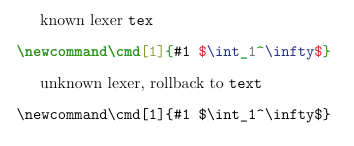
Another attempt. This time the given language/lexer name is checked by pygments function get_lexer_by_name. The new flaw is, minted has to know which python executable pygments is installed for (here python3 is used).
\documentclass{article}
\usepackage{minted}
\usepackage{xpatch}

\makeatletter
\xpretocmd\minted@pygmentize
  {\minted@checklexer{#2}}
  {}{\fail}
\xpatchcmd\minted@pygmentize
  {-l #2}
  {-l \minted@lexer\space}
  {}{\fail}

\newcommand\minted@checklexer[1]{%
  \ShellEscape{python3 -c "%
    % # python code
    % from pygments.lexers import get_lexer_by_name
    % from pygments.util import ClassNotFound
    %
    %
    % try:
    %     get_lexer_by_name('<#1>')
    % except ClassNotFound:
    %     with open('<\[email protected]>', 'w') as f:
    %         f.write('')
    from pygments.lexers import get_lexer_by_name;
    from pygments.util import ClassNotFound;
    % trick: exec('<python compound statement>')
    exec('''%
      try:
        get_lexer_by_name('#1')\@backslashchar n%
      except ClassNotFound:\@backslashchar n%
        \space\space with open('\[email protected]', 'w') as f:
          f.write('')
    ''')
  "}%
  \IfFileExists{\[email protected]}
    {\def\minted@lexer{text}\DeleteFile{\[email protected]}}
    {\def\minted@lexer{#1}}%
}
\makeatother

\setminted{autogobble}

\begin{document}
known lexer \verb|tex|
\begin{minted}{tex}
  \newcommand\cmd[1]{#1 $\int_1^\infty$}
\end{minted}

unknown lexer, rollback to \verb|text|
\begin{minted}{unknown}
  \newcommand\cmd[1]{#1 $\int_1^\infty$}
\end{minted}
\end{document}