

 gpodder
Retina window scaling bug (double size/half content) on macOS
Hello everyone! I updated to the latest version 3.11 on my MacBook Pro (13-inch, M1, 2020) running macOS Monterey 12.4 (21F79) but there were issues displaying/using gPodder. it looks minimized all the time. Here is a screenshot of it. I even removed it, redownloaded, and erased ~/Library/Application Support/gPodder but that didn't fix the issue either
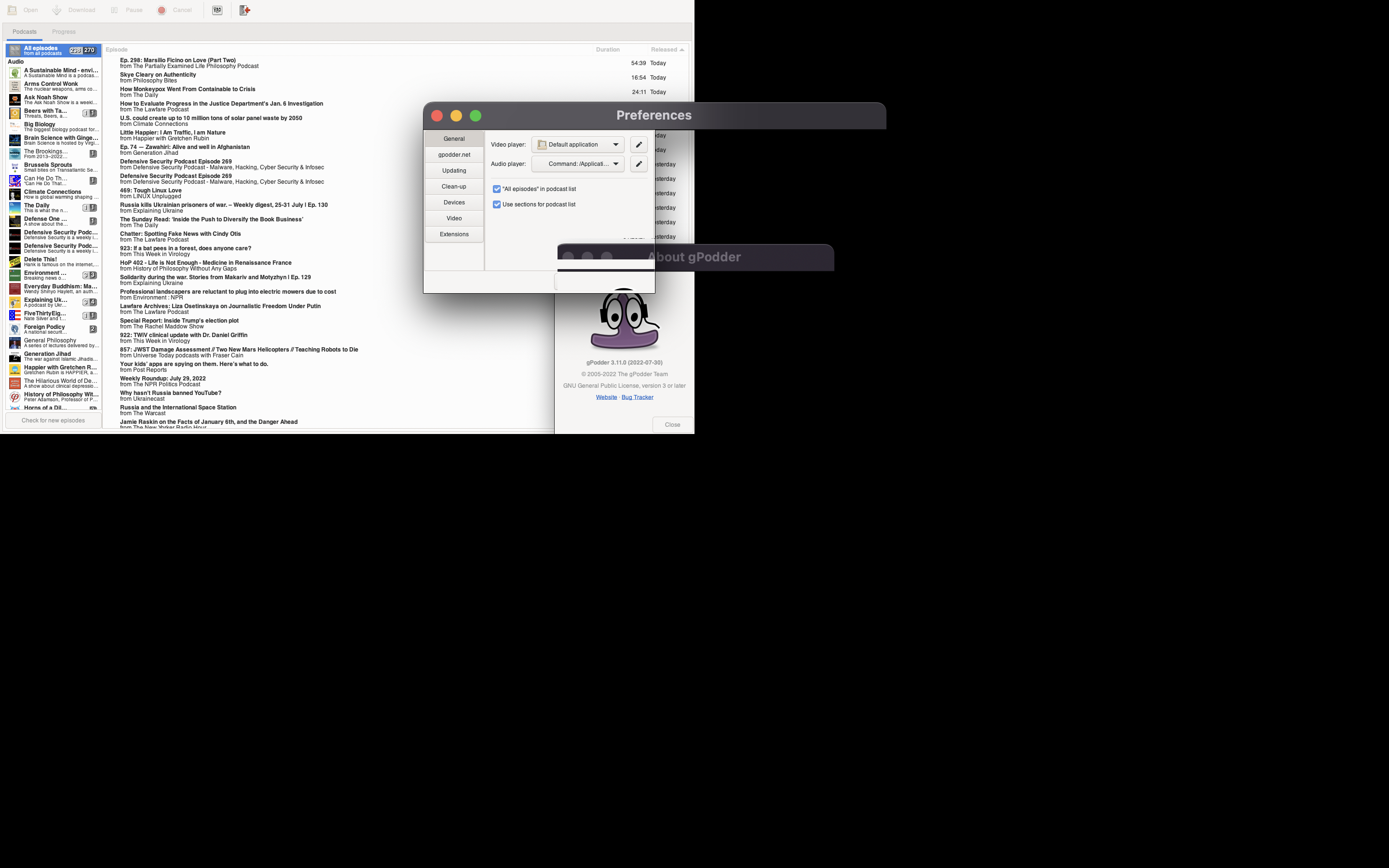

Each window is only using 50% of the width and height. Do you have some form of DPI scaling that is doubling the window size?

I haven't made any changes to the default display configuration and this doesn't seem to affect any other applications. The previous version also worked

Same problem on MacBook Pro (15-inch, 2016). MAIDAY The app is unusable Is there a way to come back to the previous version and restoring the database to the previous one?

Yes there is, see https://gpodder.github.io/docs/user-manual.html#moving-to-an-older-gpodder-release

Can confirm. Macbook Pro M1 Pro, MacOS Monterey 12.5 (21G72). Not only is the app unusably tiny but the mouse movement is off and you cannot really use the app at all. I rolled back to 3.10.21 without issue following the instructions, with no issues.


It seems that this version of the app needs to be run in low resolution mode. Click on the app, right click to open Get Info, then check the Open in Low Resolution box; then close Get Info & open app. Never have had to do this before this version, running MacBook Pro (Retina, 13-inch, Late 2013), with macOS Big Sur 11.6.8. This seems to fix appearance, although looks a bit raggedy; haven't confirmed that the functionality is unimpaired.

Thanks @PhilipJohn1956 for the workaround. I definitely aknowledge the regression but don't have a fix yet...

Low Resolution Mode is a godsend - thanks @PhilipJohn1956!
Note that the checkbox has been removed in MacOS Monterey. The functionality remains, but it now must be set by editing a text file. Instructions are here:
https://www.reddit.com/r/MacOS/comments/qh2e3u/urgent_no_open_in_low_resolution_mode_in_monterey/

@tameware Thanks, that was enough info to work out how to apply the fix on Monterey.
Cheers
(all of the following comment is just throwing some breadcrumbs, I didn't investigate closely what the real issue is)
Wonder if there's an easy way to customize it here: https://github.com/gpodder/gpodder-osx-bundle/blob/master/misc/bundle/Info.plist
Of course, for people not using an external monitor (or using a HiDPI monitor as external monitor as well), having the "pixellized" look of low resolution mode is bad.
It's something that hopefully will eventually be fixed inside GTK (switching the rendering mode when the window is moved from the internal Hi-DPI screen to the external Low-DPI screen.
(I tried googling for "gtk3 hidpi macos" but didn't find any relevant upstream gtk3 bugs)
..or is this happening just with the internal screen? In that case, maybe we set GDK_SCALE when we shouldn't?

I'm updating the osx-bundle from gtk+ 3.24.30 to 3.24.33 and we can see if that helps.
FWIW, running gPodder from source on my Retina MacBook Pro (Intel) with macOS 12.5.1 like this makes it work normally (window is Hi-DPI on Retina at least, and it seems to switch back and forth when moving to/from external monitor) including moving from the "Retina" screen to an external "non-Retina" screen at runtime:
git clone https://github.com/gpodder/gpodder
cd gpodder
python3 tools/localdepends.py
ln -sf ../tools/fake-dbus-module/dbus src
bin/gpodder -v
Packages installed via Homebrew (brew install ...) -- just the ones I think are relevant, might be missing some:
python3
gtk+3
gtk-mac-integration
gobject-introspection
pygobject3
Gtk+3 version used by Homebrew:
% brew info gtk+3
gtk+3: stable 3.24.34 (bottled)
https://app.circleci.com/pipelines/github/gpodder/gpodder/478/workflows/1ab16871-8d9e-4a6e-9a3f-e08cd0e7e525/jobs/846/artifacts has a build with newer gtk+ for anyone who wants to try it.
https://app.circleci.com/pipelines/github/gpodder/gpodder/478/workflows/1ab16871-8d9e-4a6e-9a3f-e08cd0e7e525/jobs/846/artifacts has a build with newer gtk+ for anyone who wants to try it.
I still see the issue with this build on macos 12.4 x86_64.

@eunikolsky Thanks for testing, I'll see if gtk+ 3.24.34 is in the unstable gtk-osx moduleset and try another build.
Still a problem for me in the latest release. The workaround sort of fixes it, but then you have fuzzy hard to read text....
BTW for those thinking it's a cosmetic issue, actually the app is unusable when it's tiny because you click on the window and the click areas are where they were if it was large, so you can't select anything properly, like buttons or check boxes.
But the fix doesn't totally help because you choose between not working vs hard to read - not very accessible for us with sight issues and less than 20:20 vision.


Doesn't work for me....I get a load of dbus errors on Big Sur 10.6.8 - Mid 2015 MBP.
bin/gpodder -v
Warning: python-dbus not found. Disabling D-Bus support.
1664228154.778216 [gpodder.log] DEBUG: ==== gPodder starts up (ui=gtk) ===
1664228154.814721 [gpodder.log] ERROR: Uncaught exception: Traceback (most recent call last):
  File "/Users/X/Downloads/gpodder/bin/gpodder", line 182, in <module>
    main()
  File "/Users/X/Downloads/gpodder/bin/gpodder", line 174, in main
    from gpodder.gtkui import app
  File "/UsersX/Downloads/gpodder/src/gpodder/gtkui/app.py", line 31, in <module>
    from gpodder import core, util
  File "/Users/X/Downloads/gpodder/src/gpodder/core.py", line 25, in <module>
    from gpodder import config, dbsqlite, extensions, model, util
  File "/Users/X/Downloads/gpodder/src/gpodder/config.py", line 33, in <module>
    from gpodder import jsonconfig, util
  File "/Users/X/Downloads/gpodder/src/gpodder/util.py", line 64, in <module>
    import requests
ModuleNotFoundError: No module named 'requests'

Traceback (most recent call last):
  File "/Users/X/Downloads/gpodder/bin/gpodder", line 182, in <module>
    main()
  File "/Users/X/Downloads/gpodder/bin/gpodder", line 174, in main
    from gpodder.gtkui import app
  File "/Users/X/Downloads/gpodder/src/gpodder/gtkui/app.py", line 31, in <module>
    from gpodder import core, util
  File "/Users/X/Downloads/gpodder/src/gpodder/core.py", line 25, in <module>
    from gpodder import config, dbsqlite, extensions, model, util
  File "/Users/X/Downloads/gpodder/src/gpodder/config.py", line 33, in <module>
    from gpodder import jsonconfig, util
  File "/Users/X/Downloads/gpodder/src/gpodder/util.py", line 64, in <module>
    import requests
ModuleNotFoundError: No module named 'requests'`
@fingertrouble You need to install requests.
I'll see if gtk+ 3.24.34 is in the unstable gtk-osx moduleset and try another build.
The unstable moduleset appears to pull current git for every package. There are no hashes for any of the packages, and no patches. I'm guessing the homebrew builds contain any needed patches.
So we might need to revert the moduleset to that used by 3.10.21, which I believe still works on retina machines.

Yes, editing the Info.plist file as below:
sudo vi /Applications/gPodder-new.app/Contents/Info.plist
changing
Thanks for that, @tameware!
