
GDLauncher
 GDLauncher copied to clipboard
 gorilla-devs
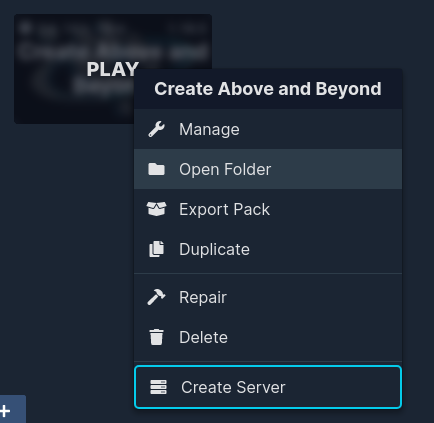
"Open Folder" on instance not working
Describe the bug "Open Folder" on instance not working
To Reproduce Steps to reproduce the behavior:
- Open GDLauncher.
- Install at least one instance of Minecraft.
- Right click the instance and click
Open Folder
Expected behavior I expected the folder of the instance to open - instead nothing opened.
Possible solutions I could try changing the File Explorer I use - however this would be a big expectation since I would have to reconfigure everything on my system and get used to the new File Explorer, and this might not even solve the issue.
Screenshots

Operating System:
- OS: KDE neon User - 5.24 x86_64
- Version: 1.1.20 (In the app under the settings, it claims the version is 1.1.21)
- Java Version: No Java present on operating-system. (Java installed on container where GDLauncher runs)
- Minecraft Version: N/A
- Mod Loader: N/A
Additional context System uses Dolphin as File Explorer.


@ayden-russo @Supermarcel10
https://github.com/microsoft/vscode/issues/114425#issuecomment-1736317696
Potential fix below
If you have VSCode installed:
- Remove Snap versions, install the Deb version instead (or other non-sandboxed version for your given distro)
- modify your
/usr/share/applications/mimeinfo.cachefile by placingcode.desktop;on the end of the line beginning withinode/directory - save the file
Should now work immediately.
