
android-maps-utils
 android-maps-utils copied to clipboard
 googlemaps
PolyUtil.distanceToLine returns wrong result
Summary
distanceToLine (from PolyUtil) returns wrong result, not the nearest point on the line will be found.
here the test data:
P:
longitude12.0978238,
latitude: 49.3210674
Start:
longitude: 12.097749
latitude: 49.321045
End: longitude: 12.097795 latitude: 49.321016
Expected behavior
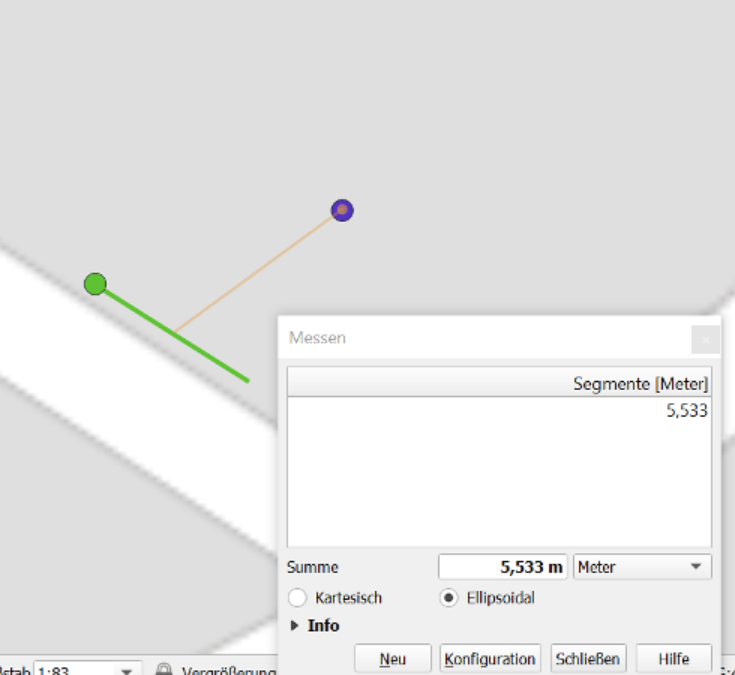
nearest distance from the point to the line (perpendicular). The distance should be ca. 5.5m
Observed behavior
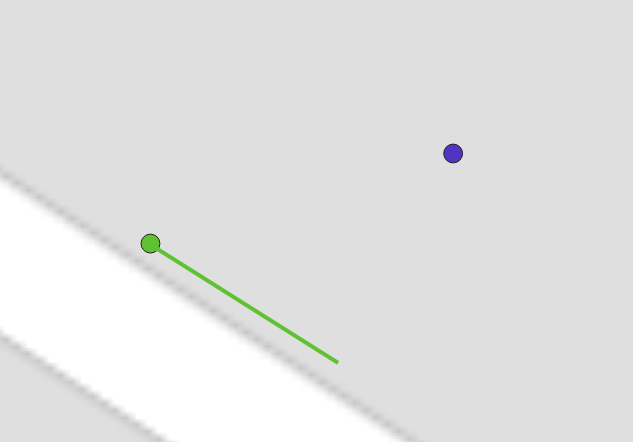
The green point is the calculated nearest point (su method variable), green is the line. Blue is the point. The distance is 5.956537
Environment details
Java
Code example
PolyUtil.distanceToLine(p, start, end). I checked this variable: su (method variable)

@robmir44 Thanks for reporting this, I'll take a look. Additional questions:
- What version of Android Maps Utils library did you observe this result in?
- What is the expected return value from
PolyUtil.distanceToLine()as distance for the input you provided?

@robmir44 Thanks for reporting this, I'll take a look. Additional questions:
1. What version of Android Maps Utils library did you observe this result in?

2. What is the expected return value from `PolyUtil.distanceToLine()` as distance for the input you provided?
- v1.2.1 (actually see master branch)
- I have updated my bug report. The reurned distance is 5.956537m, should be ca. 5.5m
@robmir44 I'm getting something a little different using the provided input.
Here's the code I'm using:
        startLine = new LatLng(49.321045, 12.097749);
        endLine = new LatLng(49.321016,  12.097795);
        p = new LatLng(49.3210674, 12.0978238);

        distance = PolyUtil.distanceToLine(p, startLine, endLine);
        assertEquals( 5.5, distance, 1e-6);
The su variable for me (the closest point on the line) ends up being (49.32101762603991,12.097792420764282), which is green in the below screenshot:
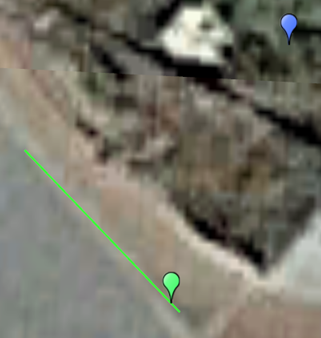
But your example shows the green dot at the other end of the line.
Could you give me a copy/paste of your code so I can match exactly what you're seeing?
12.0978238
I assume it's my fault :/ mea culpa. I'll check it again and then I'll let you know (tomorrow).
So, i checked it again and I am confused. I have two lines green and red. Point coordinates are: (lat: 49.3210674, lon: 12.0978238)
green line coordinates are: start (lat: 49.321045, lon: 12.097749), end (lat: 49.321016, lon: 12.097795)
red line coordinates are: start (lat: 49.321045, lon: 12.097749), end (lat: 49.321072082966566, lon: 12.097703106701374)
the closest point on the red line is the red point and the calculated distance is: 5.97 the closest point on the green line is the green point and the calculated distance is: 5.98
But I have measured the closest point on the green line via QGIS and the result (see screen shot) is ca. 5.6m. Secondly, the red point should be further than the green one (optically seen)? I have also measured the distance from the point to the calculated green point via QGIS and I got ca. the same result ca. 5.97m. I don't know what am I doing wrong? Is it QGIS line measurement wrong or the calculation?
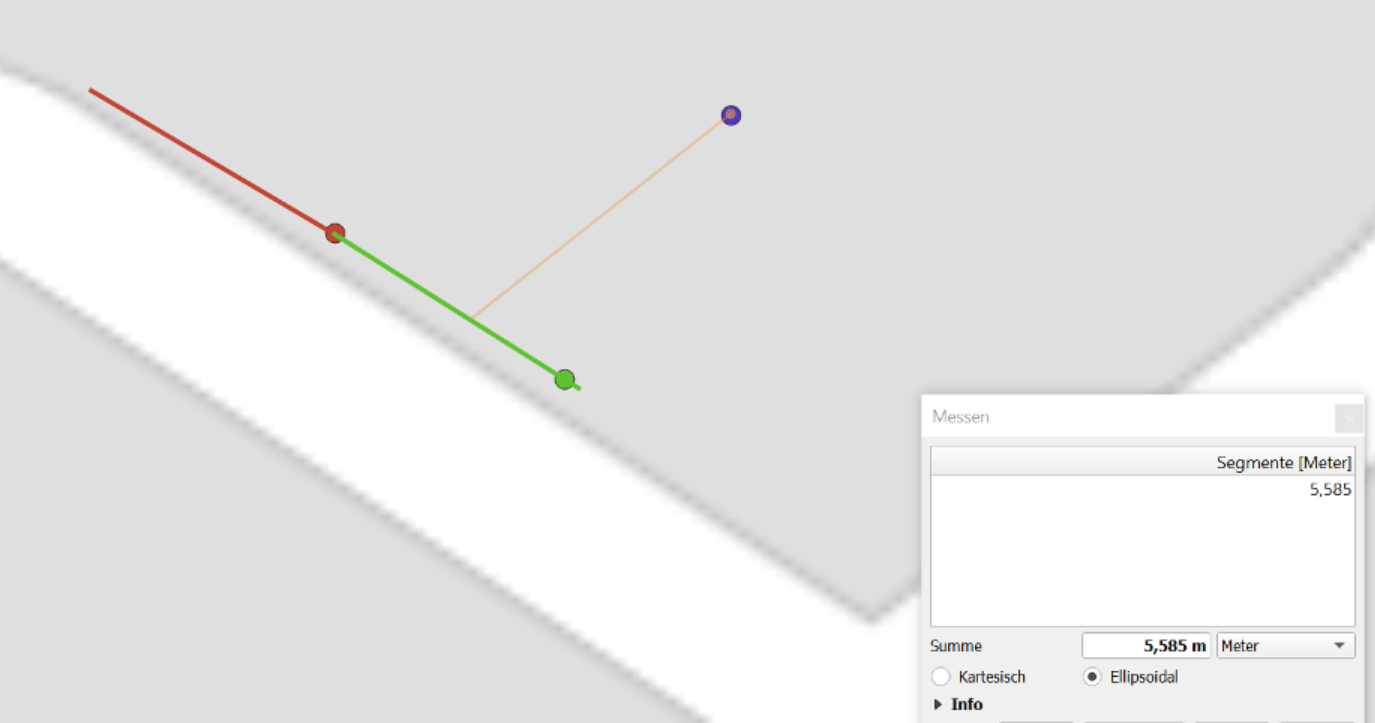
@robmir44 Thanks for the clarification. I believe the distance measurement value is correct between the blue and green dots - this comes to around 5.559m. I believe the current method for finding the closest point on the line isn't working correctly in all cases in AMU - I'm still looking into it.
So after looking at this, I think the main issue that's resulting in incorrect measurements is that the algorithm used to determine the distance to the line segment in distanceToLine() is for 2D Euclidean space - it's described in these two articles in more detail:
- "Minimum Distance between a Point and a Line" - http://paulbourke.net/geometry/pointlineplane/
- "Distance of a Point to a Ray or Segment" - http://geomalgorithms.com/a02-_lines.html
However, for accurate results we want the distance of the arc on the surface of a sphere, which approximates the WGS84 ellipsoid where latitude and longitude come from. An example algorithm for calculating this arc distance is listed here:
- "Cross-track distance" - https://www.movable-type.co.uk/scripts/latlong.html
I did a quick implementation of the cross-track distance algorithm and got the expected ~5.559m distance using the example above, so this seems correct.
However, it's important to note that the simplify() method uses distanceToLine() internally, and to work correctly distanceToLine() must be the implementation of the distance of a point to a line segment, not the distance of a point to a line that extends beyond the start and end point. I believe "cross-track distance" algorithm is the latter (point to great circle path), while the current implementation is the former (point to line segment). So I need to do more testing to identify how to restrict measuring the arc distance to just to just the line segment. We may want to have two methods for distance measurements, distanceToLineSegment() and distanceToLine(), to make it clearer what the method is doing.
Feedback on the above is welcome if anyone has any other thoughts or ideas!
One item in particular that would help with unit tests - if anyone is aware of any existing datsets for known values for distances from points to lines and line segments that I could use in testing to verify behavior, please let me know!
what you need is the longitude correction:
so, then the code should looks like: double lonCorrection = Math.Cos(toRadians(s1lat)) double s2s1lat = s2lat - s1lat; double s2s1lng = (s2lng - s1lng) * lonCorrection ; final double u = ((s0lat - s1lat) * s2s1lat + (s0lng - s1lng) * lonCorrection * s2s1lng) / (s2s1lat * s2s1lat + s2s1lng * s2s1lng)
take care, this is an approximation for small distances but works very fine.
You can read these links: https://www.movable-type.co.uk/scripts/latlong.html https://en.wikipedia.org/wiki/Equirectangular_projection
@robmir44 Thanks for the pointer! So with this code (similar to yours, just without the radians conversion, as the radians conversion happens above):
        final double s0lat = toRadians(p.latitude);
        final double s0lng = toRadians(p.longitude);
        final double s1lat = toRadians(start.latitude);
        final double s1lng = toRadians(start.longitude);
        final double s2lat = toRadians(end.latitude);
        final double s2lng = toRadians(end.longitude);

        double lonCorrection = Math.cos(s1lat);
        double s2s1lat = s2lat - s1lat;
        double s2s1lng = (s2lng - s1lng) * lonCorrection;
        final double u = ((s0lat - s1lat) * s2s1lat + (s0lng - s1lng) * lonCorrection * s2s1lng)
                / (s2s1lat * s2s1lat + s2s1lng * s2s1lng);
        if (u <= 0) {
            return computeDistanceBetween(p, start);
        }
        if (u >= 1) {
            return computeDistanceBetween(p, end);
        }
        LatLng su = new LatLng(start.latitude + u * (end.latitude - start.latitude), start.longitude + u * (end.longitude - start.longitude));
        return computeDistanceBetween(p, su);
The below tests pass, which means I do get the expected ~5.559m distance measurement in your example:
        LatLng startLine = new LatLng(28.05359, -82.41632);
        LatLng endLine = new LatLng(28.05310, -82.41634);
        LatLng p = new LatLng(28.05342, -82.41594);

        double distance = PolyUtil.distanceToLine(p, startLine, endLine);
        assertEquals(37.94596795917082, distance, 1e-6);

        startLine = new LatLng(49.321045, 12.097749);
        endLine = new LatLng(49.321016, 12.097795);
        p = new LatLng(49.3210674, 12.0978238);

        distance = PolyUtil.distanceToLine(p, startLine, endLine);
        assertEquals(5.5594433, distance, 1e-6);
I want to add some additional tests, though, for longer distances to see how the accuracy fairs.
Some additional context: the distanceToLine() implementation comes from another app "MyTracks", but in that implementation it wasn't exposed publicly - it was only used as part of the line simplification implementation. I'm guessing this issue never surfaced there because the results were close enough to produce reasonable simplified lines.
But, now that distanceToLine() is publicly exposed and people are directly using it for distance calculations, this issue is apparent. And, given that, we should test across a variety of potential use cases to ensure the results are reasonable.
^^ u r w, btw. the conversion to radians is not needed ;)
i mean for these lines
final double s0lat = toRadians(p.latitude); final double s0lng = toRadians(p.longitude); final double s1lat = toRadians(start.latitude); final double s1lng = toRadians(start.longitude); final double s2lat = toRadians(end.latitude); final double s2lng = toRadians(end.longitude);
:tada: This issue has been resolved in version 2.4.1 :tada:
The release is available on:
v2.4.1- GitHub release
Your semantic-release bot :package::rocket:
