

 google
Enhance UX of banner notifications with a link type CTA
Feature Description
Our BannerNotification component is our general notification used in many places for various CTAs and notifications on the dashboard.
For notifications that have a CTA, these generally have three forms:
- buttons that when clicked do something in the background, or
- links that navigate to another page
- acknowledge the message
All three actually have the same behavior regarding the dismissal of the notice (if dismissible) and dismiss the notice. Once dismissed, the notice is no longer present in the DOM which of course removes it from view.
For CTAs that do something in the background, the onCTAClick supports an async function which will toggle the built-in spinner as long as the function is running, which also delays the dismissal until after it's completed.
For CTAs that simply link to another page, the experience leaves something to be desired as it causes the banner to disappear immediately on click which makes for an odd experience for a few seconds as the page is navigating.
Do not alter or remove anything below. The following sections will be managed by moderators only.
Acceptance criteria
- Banner notifications with link CTAs should be updated such that clicking on the CTA link
- enables the spinner
- does not remove the banner from the screen
- still dismisses the notice (as today)
- The primary CTA should continue to use an anchor
<a>tag for CTA links
Implementation Brief
- Using
assets/js/components/notifications/BannerNotification/index.js,- Update the
handleCTAClickfunction to do the following if there is a valid link defined (ctaLink) and it does not open in a new tabctaTarget.- Prevent the click action.
- Dispatch the
navigateToaction fromcore/location, with the link as parameter. - Existing logic should remain the same.
- Check if there is a "navigateTo" in progress by querying the
core/locationdata store via theisNavigatingToselector, passingctaLinkas parameter. - Display the
Spinnerif the result of the above selector returnstruein addition to the current condition. - The
isURLfunction from@wordpress/urlcan be used to check for a valid link, because sometimes it can be an anchor link which in this case don't want to display the spinner.
- Update the
Test Coverage
- No new tests to be added.
QA Brief
- Ensure you have landed on a banner notification with a CTA (button) that navigates to an internal link. For example, the WordPress version bump notification.
- Click the primary CTA.
- Ensure the CTA is disabled and a spinner displayed next to it, and this state persists until the user is navigated to the new page/URL.
https://user-images.githubusercontent.com/24408261/195339112-488b5fff-21ad-47dc-b305-a5e6de31ff53.mp4
Changelog entry


QA Update: ❌
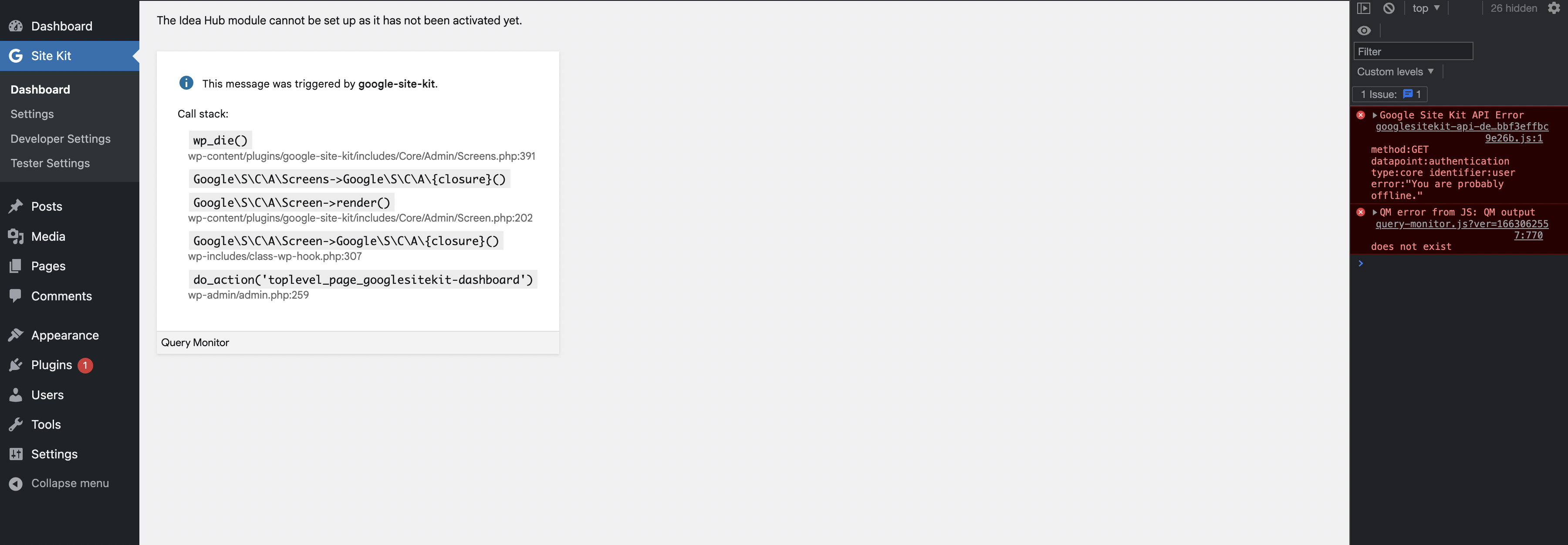
@hussain-t as per our conversation in Slack. Found this issue while doing general testing. When I click on the ‘Set up’ CTA for Idea Hub on the notification banner on Dashboard, a message appears The Idea Hub module cannot be set up as it has not been activated yet and it dies, unable to set up Idea Hub.

QA Update: ❌
@hussain-t @techanvil I've noticed an issue which I think is due to this ticket. It only exists on the develop branch.
I have explained the issue in this screencast, but in short, when a banner is dismissed (i.e. click on the remind me later link) in this case the GA4 Activation Banner, it disappears. I then click another CTA, i.e. set up Idea Hub banner, the GA4 Activation Banner is loaded again, and eventually, I am sent to the connect Idea Hub screen.
Please also note that the same occurs with the Bump WP Version banner, when clicking on the maybe later link, then following the same steps above.
I had to change the throttling to slow 3G so you can see the behaviour.
It is noticeable though on a normal internet connection.
https://user-images.githubusercontent.com/73545194/198289840-73130ba6-843d-4259-98c0-c66a7b27c4fe.mp4
QA Update: ✅
Verified:
When on a banner notification with a CTA (button) that navigates to an internal link. when I click on the primary CTA. the CTA is disabled and a spinner is displayed next to it. This state persists until the user is navigated to the new page/URL. I tested this with the Bump WP Version banner and also the Idea Hub Sign up CTA banner notification.
Also the issues reported here and here are now fixed. I also noticed a regression when you set up Analytics via the CTA on the dashboard, where the spinner appears on the banner notification for a few seconds, but this is also fixed.
https://user-images.githubusercontent.com/73545194/198296883-d73ab4d8-302b-4deb-be5f-5deead6f0cda.mp4