

 google
Tag Manager permission error not shown to user
Bug Description
In Tag Manager settings, when a user doesn't have permission for the current container, an error is returned by the backend but is not displayed to the user.
Steps to reproduce
- Create a Tag Manager account and container. Share the selected Tag Manager account with a second Google account, granting User permissions only, and grant Read access to the container.
- Set up Site Kit with this second Google account, connect Tag Manager and set it up with an account and container.
- Remove the Read access to the container.
- Reload the Settings screen and navigate back to the edit settings view for Tag Manager. Watch out for the bug where refreshing the Tag Manager edit settings view will result in a stuck loading state, if the related issue is not fixed yet, see #6464.
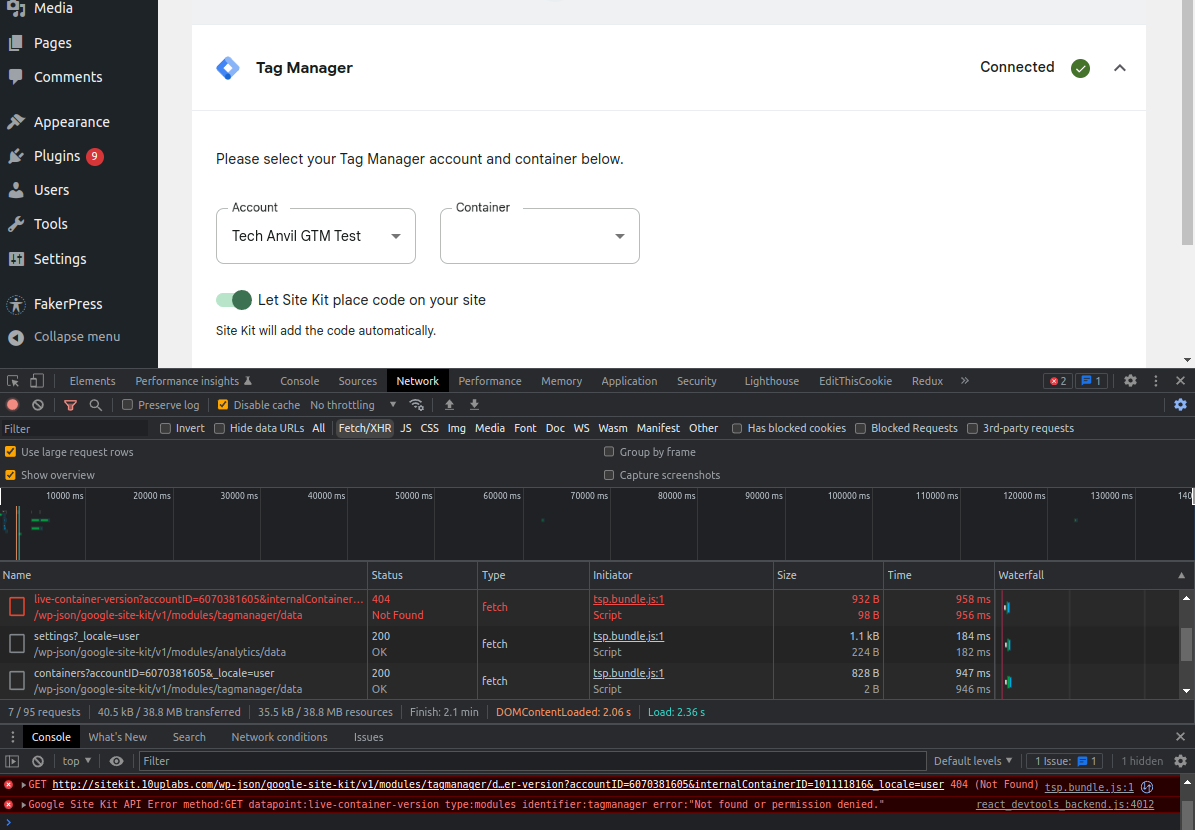
- The settings view will display with the account selected, but the container empty. The request to the
live-container-versionendpoint will have failed with the error "Not found or permission denied." but this error is not displayed to the user. See first screenshot below. - By way of comparison - when the
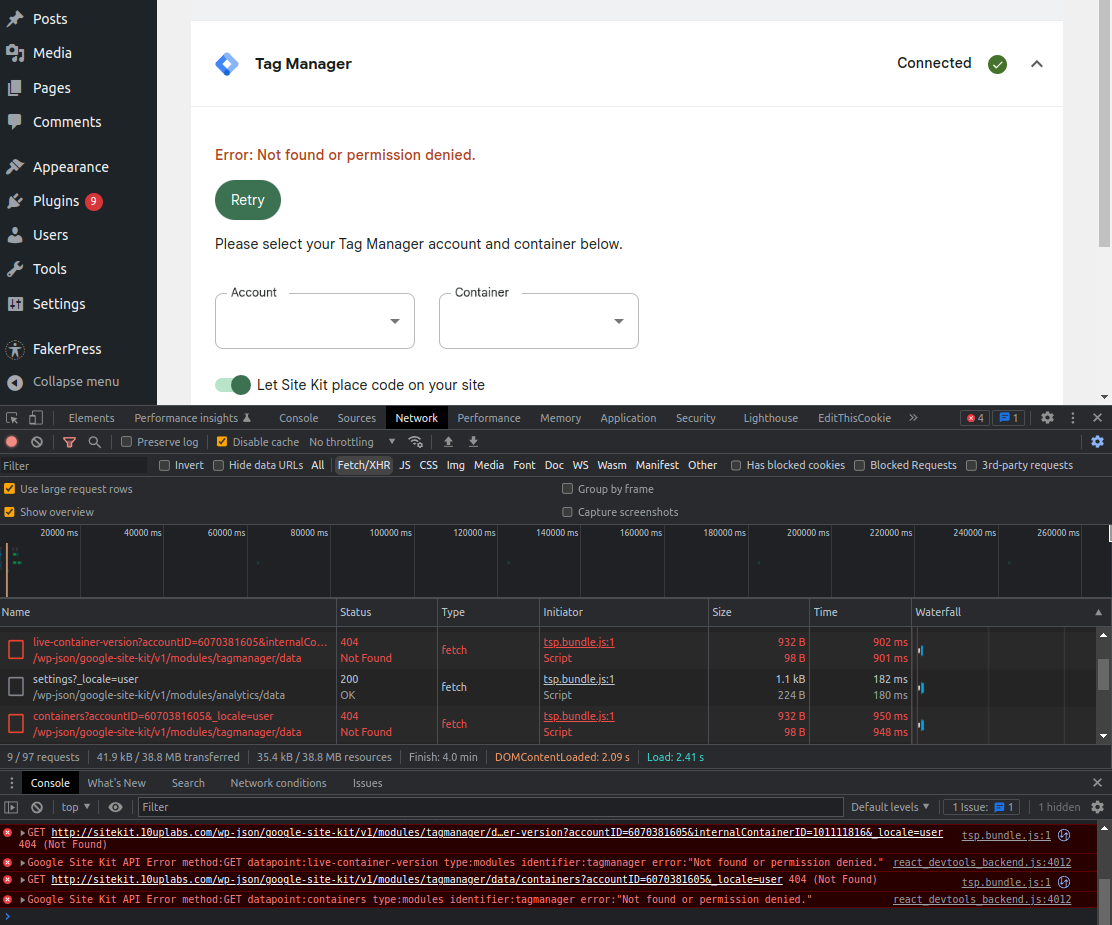
containersendpoint returns the same error (to reproduce, repeat the above but without sharing the Tag Manager account at all), it is shown to the user. See second screenshot below.
Screenshots
The permissions error from live-container-version is not displayed:
However, it should be, as it is when containers errors:
Additional Context
- PHP Version: any
- OS: any
- Browser: any
- Plugin Version: any recent (recorded on 1.78.0)
- Device: any
The reason the error is being ignored is that 404 errors are being suppressed in the controlCallback function for the live-container-version endpoint:
https://github.com/google/site-kit-wp/blob/77e79439f74c850215413eedb0a26e16f27ec8c9/assets/js/modules/tagmanager/datastore/versions.js#L64-L67
This logic either needs to be refined, or we could consider removing it and showing the "no published version" error to the user.
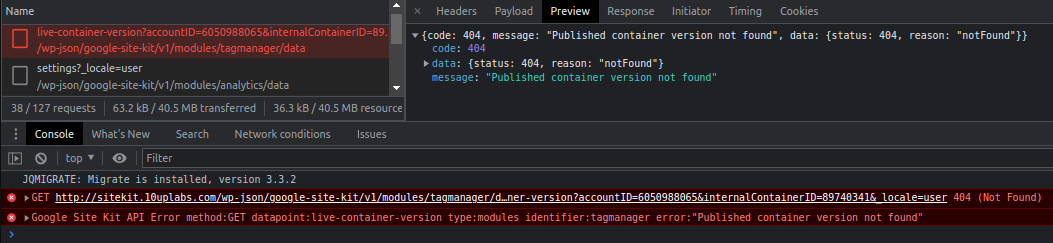
Note the response for the "no published version" error is pretty similar with only the message property changing:
Do not alter or remove anything below. The following sections will be managed by moderators only.
Acceptance criteria
- In the edit settings view for Tag Manager, when a call to the
GET:live-container-versionendpoint returns an error, it should be displayed to the user, with one exception for the "no published live version" case as described below. - The error should be retryable via the standard Retry button.
- Note that currently errors other than those with a
404status code are displayed to the user, so this is really about ensuring404errors are displayed. - An exception should be made in the case where the error is because there's no published live version for the container. In this case, the error should continue to be handled as it is now, i.e. returning
nullfrom thegetLiveContainerVersionfetch store'scontrolCallback(see Additional Context, above).
Implementation Brief
Pre-brief notes:
- Unfortunately, the only way to differentiate the "no permission" error response from the "no published live version" response is the difference in the error message.
- Another thing to be aware of, it looks like Tag Manager behaviour may have changed as when a new container is created a version is automatically created and published. I think that previously, it did not automatically create an initial version. So, it might be tricky to test the "no published live version" case. Maybe the scenario can be recreated via the Tag Manager API rather than the GUI, alternatively reach out to @techanvil who has an old container with no live version that can be shared, if you don't have one yourself.
- [x] Update the following statement in
assets/js/modules/tagmanager/datastore/versions.jsthat blocks 404 errors from being re-thrown. Add an additional check to the condition, so it's only true whenerr.codeis404anderr.messagecontains the string'container version not found'. https://github.com/google/site-kit-wp/blob/ae463cb0af9efd8afeab5b615139f3af06e8ea59/assets/js/modules/tagmanager/datastore/versions.js#L63-L66 - [x] Add a detailed inline comment to explain why we must use a comparison to the error message here for future reference.
Test Coverage
- Add a new test in
assets/js/modules/tagmanager/datastore/versions.test.js:dispatches an error if the request returns not foundtesting that 404 errors are thrown bycontrolCallbackcorrectly. - Confirm the
receives null if the container has no published versiontest still passes.
QA Brief
- Follow the steps to reproduce to test that the permission denied or not found error is correctly displayed and can be retried.
Changelog entry
- Update the Tag Manager module to display permission errors to users.

@techanvil this looks important to address. Sending this your way for AC although feel free to close if it's no longer an issue 👍


Thanks @bethanylang, I've not forgotten about this, just had a number of things on my plate and have been trying to balance those with the ongoing sprint requirements as usual. I should be getting round to this one soon.
@techanvil this looks important to address. Sending this your way for AC although feel free to close if it's no longer an issue +1
Thanks @aaemnnosttv, I've rechecked this, updated the issue and added AC and some notes for the IB.

@jimmymadon Are you planning to work on this soon? If not, can you please unassign yourself so someone else can pick up? Thank you!

@techanvil I can confirm that new Tag Manager containers are created with a version by default now. Can you invite me to the container you have that triggers this error so I can complete the IB here.

Hey @benbowler, good to confirm that thanks, and as per Slack I've invited you to the relevant container.
@techanvil even with the account you shared I wasn't able to repeat, the IB as provided would surface these 404 errors in future but perhaps the original issue is no longer repeatable? Assigning back to you, perhaps you can re-evaluate using your own tag manager properties and provide a method for simulating the error for other to develop an update for this ticket or close if it's not longer an issue?
Hi @benbowler, having looked into this I've realised I shared the wrong container with you :disappointed:. The container I shared does have no live versions, but it has an iOS usage context which results in the container being filtered out as we parse the response for the call to list the containers. Sorry about the mixup.
I've found the correct container to use, one with no live versions which has a web usage context. I've given this a test and can see the issue is still valid, with the Published container version not found error present in the console but not visible on the page:
I've invited you to this container - please take another look at this issue if you have time before your break, otherwise feel free to unassign it and I can share the relevant container with whoever takes a look next. I need to prioritise Audience Segmentation definition, so I don't imagine I'll pick this up to work on the IB myself in the short term future.
For reference, so I don't make the same mistake again the Tag Manager account I should share is now called "Test No Live Versions" as per the screenshot above.
Thanks @techanvil, I've got it and created an IB here that covers the AC.
Thanks @benbowler! The IB pretty much LGTM, although I'm not sure we need to lower-case the message so I've tweaked it to remove that detail. IB :white_check_mark:
QA Update ✅
- Tested on dev environment.
- Tested for the user whose access to account is removed.
- Tested for the user whose access to container is removed.
- Verified that "No found or Permission denied" error showing.
- Verified that error is retriable via the standard Retry button.
Account access removed
https://github.com/google/site-kit-wp/assets/94359491/fad5cf4f-329d-4ce1-80c7-f8c317c40fa8
Container access removed
https://github.com/google/site-kit-wp/assets/94359491/069174f1-d32e-4ac6-976b-e2a40f74d5de
