

 google
Show Measurement ID instead of Property ID in Analytics 4 Property Select Dropdown when there is an existing GA4 Tag
Feature Description
When there's an existing GA Tag, it is added as and shown to the UI as the Measurement ID. However, In the property select dropdown, there is only the Property ID present. This is confusing UX, as even though the toggle behaves correctly (Turning on/off) based on the selected properties underlying measurement ID, to the user it seems to be happening randomly as there's no indication that the selected property has/doesn't have the same existing tag measurement ID.
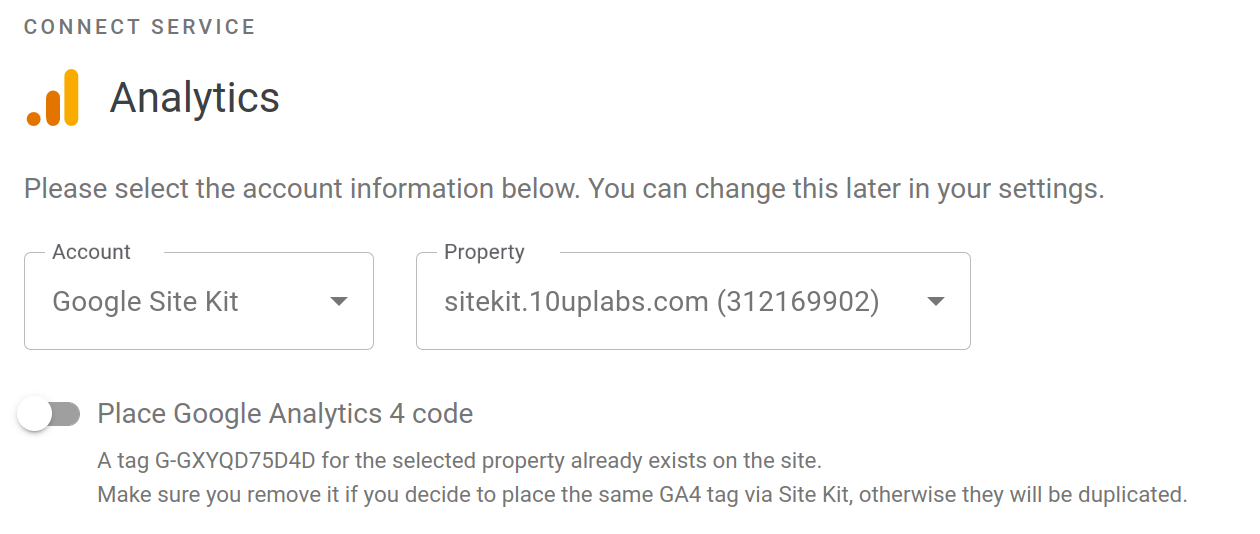
Showing the measurement ID in place or in addition to the property ID would make things clearer and also help user to select the correct property.
Do not alter or remove anything below. The following sections will be managed by moderators only.
Acceptance criteria
- Google Analytics 4 properties in the GA4 property dropdown/select should show their name and measurement ID, rather than their name and property ID (as they currently do).
- The REST API endpoints for GA
propertiesandpropertyshould be updated to include the measurement ID, which is not currently included in the response. (See this comment: https://github.com/google/site-kit-wp/issues/5145#issuecomment-1166382009)
Implementation Brief
In assets/js/modules/analytics-4/components/common/PropertySelect.js:
- Get the
measurementIDs of all thepropertiesusing thegetWebDataStreamsBatchselector.- if
propertiesis not loaded, returnnull. - Get the
propertyIDsarray by mapping over theproperties. - Get
webDataStreamsfor the abovepropertyIDsusing thegetWebDataStreamsBatchselector. - if
webDataStreamsis not loaded, returnnull. - Return a
propertyID:measurementIDobject by mapping over all the webstreams and picking upwebDataStream[ 0 ].webStreamData.measurementId.
- if
- Update
isLoadingto betruewhenmeasurementIDis null. - In the JSX, Update the
Optionelement to use themeasurementIDlike this-
<Option key={ index } value={ _id }>
      { _id === PROPERTY_CREATE
        ? displayName
        : sprintf(
        /* translators: 1: Property name. 2: Measurement ID. */
        _x(
          '%1$s (%2$s)',
        'Analytics property name and ID',
        'google-site-kit'
    ),
      displayName,
      measurementIDs[ _id ]
  ) }
</Option>
Test Coverage
- Not needed.
QA Brief
- Navigate to the analytics edit screen in settings on an installation with GA4 properties
- Ensure that the GA4 property dropdown shows the measurement ID (G-1234ABCD format) instead of the property ID.
Changelog entry

@eclarke1 Can we move this forward to AC? This was a nice to have in ETS and somehow got lost in the ocean of Triage :(
Good suggestion, moved over to AC for the engineering leads to add. Thanks @kuasha420

(Tagging this as a good first issue, as it should involve replacing the Property ID with the Measurement ID in the UI.)

IB Investigation Update
This is harder than it looks. Here's my findings so far.
-
The AC is wrong. The
PropertySelectDropdownis already showing property ID.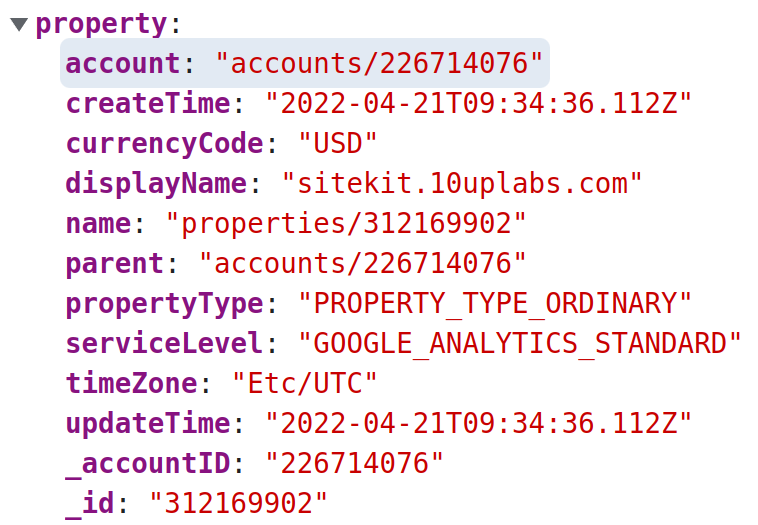 On the other hand, the Existing Tag Notice is showing a measurement ID as that is added in the GA4 snipper.
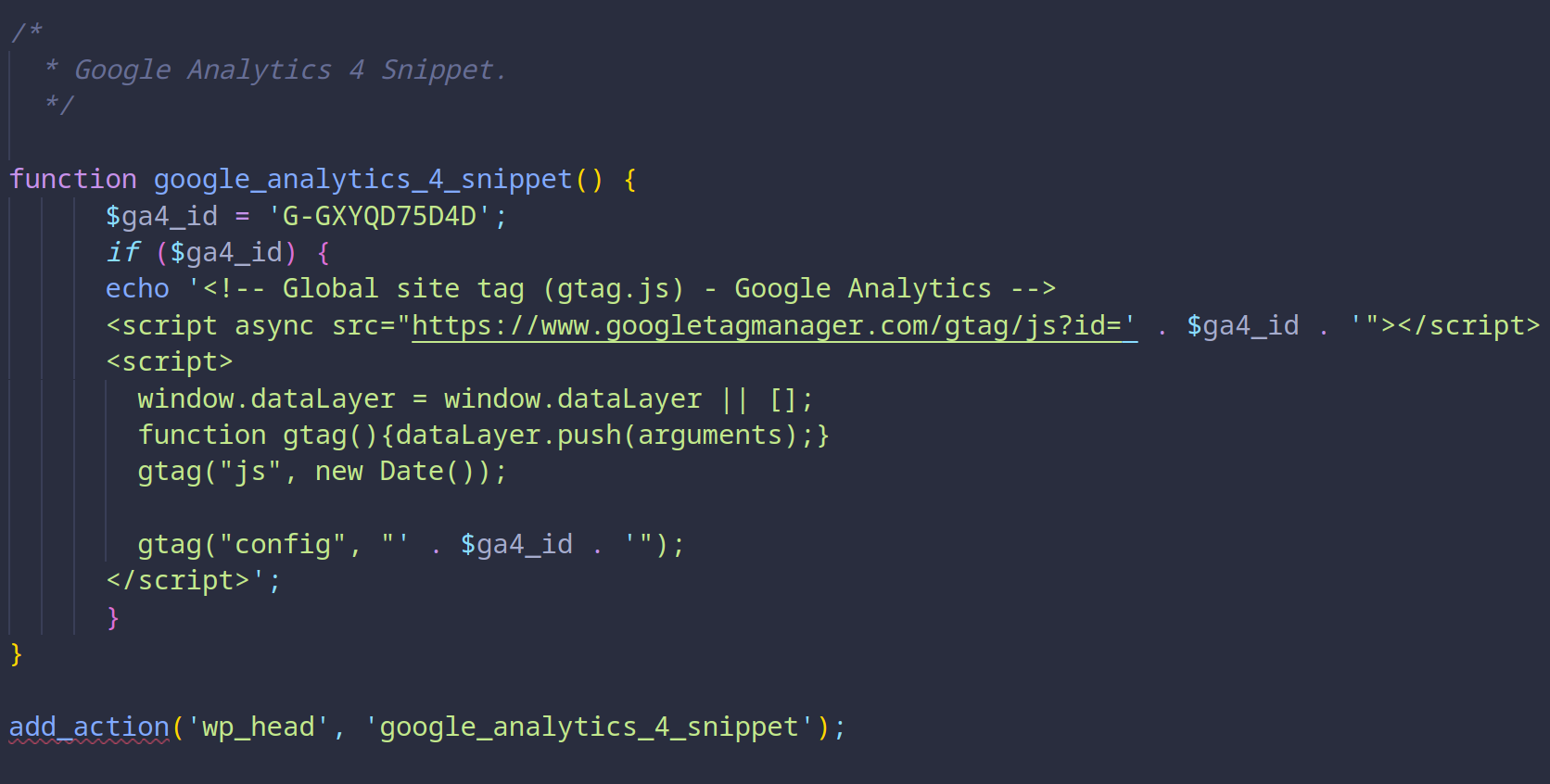 So, we will probably have to amend the AC to say either:
- Show "Measurement ID" in Dropdown (G-XXXXXX)
- Show "Property ID" in the ETS Notice.
-
Now the problem with first approach is that the measurement ID is not available in the
propertyobject (see above screenshot) and only becomes available after selecting a property via webstream. See here.- We will probably have to update the
propertiesandpropertydata point to request websteams and augment the property object with the measurement ID.
- We will probably have to update the
-
Or, if we update the ETS notice, we will have to have a mechanism to get property from the existing tag measurement ID. However, I'm not sure if that is possible, specially for a account without permission.
Forgive the formatting and let me know if I missed something. Assigning it back to you @tofumatt for a decision.
@kuasha420 could you kindly add an estimate to this one please, or are you waiting on a decision from @tofumatt first before adding? :)
@eclarke1 The IB isn't ready yet as we need a decision regarding AC. I've incorrectly put it in IBR. It should be back to AC and I'll do that now. Cheers!
Ah, it's possible I mixed up the names of the property/measurement ID, my bad. 😅
Thanks for the summary here @kuasha420, it's super-helpful 👍🏻
I think, of the options you presented, we want to go with Show "Measurement ID" in Dropdown (G-XXXXXX).
I've amended the ACs to include the points you raised, but I think that's the best option and it's actually what I meant! 😅
@tofumatt So I did some more experiments on this and while we can do this in the backend, it breaks all our conventions because the measurement ID is only available in the webDataStream. so we will have to make two request, one dependent on another and breaks our create_data_request -> parse_data_response pattern. I think we can do it easily in the JS using existing selectors. I have added the IB accordingly, what do you think?
Cheers.
Thanks for the digging on this @kuasha420.
I agree, if we already have the selectors available to do this in JS, let's go for it that way.
IB ✅
QA Update ❌
- Verified on dev.
- Verified under settings and GA4 set up activation banner.
@hussain-t Can you please look into this issue as you have done code review ?
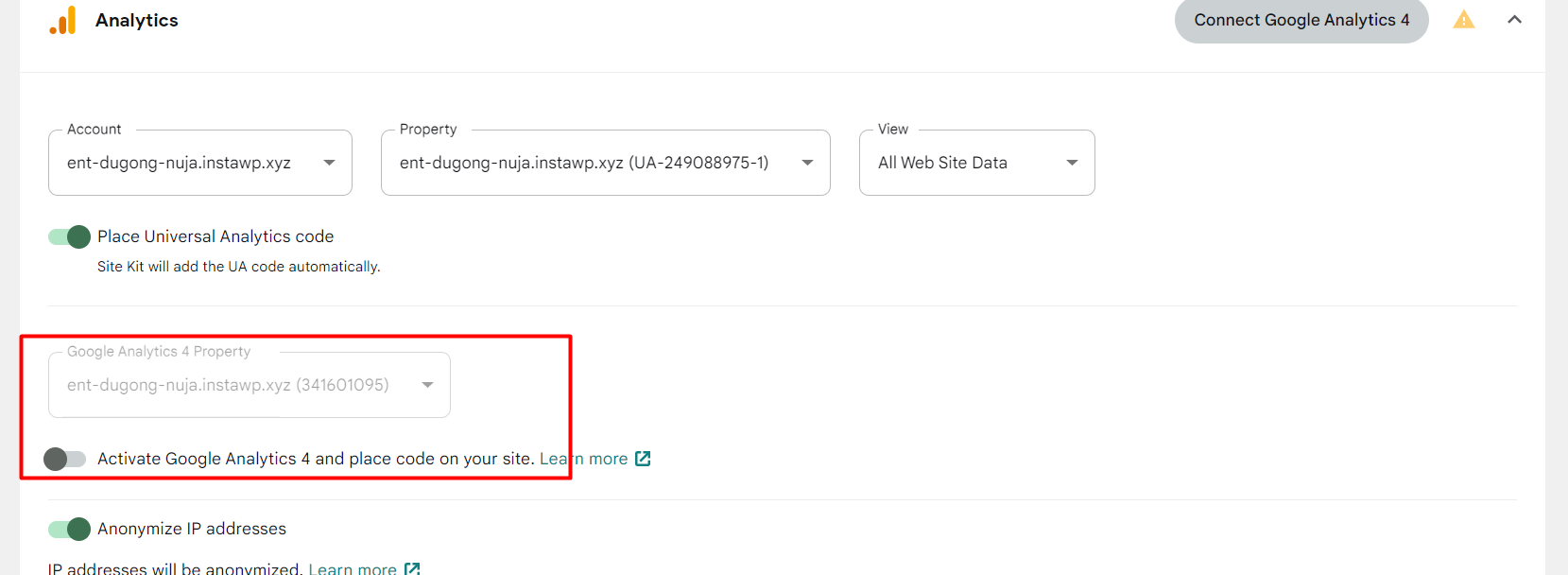
Issue > When Analytics UA property is connected but not GA4 property and connected accounted already have existing GA4 property then under GA4 dropdown placeholder GA4 property name and property ID is showing.

QA Update ⚠️
@hussain-t
- Verified on main.
- Regarding the issue reported above. I found one difference between latest and main environment.
- On latest when we click on edit then "Activate GA4" toggle option remains off/disable and if click on "Connect GA4 button" then it gets on/enable/active. On main in both cases toggle is On. Is it expected ?
Latest -
https://user-images.githubusercontent.com/94359491/202107349-153a9ee2-c008-4962-b6cf-9287d0136117.mp4
Develop-
https://user-images.githubusercontent.com/94359491/202107506-15c3748b-999f-4853-82ef-513e52c25a2c.mp4
- Property select content shift issue. This issue is also exist on latest. So, I will create separate issue for this.
https://user-images.githubusercontent.com/94359491/202108403-27ae8e78-0957-4e3e-adaa-55155dfc698c.mp4
- Verified the infinite loop issue using oi.ie site. I'm not getting infinite loop issue now on oi.ie. Also, tested on fresh site as per steps mentioned under QAB. Not getting infinite loop in that case also.
But I've noticed that measurement id is not showing in dropdown for oi.ie. But user connects the property then it shows measurement id. I created new GA4 property on oi.ie site. Dropdown was not showing measurement id for new created property. After that I selected the property and provided additional permission for creating measurement id then and only that property start showing newly created measurement id. Is this the same issue for which you have created ? https://github.com/google/site-kit-wp/issues/6152
https://user-images.githubusercontent.com/94359491/202113861-d3d4ecd0-25d4-478d-b984-53f9af57e2f9.mp4
Thanks, @mohitwp. Regarding your questions:
On latest when we click on edit then "Activate GA4" toggle option remains off/disable and if click on "Connect GA4 button" then it gets on/enable/active. On main in both cases toggle is On. Is it expected ?
Yes, this is expected. Remember there was an issue when you clicked the edit link? I have fixed it in this PR. Please refer to this comment.
Property select content shift issue. This issue is also exist on latest. So, I will create separate issue for this.
Yes, this is an existing issue as I pointed out on Slack. Feel free to create a separate issue.
But I've noticed that measurement id is not showing in dropdown for oi.ie. But user connects the property then it shows measurement id. I created new GA4 property on oi.ie site. Dropdown was not showing measurement id for new created property. After that I selected the property and provided additional permission for creating measurement id then and only that property start showing newly created measurement id. Is this the same issue for which you have created ? https://github.com/google/site-kit-wp/issues/6152
This is not the same as #6152. This is a different problem. I will create a follow-up PR to fix this.

QA Update ⚠️
@hussain-t I noticed few issues whenever I reloading the page it trigger weird behavior.
1) When I'm using developer plugin and oi.ie website then in analytics dropdown I'm still getting blank space instead of measurement id [property name()] . Once we select property name from the list then it shows Measurement id. Here I notice two behavior
- For few properties measurement id starts showing in drop down after I selected and connected them.
- There are many properties for which measurement id still not showing in drop down list after connection. Steps -
- Edit analytics settings> Select GA4 Dropdown>Select property name without M-ID>Connect.
- Edit analytics settings>Measurement id will show for connected property.
- Now reload the page > Now measurement id will not appear for connected property and few other properties in dropdown.
I checked above scenario on fresh after creating multiple GA4 properties using analytics console and switched to main branch. On fresh site I'm getting property name along with measurement id. I can recreate this issue only when I'm using oi.ie site.
https://user-images.githubusercontent.com/94359491/202380605-f4f6a259-6be6-4c37-a537-efddc8179501.mp4
2) On main branch measurement id load after delay of few milliseconds. On latest when we reload the page it loads property name and property id together. See scrrencast-
Main-
https://user-images.githubusercontent.com/94359491/202381072-bb6eee4d-12bf-4524-9f27-4017a6046b67.mp4
Latest -
https://user-images.githubusercontent.com/94359491/202381141-52ae61fd-4796-4946-8320-6d759adcbb54.mp4
3) Placeholder showing property name with property id instead of measurement id when we reload the settings page. Steps-
- Disconnect GA4 or use site on which only UA property is connected.
- Go to settings > Click on 'Connect GA4 button> it will open analytics settings in edit mode.
- Now reload the page.
- Notice placeholder it will show property name with property id. or
- Go to settings > Open analytics settings >Click on edit option.
- Now reload the page.
- Notice placeholder it will show property name with property id.
cc @wpdarren
https://user-images.githubusercontent.com/94359491/202382386-821651a7-f1b4-478c-9b24-754831d28ace.mp4
@mohitwp, regarding your observations:
- When I'm using developer plugin and oi.ie website then in analytics dropdown I'm still getting blank space instead of measurement id [property name()] . Once we select property name from the list then it shows Measurement id. Here I notice two behavior
This is because the maximum web data stream per batch is 10 for the getWebDataStreamsBatch resolver. It's not a bug; it works as expected. As you can see, the first ten properties have measurement IDs, and the rest don't. It should be tackled in a separate ticket if we want to enhance it.
- On main branch measurement id load after delay of few milliseconds. On latest when we reload the page it loads property name and property id together. See scrrencast-
This is the same as the property select content shift issue we discussed yesterday. We need to show the progress bar until the measurement IDs are loaded. Unfortunately, it's not trivial/straightforward. IMO, we should tackle it in a separate issue.
- Placeholder showing property name with property id instead of measurement id when we reload the settings page.
This is a valid issue. I will create a follow-up fix for it. As this ticket is a tricky one, there are many scenarios; we missed a few during the development and QA previously. Thanks!
cc: @wpdarren
@hussain-t Created separate issue https://github.com/google/site-kit-wp/issues/6158 for content shift. I added the issue related to delay in loading of measurement id in the same ticket.
Also created separate ticket https://github.com/google/site-kit-wp/issues/6159 for 2nd observation posted above . Because user is able to see measurement id for only initial 10 GA4 properties. If a/c have more than 10 GA4 properties then for remaining measurement id is not showing in GA4 property drop down.
cc @hussain-t @aaemnnosttv
@mohitwp the fix is in for your third observation, please take another look.
- Placeholder showing property name with property id instead of measurement id when we reload the settings page.

QA update ✅
- Verified on main branch.
- Google Analytics 4 properties in the GA4 property dropdown/select and in GA4 activation banner now showing name and measurement ID, rather than their name and property ID
- Below issue is now resolved.
3) Placeholder showing property name with property id instead of measurement id when we reload the settings page.
https://user-images.githubusercontent.com/94359491/202647005-9ebe3dc9-406a-43d8-9cca-6dd67ba7faaa.mp4
For Issue no 1 and 2 reported here. I Created separate tickets https://github.com/google/site-kit-wp/issues/6159 and https://github.com/google/site-kit-wp/issues/6158 after discussion with @hussain-t.
cc @aaemnnosttv @wpdarren