

 google
When Javadoc formatting is disabled, don't change javadoc so much
Javadoc formatting regularly gives undesired results and lags behind in its support for both Javadoc (esp. {@snippet ...}) and HTML (e.g. elements such as <section>, <article>, <figure>, <figcaption>, ... aren't properly supported, nor is wrapping a "block" with an <a> element, etc.).
With --skip-javadoc-formatting, the result is unusable as well, because indentation is still removed.
So because of the poor Javadoc formatting, and the inability to disable it altogether, it's impractical to format my Java code with GJF.
I propose to at least provide an option to disable Javadoc formatting altogether (i.e. not even adding asterisks or doing any alignment/indentation changes). Either by updating the semantics of --skip-javadoc-formatting, or by introducing a new option (e.g. --disable-javadoc-formatting).
It would also be helpful to have an option where GJF only formats pure Javadoc (i.e. anything within {@... } and lines that start with a tag) and leaves anything else untouched (with an additional option to specify tags to exclude, such as @snippet while it's unsupported).

Can you share any self-contained examples that demonstrate the problems you're seeing with javadoc formatting, and with --skip-javadoc-formatting?

So there's a couple issues. One is that I want to do without the leading asterisks. Especially for (package|module)-info.java files, which are > 99% Javadoc, it's useful to be able to author the files with any HTML editor. Unfortunately, the leading asterisks prevent this. Another one is that GJF strips indentation, even of very basic constructs such as lists.
As an example of the above, suppose I have:
/**
Provides foo.

<ul><li>item 1</li><li>item 2</li></ul>
*/
public interface Foo {}
Now I let VS Code interpret this file as HTML and format it, which gives what I want:
/**
Provides foo.

<ul>
    <li>item 1</li>
    <li>item 2</li>
</ul>
*/
public interface Foo {}
Now I let GJF format it:
/**
 * Provides foo.
 *
 * <ul>
 * <li>item 1</li>
 * <li>item 2</li>
 * </ul>
 */
public interface Foo {}
Notice how the list items are no longer indented. And VS Code is no longer able to make sense of the HTML due to the asterisks, so if I let it format the file as HTML, the result is unsatisfactory:
/**
* Provides foo.
*
* <ul>
    * <li>item 1</li>
    * <li>item 2</li>
    * </ul>
*/
public interface Foo {}
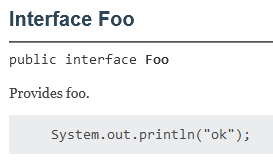
Specifically for snippets, the stripping of indentation changes the actual Javadoc output after GJF formatting.
For example:
/**
Provides foo.

{@snippet :
    System.out.println("ok");
}
*/
public interface Foo {}
results in:
But after formatting with GJF, the source becomes:
/**
 * Provides foo.
 *
 * {@snippet :
 * System.out.println("ok");
 * }
 */
public interface Foo {}
and the Javadoc:
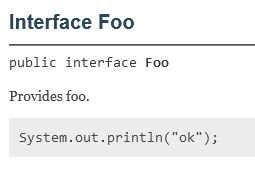
Note that any formatting with GJF above was done with --skip-javadoc-formatting passed as an argument, so it affects neither the addition of leading asterisks, nor the stripping of indentation.
Formatting the snippet example without --skip-javadoc-formatting is even worse:
/**
 * Provides foo.
 *
 * <p>{@snippet : System.out.println("ok"); }
 */
public interface Foo {}
So it breaks the snippet entirely.
As a final example, take the following Javadoc with valid HTML:
/**
Provides foo.

<a href="https://github.com">
    <div>
        <p>Some paragraph.</p>
    </div>
</a>
*/
public interface Foo {}
Formatting with GJF (without --skip-javadoc-formatting) gives:
/**
 * Provides foo.
 *
 * <p><a href="https://github.com"><div>
 *
 * <p>Some paragraph. </div> </a>
 */
public interface Foo {}

@anthonyvdotbe what an excellent set of examples you pulled together, thanks!
I've filed #886 for the problems with {@snippet} and #887 about these novel HTML tags like <section>.
I'm a bit surprised that --skip-javadoc-formatting does as much as all this shown above. I think it should slide the entire rectangle around it to the left or right as needed, but should it really do anything else?
I'm predisposed against any features that control how Javadoc formatting is done when it is enabled. GJF has enough flags as it is, but most of them are limited to just switching entire behaviors on or off, and I think it should stay that way.
