
google-java-format
 google-java-format copied to clipboard
 google
google-java-format Eclipse plugin does not provide AOSP Style option as google-java-format IntelliJ plugin
The google-java-format Eclipse plugin works in Eclipse IDE for Java Developers Version: Oxygen Release (4.7.0) Build id: 20170620-1800
But it does not provide AOSP Style option. Is this intentional design? Most members of my team like AOSP style, while half of them are using Eclipse. Is there a workaround to get over this problem. E.g. can you expose an XML configuration file for AOSP. Thank you!
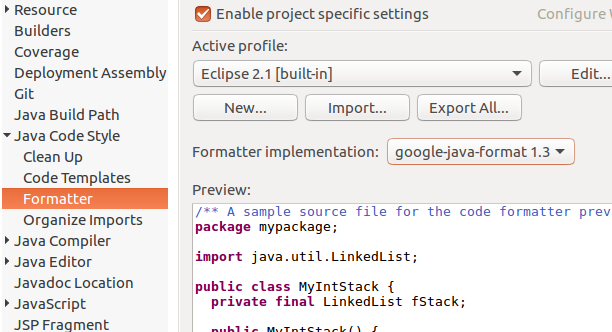


The easiest way is to install a second "Formatter implementation" plugin that provides AOSP style formatting out of the box. Then the user may choose the first or second implementation in the drop-down box shown in your screenshot.

This is the line that creates the Formatter with default options: https://github.com/google/google-java-format/blob/master/core/src/main/java/com/google/googlejavaformat/java/SnippetFormatter.java#L60 Here you could create a Formatter instance using AOSP style.
Thank you! @sormuras About the idea to "install a second "Formatter implementation" plugin that provides AOSP style ". I am wondering if it has the same effect as 'google-java-format IntelliJ plugin'. Because I just fetched a copy of https://github.com/android/platform_development/blob/master/ide/eclipse/android-formatting.xml and configured it in eclipse. Let Eclipse format a class and find the result is not same as that formated by 'google-java-format IntelliJ plugin'.
@sormuras
This is a good idea to add a hot patch. I want to know where I can get the src code of 'google-java-format Eclipse plugin'.
If I need to add a patch I think I should add it to the 'google-java-format Eclipse plugin'.
correct me if I am wrong. Thank you!
AFAIK, there's no (easy) possibility to present custom formatter options for the selected formatter implementation in Eclipse.
The Eclipse plugin contains an entire GJF distro -- using a default Formatter instance with default FormatterOptions.
This is what I'd do:
- Fork the project and copy the
eclipse_pluginfolder toeclipse_plugin_aosp. - Modify the
eclipse_plugin_aospsource to produce a different artifact (jar) theneclipse_plugin. - Enhance the
SnippetFormatterto take aFormatterOptionsinstance. - Use/pass the normal options in
eclipse_pluginand the AOSP style optionseclipse_plugin_aosp
Finally, use https://jitpack.io to build and host your fork with two eclipse plugins.
I've create a PR to address this: https://github.com/google/google-java-format/pull/251

It is weird a solution to this issue doesn't seem to be needed. Looks like nobody is using Eclipse anymore and I'm the only one.
After playing around a little bit with google-java-format, I think for Eclipse users it is still more convenient to use the old eclipse-java-google-style.xml.

I still would like to use the AOSP style with eclipse and I would greatly appreciate any kind of feedback from Google about the PR https://github.com/google/google-java-format/pull/251
The XML files for Eclipse do not behave the same as the actual formatter implementation. I see them more as an approximation of the real thing. I actually think that the XML files should be removed. See https://github.com/google/styleguide/issues/687
