

 google
Order Independent Transparency?
Does Filament support depth sorting of transparent fragments or any order independent handling of transparency?
Is your feature request related to a problem? Please describe. I have a reasonably complex scene in terms of transparency, with up to a few dozen layers of transparent surfaces (separate thin triangle mesh entities, not volumes) at some pixels, including concave self-occluding surfaces, a mix of opaque and transparent renderables/materials, and transparency controlled by a texture map (so that each mesh can have transparent and opaque areas). Depth sorting at object (or even triangle) level is generally not sufficient.
If I get lucky, Filament produces a very nice render. But my luck rate is about 50% and from the users perspective the behavior seems non-deterministic.
Describe the solution you'd like
- Depth sorting of transparent fragments, implemented in the shader, if possible.
- Any order-independent transparency implementation (correctness is more important than speed).
- Triangle-level sorting might be an acceptable poor-men's alternative?
Describe alternatives you've considered Disabling depthCulling or depthWriting "fixes" the trivial two-intersecting-triangles case, but disabling them is not acceptable in the real scene. And the "twoPassesTwoSides" mode is no more effective than the "default". "Fade" blending produces best results when objects are rendered in the correct order.
OS and backend Windows 10, OpenGL, desktop, NVidia GPU.

The best solution we have right now is twoPassesTwoSides and twoPassesOneSide but they won't work in all cases as you mentioned. OIT is something I'd like to add at some point but it's unfortunately not a high priority because it's not needed for our main use cases (and it would be expensive on mobile devices). I imagine that the self occluding surfaces you mention cannot be split into sub-meshes?

Thanks for the quick response @romainguy. Some of the self-occluding objects are cloth meshes with wrinkles and folds. Splitting them into convex pieces is not an attractive proposition, and it's not obvious that doing so would help. We are seeing similar issues with "hair" and "foliage", where there are many layers of curved surfaces with translucent textures painted on them. Results are view dependent, with visible pops in transparency rendering between two nearby view angles. Some views are better than others, but none are 100% correct.
My trivial two-intersecting-transparent-triangles test shows no improvement when each triangle is in a separate mesh/material, which is unsurprising as there is no correct depth ordering of meshes or triangles. In the real scene, almost all meshes are concave, some are both in front and behind (wrap around) other meshes, and intersections between meshes are possible.
Hair and foliage would typically be addressed by using either specialized shaders (for hair, but we don't have that at this point) or by using alpha masking for both.
Right, we are doing fake hair, not a strand-based volumetric approach with glints, self-shadowing, and scattering. We do use both transparent and cut-out (masking) textures, and the results look good when they are alpha-blended in a nearly correct order. I mentioned hair and foliage as an existing example of separate meshes and significant depth complexity, where anything short of per-fragment depth sorting eventually falls short. I'll play a bit with priorities and more fine-tuned depth-writing/culling, in hope of increasing the odds of good renders. But I don't expect that this will solve the problem.
Are you aware of any existing or recently fixed depth related transparency bugs (other than the now disabled depth prepass, and issue #2423)? I ask because sometimes we see results that don't make sense, like opaque fragments not been drawn (at all) behind transparent fragments (at a slight change of the view angle). It's probably not a precision problem (our near-far planes are already pretty tight). Unfortunately, I don't have a simple test case that reproduces this.
I can't think of any change that we made recently that would explain this no, except an issue with depth buffer precision. I believe we still only pick 24 bit even on desktop, you could try to force it to 32F and see if it helps. Can you share screenshots by any chance?
Unfortunately not, unless I can create a simpler test case, without the actual assets. I'll get back to you tomorrow.
Thanks! You may also want to test by disabling various effects (SSAO, shadows, etc.) if you haven't done so already. The issue might not be where we think it is. Are you using screen-space refraction anywhere?
Excuse me, have you solved this problem in the fake hair situation? I had the same problem and wanted to ask for a solution

We recently switched to inverted z depth buffer, and now always select F32 for the depth buffer. If nothing else, the precision should be slightly better. We also use the clip_control extension if present on gl, on other backends it's always used.

I have not tested the inverted z buffer. But with v1.9.4 on Windows 10 and OpenGL, my favorite test:
cd out
samples/Release/material_sandbox.exe -i ../docs/webgl/pillars_2k ../assets/models/cloth/cloth.obj
still exhibits severe depth sorting issues if you change Blending to Transparent, and spin the camera:
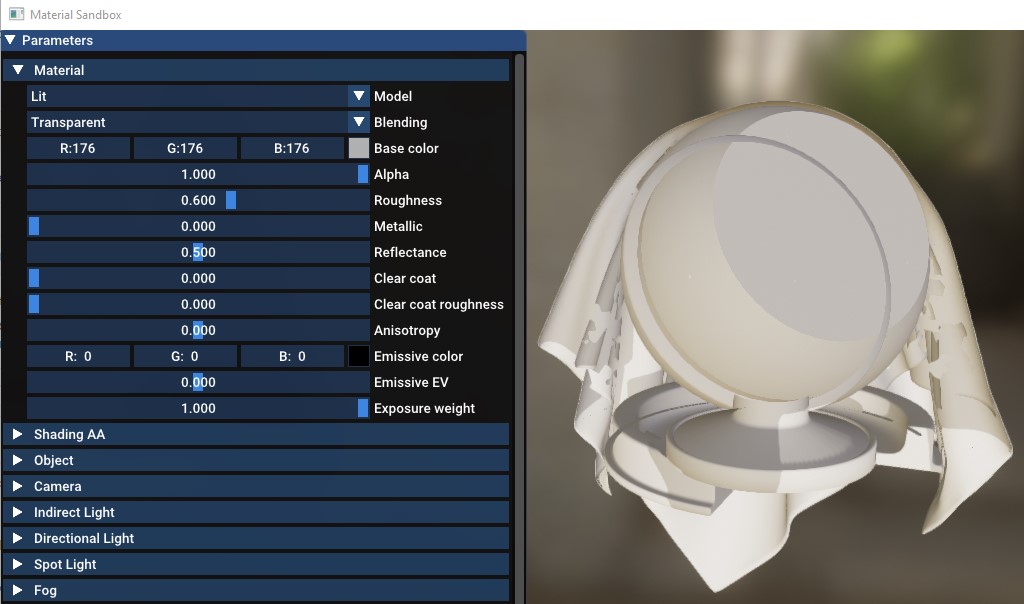
I was not able to reproduce some of the issues I mentioned earlier using simple test models that I can share, but the above Material Sandbox with the cloth.obj model shows similar problems. If someone can fix this demo, perhaps the changes would be instructive for all.
My experiments with preferences, disabling SSAO, MSAA, shadows, etc. were all unsuccessful. The only thing that worked was view-dependent depth sorting of triangles. We had an existing CPU implementation that re-indexes the mesh triangles based on depth from a particular view. If you send this mesh to Filament it looks reasonable as long as the view direction or mesh orientation don't change by more than 90 degrees. Then you have to re-sort and replace the mesh. Needless to say, it is super inefficient and a despicable hack.
Whoever implements OIT or even triangle depth sorting in the shader will be my hero forever. 😉
For this type of mesh we have the two pass transparent modes. They make used of the depth buffer and face culling and draw the object twice. It's definitely not OIT but it's very cheap and can work great with some objects. But those modes won't work when multiple transparent objects are nested or intersect (typical example: CAS visualization).
Yeah, "multiple nested and intersecting transparent models" describes our problem. 😂
The twoPassesTwoSides mode has been our default from day one, but in our tests with more complex transparency it didn't seem to do much better than the default.
A while ago (whatever was the last version that built with VS2017, v1.4.3?) I remember taking the cloth.obj test model to Blender, making the cloth transparent, and exporting it as glTF. The gltf_viewer at the time did significantly better than the material_sandbox, so we've been following its example. Still, as the complexity of transparent models increased, we started seeing problems not unlike the above material_sandbox example. And so the triangle depth pre-processing on the CPU came as a workaround that I would very much like to get rid of.
Apologies for relying so much on anecdotal evidence.
You don't have to convince me :) I know the only correct fix is triangle sorting or OIT. My favorite quote on this topic is: https://twitter.com/levork/status/1263710337846480896 (rendering engineer at Pixar since 1999 😀)
So what incentive works the best for you @romainguy? Chocolate, wine, scotch,...? It could be arranged. 😉