

 google
Code sample followed by heading causes scrolling issue
Hello,
I've noticed a peculiar issue with the theme. If there is a code sample that has a horizontal bar appear on it and it is followed by a heading, the margin on that heading overlaps the element above and causes the horizontal scrolling bar to be dysfunctional.
See the attached image in the issue. You'll notice that the margins created by the heading covers the horizontal bar of the above code sample, causing the horizontal bar to not be clickable and useable.

Thank you!


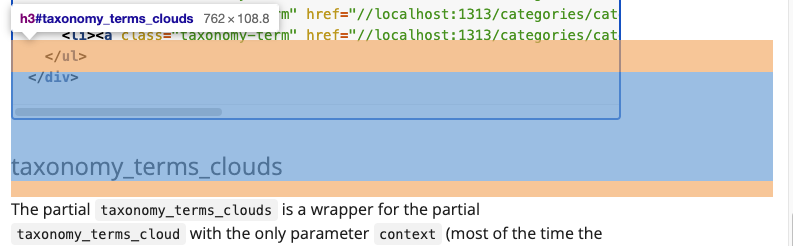
So I can see the overlapping margins but it's not affecting the scrollbar - I can scroll backwards and forwards through the code sample above taxonomy_terms_clouds no problem.
Do you want to try it with the same page? It's in the public Docsy docs at https://www.docsy.dev/docs/adding-content/taxonomy/#taxonomy_terms_clouds, and I'm using Chrome on a Macbook Pro.
It's not only, when there is a scrolling bar before the headline. All h2 - h5 have an empty content before the headline text as offset for the anchor links:
@media (min-width: 768px)
h2[id]:before, h3[id]:before, h4[id]:before, h5[id]:before {
    display: block;
    content: " ";
    margin-top: -5rem;
    height: 5rem;
    visibility: hidden;
}
But this shouldn't effect the functionality of the scrolling bar.

Thanks for the comments! I see in the above taxonomy_terms_could that the scrollbar is working properly above a heading.
Here is a link to a page in our documentation where we see the issue occurring on our end: Doc
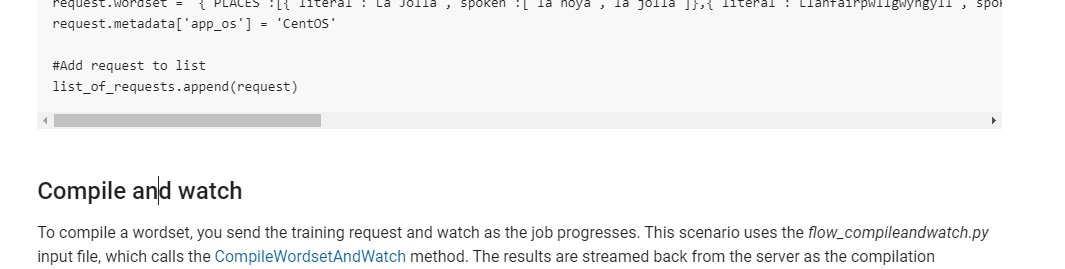
The scrollbar in the code sample above the heading is not functional as described in the original post.
Thanks for taking the time again!
I've tested your link on Safari, Chrome and Firefox on Mac, but the scrollbar above "Compile and watch" work on all three browsers for me.
I'm on Windows, just tried Chrome, Firefox, and Edge. Only Edge was able to move the scrollbar properly.
Updated Chrome to version 105.0.5195.127, now it works.
Firefox is on version 104.0.2 with no updates pending but it still doesn't work.
Unsure what a proper longterm solution to this is as I can't guarantee what browser versions users are running and it compromises a functional user experience.
I should add, it's more the action of physically clicking and dragging the scrollbar if you were to be using a mouse, as opposed to sliding on a trackpad which seems to cause no issue.
I was able to reproduce it on Firefox on Win and should have found a bugfix using z-index. I will test it tomorrow.
Interesting that the issue could be something related to the z-index. Thank you!
It's not really related to the z-index, but hopefully the bug can get fixed with z-index.
To scroll to the correct position when using anchor links the headlines get an vertical intercept by adding an empty content displayed as block before the original headline text by CSS. And it looks like this empty block is above the scoll bar on Windows-Firefox. So I try switch position by using z-index.
Want to bump this again as it is an ongoing issue with no suitable fix yet.
Just checking that this is still happening - the actual Docsy site is using Docsy at head, so if the bug isn't happening in the Docsy site on your browser of choice it will be fixed in the next release.
...and/or it's been fixed in the latest version of Firefox, which we have no control over...
I think once the bug is isolated to a previous version of Firefox we can consider it as obsolete and/or a Firefox bug because users can fix it by upgrading their browser, I don't think it's feasible to assume we can create sites that will work on all browsers including old versions.
Hello! @kimberleybrown is on leave but I can happily confirm that the issue appears to have disappeared. Thanks for your attention!
