

 google
Using Lunr on large site causes section menu/navigation to freeze on page load
We have a large site (over 5000 pages). For our main deployment to our website, we plan on using Algolia for search.
However, for internal use/testing and potentially for offering a local downloadable version of our doc, we also need to use Lunr. I've enabled it in some build environments, and it does work. However, the index file is rather large, at over 10MB. This size seems to be causing a long pause during each page load. The main symptom is that the section menu is not responsive. It cannot be scrolled, and clicking entries does not immediately begin loading a new page. Instead, several seconds pass by before you can navigate or scroll the menu.
My suspicion is that the pause is due to Lunr crunching the search index. There is no pause in the page load when I disable local search.
Is there some way we can either:
- cache the parsed JSON data for the index as a JavaScript object, so after the initial pause while loading the first page, other pages can avoid re-parsing the JSON data?
- prevent the parsing of the JSON data from interfering with the execution of whatever scripts are responsible for making the section menu scrollable and allow for navigation. I think forcing the user to wait a few seconds before they can search is a minor tradeoff, as long as it doesn't interfere with navigation. I looked at the
offline-search.jsfile, and it looks like the AJAX call to load the index file should be asynchronous. I haven't done any profiling to see where else the slowdown could be.

Hi, are you sure that the pause is because of lunr parsing the file, and not caused by donwloading the file? Try checking the download speed of the page (for example, with Lighthouse in Google Chrome), and see what it reports as blocking interaction. If the problem the downloading of the file, then you could check your webserver if it has gzip compression enabled for json files, and also if caching is enabled for the file.

Yes. I confirmed that after the initial load, the search index file is cached, as reported in the FireFox and Chrome web developer tools network panel. Lighthouse indicates that the main thread for each page load takes 14.9 seconds, with 12 of those seconds in script evaluation. When disabling local search, there's less than 1 second of script evaluation.
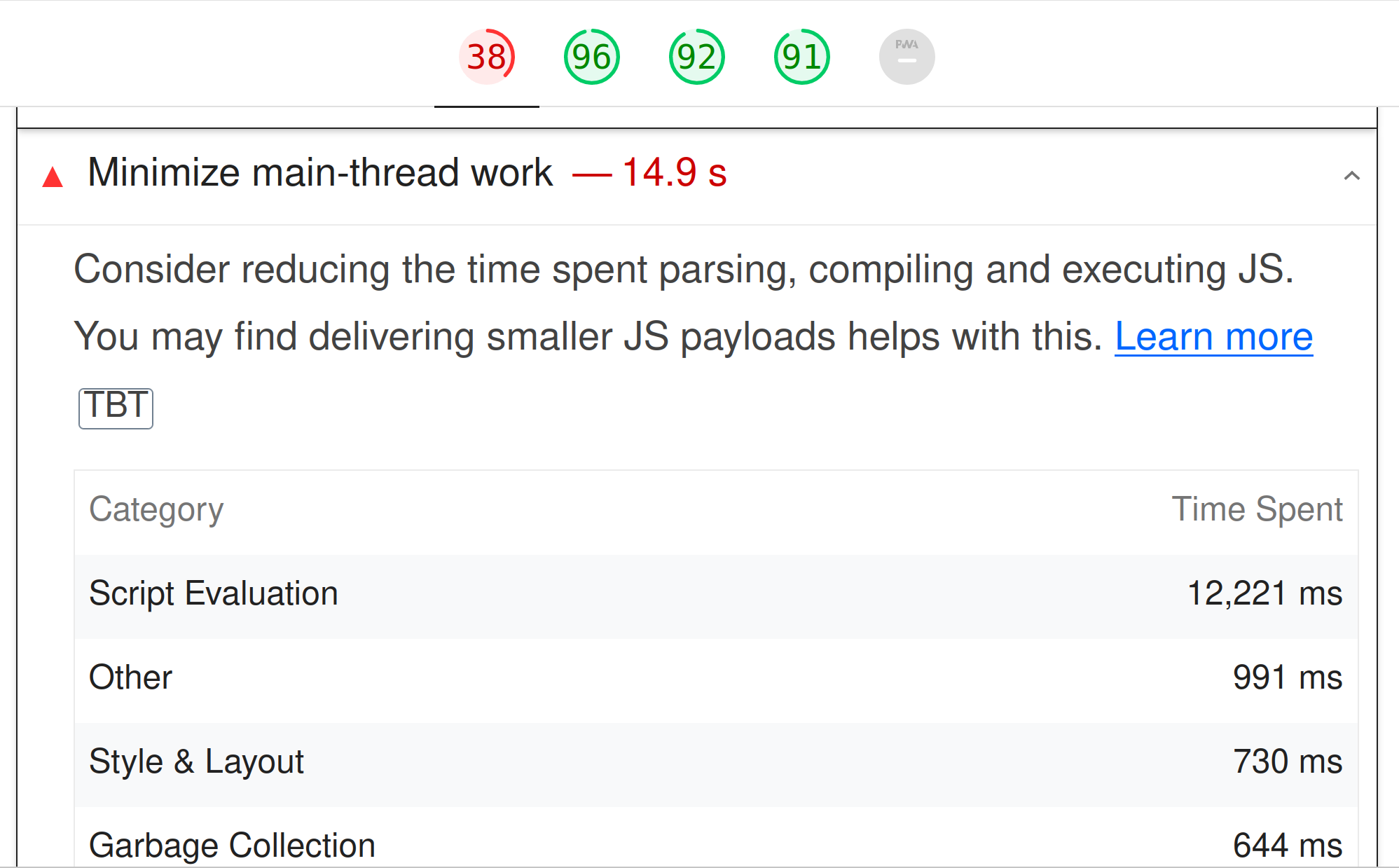

Without knowing much about Javascript (so I might be completely wrong here), it seems to me that the way Docsy is using lunr is that:
- it generates the offline-search-index.json file from the site during build-time, which is just the content of the site in json format
- then themes/docsy/assets/js/offline-search.js loads this file and builds an index from it.
According to the lunr docs, it's possible to pre-build the index file: https://lunrjs.com/guides/index_prebuilding.html, then the themes/docsy/assets/js/offline-search.js could just load the index file instead of building it.
themes/docsy/assets/js/offline-search.js could just load the index file instead of building it.
That's what it is doing now. The index is built when Hugo builds the site. The delay isn't caused by re-indexing. It's caused by parsing and loading the index's JSON data. Because the index is loaded on every page, the browser has to re-parse all 10MB of JSON on each page load. That's what is causing the delay.
I've patched around this a bit by hacking the assets/js/offline-search.js file to not load the index file on every page load. Instead, it loads the file when the user clicks the search box. This means unless you are actually doing a search, you don't encounter the long pause caused by parsing the JSON data. In addition, the script gives the user a busy cursor to indicate it is doing something in the background as it loads the JSON, so they at least have an indication that something is being processed and a visual cue when it has finished.
        //
        // Lunr
        //

        let idx = null; // Lunr index
        const resultDetails = new Map(); // Will hold the data for the search results (titles and summaries)

        // Move ajax call into a .focus event handler, so we don't start loading the index until the user starts typing a search
        // query
        $searchInput.focus(function() {
        // Set up for an Ajax call to request the JSON data file that is created by Hugo's build process
            // See if the index is already loaded.
            if (!$searchInput.attr("indexLoaded")) {
                $searchInput.css("cursor", "progress");
                $.ajax($searchInput.data('offline-search-index-json-src')).then(
                    (data) => {
                        idx = lunr(function () {
                            this.ref('ref');

                            // If you added more searchable fields to the search index, list them here.
                            // Here you can specify searchable fields to the search index - e.g. individual toxonomies for you project
                            // With "boost" you can add weighting for specific (default weighting without boost: 1)
                            this.field('title', { boost: 5 });
                            this.field('categories', { boost: 3 });
                            this.field('tags', { boost: 3 });
                            // this.field('projects', { boost: 3 }); // example for an individual toxonomy called projects
                            this.field('description', { boost: 2 });
                            this.field('body');

                            data.forEach((doc) => {
                                this.add(doc);

                                resultDetails.set(doc.ref, {
                                    title: doc.title,
                                    excerpt: doc.excerpt,
                                });
                            });

                        });
                        $searchInput.css("cursor", "default");
                        $searchInput.attr("indexLoaded", true);
                        // $searchInput.trigger('change');
                    }
                );

            }

         });
After last week's HugoCon, I'm looking at moving to using pagefind instead of Lunr. They solve the large index issue by breaking the index into many smaller files, which avoids the need to transfer and parse a big blob of JSON data.
