

 google
Can't Use Field-Date in Angular Project
Category
- Plugins
Component
- field-date
Describe the bug
- Can't use field-date in Angular Project.
To Reproduce
- Install blockly in Angular project using npm. (using version 8.0.1-beta.0 because of this bug I have.
- Install @blockly/field-date in Angular using npm. (using version 5.0.13)
- Import blockly's main files in angular.json file under the 'scripts' tag.
- Have a .js file containing custom block definitions inside one function that is called inside an Angular Component.
- Define a block inside that file that uses the FieldDate field.
- See error raised.
Expected behavior
. The block is initialized with a working fieldDate field.
Additional context
I have all my blocks defined in a javascript file [DISMECustomBlocks.js] that i include in my Angular Project through the 'import' tag in the angular.json file, where I also include Blockly's main files [blockly_compressed, javascript_compressed, msg/en & blocks_compressed].
Inside that DISMECustomBlocks.js file, I have all the blocks' definitions inside a function 'customBlocks()' that I call from my Angular component.
I don't even do the 'import * as Blockly from 'blockly' on the DISMECustomBlocks.js file, as it raises an error if I do so ["Uncaught SyntaxError: Cannot use import statement outside a module"], but all the other blocks load correctly [I assume it's because I do the import through the 'import' tag in angular.json].
I have also tried to insert the field_date.js inside that 'import' tag in the angular.json file, but when I do so I get the error 'ReferenceError: goog is not defined at field_date.js:12:1' as soon as the page is loaded and then the 'ERROR TypeError: Blockly.FieldDate is not a constructor' when I try to open the category that contains the block with the FieldDate.
The block I'm using the FieldDate on is just a test, so its definition is rather simple:
Blockly.Blocks['test_date'] = {
  init: function() {
    this.appendDummyInput()
      .appendField(new Blockly.FieldLabel(translate.instant('BLOCKLY-BLOCKS.VALIDATION-CONDITION.TITLE'), 'blockTitle'))
      .appendField(new Blockly.FieldDate('2020-02-02'));
    this.setOutput(true,'validation_condition');
    this.setColour(180);
    this.setTooltip('');
    this.setHelpUrl('');
  }
};
Also tried to do the "import FieldDate from '@blockly/field-date';" in my Angular component, pass the FieldDate as an argument to the 'customBlocks()' function, and use that receiving argument in the block definition. In this case, the block renders with the dateField, but when the block is clicked on, the error displayed in the image is obtained.
Blockly.Blocks['test_date'] = {
  init: function() {
    this.appendDummyInput()
      .appendField(new Blockly.FieldLabel(translate.instant('BLOCKLY-BLOCKS.VALIDATION-CONDITION.TITLE'), 'blockTitle'))
      .appendField(new FieldDate('2020-02-02'));

    this.setOutput(true,'validation_condition');
    this.setColour(180);
    this.setTooltip('');
    this.setHelpUrl('');
  }
};
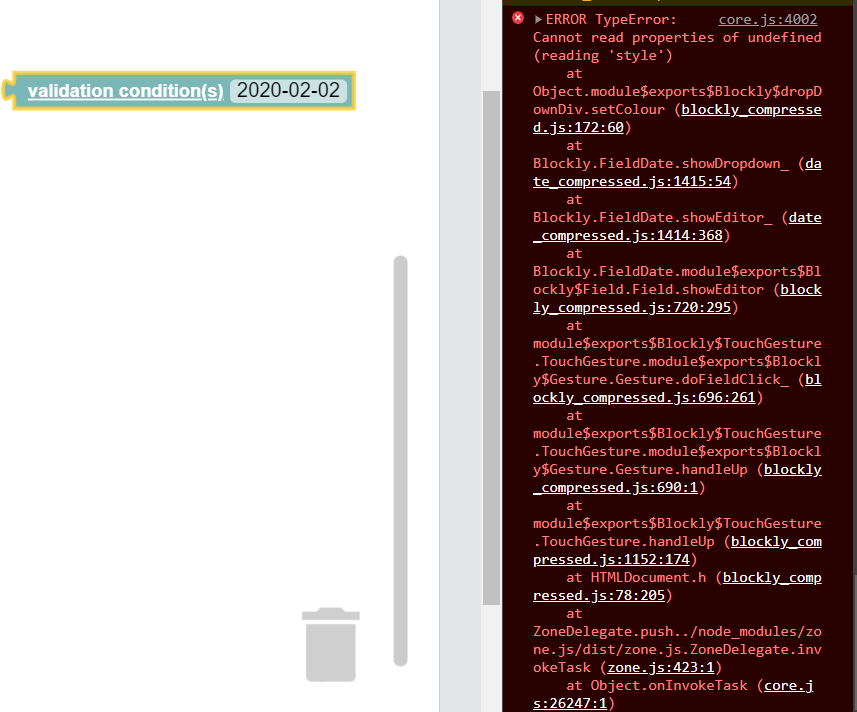

Hello!
I believe what you want to do is first, make your DISMECustomBlocks.js file a module so that you can use import statements within it. Then import Blockly and FieldDate using the following format:
import * as Blockly from 'blockly';
import FieldDate from '@blockly/field-date';

Blockly.Blocks["test_fields_date"] = {
  init: function () {
    this.appendDummyInput()
      .appendField("date: ")
      .appendField(new FieldDate("2020-02-20"), "FIELDNAME");
  }
};
Hopefully that fixes your issue! But if it doesn't, could you post the resulting errors you get?
Best wishes, --Beka

Hello!
I believe what you want to do is first, make your DISMECustomBlocks.js file a module so that you can use import statements within it. Then import
BlocklyandFieldDateusing the following format:import * as Blockly from 'blockly'; import FieldDate from '@blockly/field-date'; Blockly.Blocks["test_fields_date"] = { init: function () { this.appendDummyInput() .appendField("date: ") .appendField(new FieldDate("2020-02-20"), "FIELDNAME"); } };Hopefully that fixes your issue! But if it doesn't, could you post the resulting errors you get?
Best wishes, --Beka
Hey!
Unfortunately it did not fix the issue.
I made my file a module as you suggested and yes, now I can import FieldDate as described! The block renders correctly as it did when I tried doing
"import FieldDate from '@blockly/field-date';" in my Angular component, pass the FieldDate as an argument to the 'customBlocks()' function, and use that receiving argument in the block definition
but the error obtained is also the same when I click on the FieldDate field after having dragged the block to the workpace.
import FieldDate from '@blockly/field-date';

export function customBlocks(blocklyComponent) {
...

Blockly.Blocks['test_date'] = {
        init: function() {
            this.appendDummyInput()
                .appendField(new Blockly.FieldLabel(translate.instant('BLOCKLY-BLOCKS.VALIDATION-CONDITION.TITLE'), 'blockTitle'))
                .appendField(new FieldDate('2020-02-02'));
        }
    };
}
I'm importing it in my Angular component as
import {customBlocks} from 'src/assets/js/blockly/DISMECustomBlocks.js';
By the way, I'm sorry, didn't mean to close the issue, was a misclick!
Thank you for all your help! --Vítor