

 gonzaarcr
Why not just roll the menubar into the hud?
I've had this idea for years now: why not just put the actual menubar in the hud?
The global menu only works when it's actually global and, given the incongruities of UI on Linux, that's simply not in the cards. It was possible on Unity, but these days many apps don't have menubars (and don't benefit from menubars).
Furthermore, an always visible global menubar presents technical problems that seem to be insuperable. First, you have to draw it immediately once an app window comes in focus. Some apps can be slow to export their menus, which leaves you with a bugged global menu. On KDE, I've observerved several cases where the global menu is bugged but rofi-hud still works. Second it can be taxing performance-wise, especially on Gnome. Third, relying to gjs means it will probably break with the next update. Finally, multiple monitors presents a challenge of where to draw the global menu. Gnome to my knowledge doesn't allow you to even draw a panel on a secondary monitor, never mind place a menubar into it.
What if you just draw the menubar inside the pop-up hud, on demand? A "global hud" makes much more sense, especially on gnome. Even gnome apps that don't have menubars can still export a hud (see https://github.com/p-e-w/plotinus, though this will be impossible with gtk 4). The HUD paradigm is much more universal, since it comprises 1) apps with menubars 2) apps without menubars but which can be hacked to export HUD items (plotinus) 3) apps that provide their own HUDs (IDEs and text editors). So here you'd just have to draw a menubar in the hud for category (1) and get a reasonably consistent UX. Virtually every app can have a HUD, making the HUD much more "global" concept than a "global menu".
Also, a hud popup with a menubar can be displayed on the same monitor as the actual window, instead of having the user potentially traverse thousands of pixels to get to the global menu. And you're no longer dependent on gjs.
So why not just put the menubar in the hud? The user hits a shortcut and they can access menu items with both search and point-click. It would be even better if you could say Alt+Click a window and get the HUD+menu popup displayed, but I'm not sure how feasible that is.


The shortcut doesn't matter. I have a HUD that's mapped to just Alt.
What I am saying is put the menubar inside the hud, instead of on the panel.
You mean combine the HUD and the menu? Something like this?
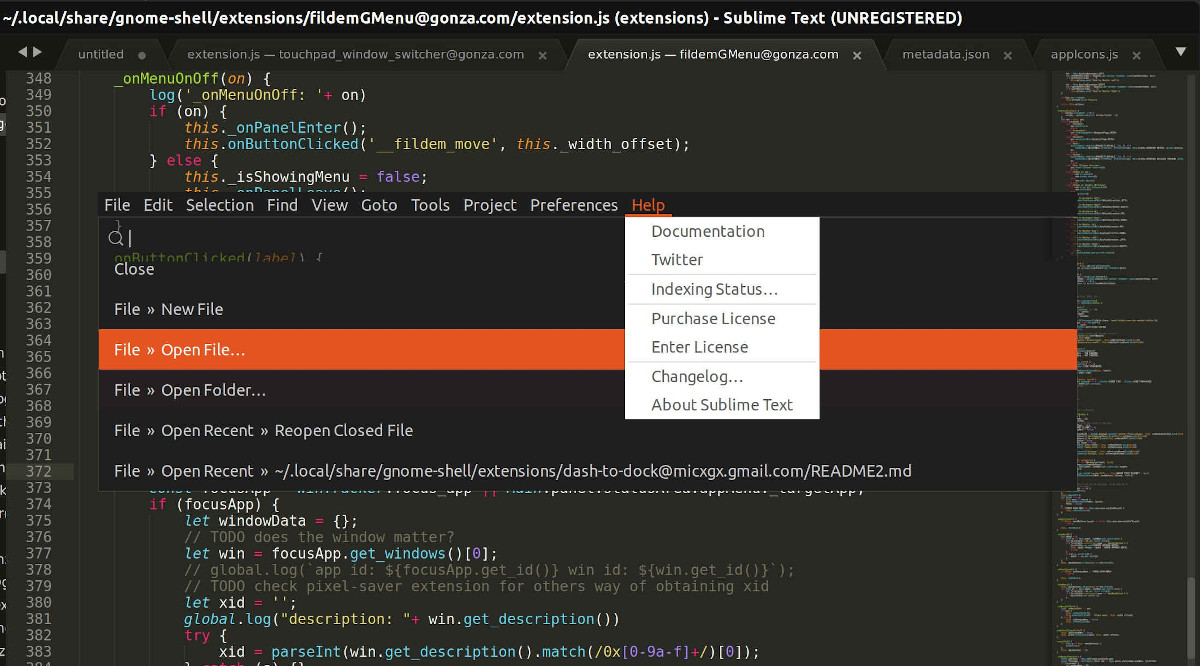
And remove the one on the panel?
Exactly.
This way your HUD can potentially be used on any desktop, not just Gnome.
One could also add a hamburger button to the top panel, which when pressed would open the HUD (for people would rather point and click).
Wow I think this is a great idea, given that in the current state, it is not possible to use alt key to open up the menus. I think this is a very serious drawback of the plugin, that I loose the ability to navigate with my keyboard. This could potentially solve this issue as well.

I’m gonna give this a try. It shouldn’t be that hard, but still I expect unexpected problems.