

 goharbor
Is the user name or password incorrect when the harbor is installed for the first time?
This is my cluster distribution table:
| 角色 | 主机名 | ip | 系统 | 资源最低要求 |
|---|---|---|---|---|
| Harbor1 nginx Keepalived1 |
harbor1 | 192.168.48.106 | OpenEuler22.03LTS | CPU:4核 内存:8G 硬盘:40G |
| Harbor2 nginx Keepalived2 |
harbor2 | 192.168.48.107 | OpenEuler22.03LTS | CPU:4核 内存:8G 硬盘:40G |
| postgresql Redis NFS共享 |
zujian | 192.168.48.108 | OpenEuler22.03LTS | CPU:4核 内存:8G 硬盘:40G |
| Virtual IP Address | 192.168.48.100 |
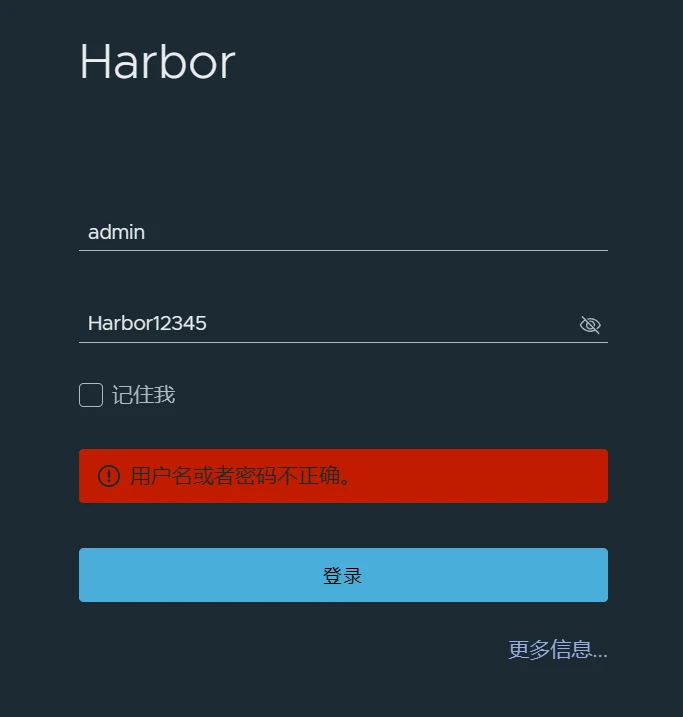
Previously: My redis service, postgresql database service no issues no errors, harbor offline installation
Here is the version information:
redis-7.24 , harbor-offline-installer-v2.9.4 , postgresql-16.2
问题:
The first time I executed harbor's install.sh script to install harbor, harbor could also connect to a postgresql database to create tables, but I couldn't log in to the harbor page. harbor_admin_password: Harbor12345 in the harbor configuration file has not been modified, but it cannot be logged in.
No errors are reported in the harbor log file.

Here is harbor.yml for harbor1
hostname: 192.168.48.106  #harbor1
http:
  port: 8081

#https:       #先注释https协议,后面再实现
 # port: 443
 # certificate: /your/certificate/path
 # private_key: /your/private/key/path

## 启用外部代理,启用后hostname将不再使用
external_url: 192.168.48.100:80

#harbor页面密码
harbor_admin_password: Harbor12345


#配置NFS共享存储
data_volume: /data/harbor_data
_version: 2.9.0
#配置数据库
external_database:
  harbor:
    host: 192.168.48.108  # 数据库主机地址
    port: 5432              # 数据库端口
    db_name: registry    # 数据库名称
    username: postgres        # 连接该数据库的用户名
    password: 123456    # 连接数据库的密码
    ssl_mode: disable
    max_idle_conns: 50
    max_open_conns: 100
  notary_server:
    host: 192.168.48.108
    port: 5432
    db_name: notary_server
    username: postgres
    password: 123456
    ssl_mode: disable
  notary_signer:
    host: 192.168.48.108
    port: 5432
    db_name: notary_signer
    username: postgres
    password: 123456
    ssl_mode: disable
#配置redis
external_redis:
  host: 192.168.48.108:6379 #redis服务IP地址和端口号
  password: 123456   #连接外部redis服务的密码
  registry_db_index: 1
  jobservice_db_index: 2 #job服务的数据库索引
  chartmuseum_db_index: 3  #chartmuseum插件的Redis索引
  trivy_db_index: 5   #Trivy扫描器的数据索引
  idle_timeout_seconds: 30  #超时时间

#启用metrics数据采集插件
metric:
  enabled: false
  port: 9090
  path: /metrics

trivy:
  ignore_unfixed: false
  skip_update: false
  skip_java_db_update: false
  offline_scan: false
  security_check: vuln
  insecure: false
jobservice:
  max_job_workers: 10
  job_loggers:
    - STD_OUTPUT
    - FILE
  logger_sweeper_duration: 1 #days
notification:
  webhook_job_max_retry: 3
  webhook_job_http_client_timeout: 3 #seconds
log:
  level: info
  local:
    rotate_count: 50
    rotate_size: 200M
    location: /var/log/harbor
proxy:
  http_proxy:
  https_proxy:
  no_proxy:
  components:
    - core
    - jobservice
    - trivy
upload_purging:
  enabled: true
  age: 168h
  interval: 24h
  dryrun: false
cache:
  enabled: false
  expire_hours: 24
Here is harbor.yml for harbor2
hostname: 192.168.48.107  #harbor2
http:
  port: 8081

#https:       #先注释https协议,后面再实现
 # port: 443
 # certificate: /your/certificate/path
 # private_key: /your/private/key/path

## 启用外部代理,启用后hostname将不再使用
external_url: 192.168.48.100:80

#harbor页面密码
harbor_admin_password: Harbor12345

#配置NFS共享存储
data_volume: /data/harbor_data
_version: 2.9.0
#配置数据库
external_database:
  harbor:
    host: 192.168.48.108  # 数据库主机地址
    port: 5432              # 数据库端口
    db_name: registry    # 数据库名称
    username: postgres        # 连接该数据库的用户名
    password: 123456    # 连接数据库的密码
    ssl_mode: disable
    max_idle_conns: 2
    max_open_conns: 0
notary_server:
  host: 192.168.48.108
  port: 5432
  db_name: notary_server
  username: postgres
  password: 123456
  ssl_mode: disable
notary_signer:
  host: 192.168.48.108
  port: 5432
  db_name: notary_signer
  username: postgres
  password: 123456
  ssl_mode: disable
#配置redis
external_redis:
  host: 192.168.48.108:6379 #redis服务IP地址和端口号
  password: 123456   #连接外部redis服务的密码
  registry_db_index: 1
  jobservice_db_index: 2 #job服务的数据库索引
  chartmuseum_db_index: 3  #chartmuseum插件的Redis索引
  trivy_db_index: 5   #Trivy扫描器的数据索引
  idle_timeout_seconds: 30  #超时时间

#启用metrics数据采集插件
metric:
  enabled: false
  port: 9090
  path: /metrics

trivy:
  ignore_unfixed: false
  skip_update: false
  skip_java_db_update: false
  offline_scan: false
  security_check: vuln
  insecure: false
jobservice:
  max_job_workers: 10
  job_loggers:
    - STD_OUTPUT
    - FILE
  logger_sweeper_duration: 1 #days
notification:
  webhook_job_max_retry: 3
  webhook_job_http_client_timeout: 3 #seconds
log:
  level: info
  local:
    rotate_count: 50
    rotate_size: 200M
    location: /var/log/harbor
proxy:
  http_proxy:
  https_proxy:
  no_proxy:
  components:
    - core
    - jobservice
    - trivy
upload_purging:
  enabled: true
  age: 168h
  interval: 24h
  dryrun: false
cache:
  enabled: false
  expire_hours: 24


您可能在
data_volume: /data/harbor_dataI do have an NFS shared directory:/data/harbor_data. How do I need to update, shouldn't I update the data every time I restart docker-compose up -d
您可能在
data_volume: /data/harbor_data
、Hello, I don't quite understand what you mean, could you please explain it
已解决,因为配置的外部数据库,pg 数据库需要 sha256 加密协议,则需要配置 ssl 证书,刚刚好我之前部署集群的时候没有安装 ssl 证书,才导致在页面访问的时候进行 admin 登入操作不成功