

 godotengine
Compatibility renderer: lights seem brighter when their shadows are enabled
Tested versions
- Reproducible in: 4.2.0, 4.3.dev5
System information
Godot v4.3.dev5 - Windows 10.0.19045 - GLES3 (Compatibility) - NVIDIA GeForce GTX 1060 6GB (NVIDIA; 31.0.15.3713) - Intel(R) Core(TM) i5-3470 CPU @ 3.20GHz (4 Threads)
Issue description
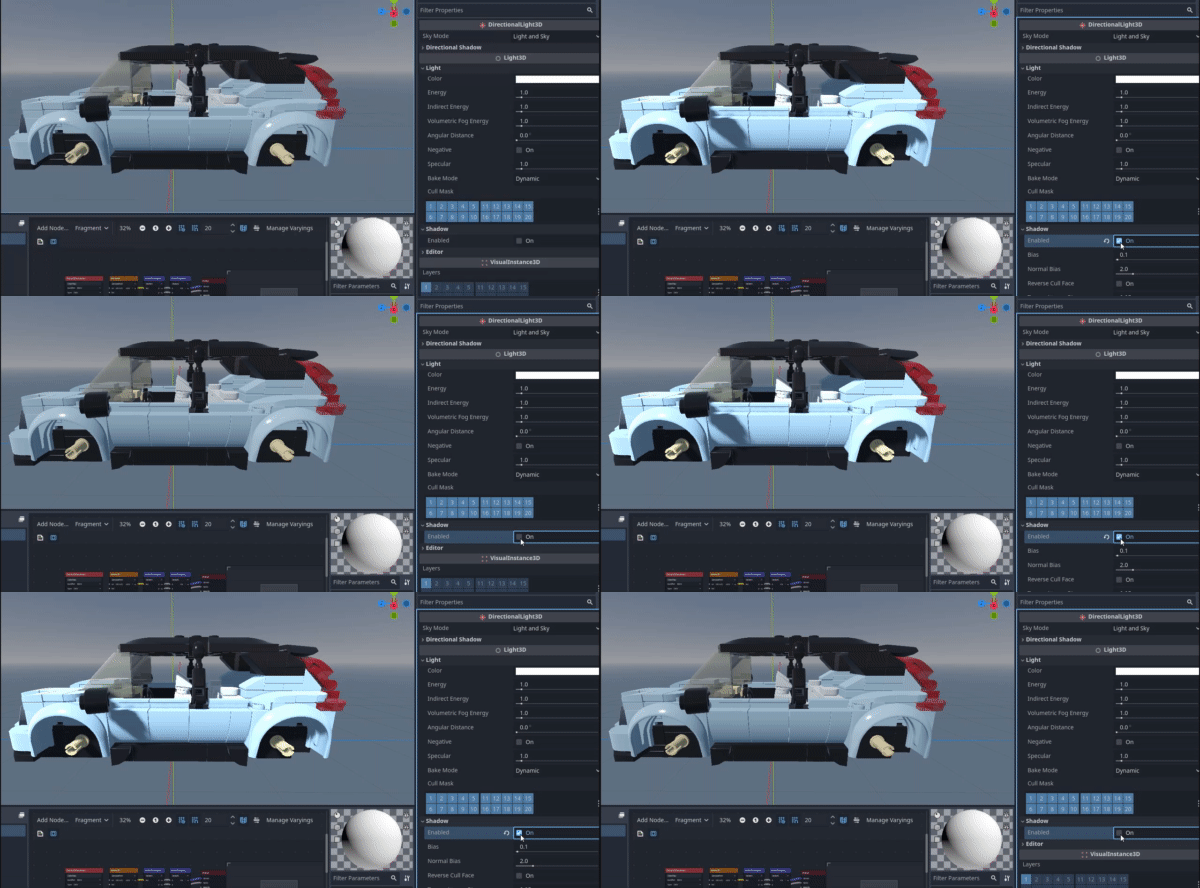
When using the compatibility renderer, enabling shadows on a light will make lit surfaces brighter. This happens for directional (over the whole scene), omni and spotlights.
If the ambient light is made black, the problem goes away. If shadows are disabled for all lights, the problem also goes away. If multiple lights have shadows turned on, the problem is more pronounced than if a single light has shadows turned on. It looks like the ambient light might be applied one extra time for each light with shadows enabled.
This seems to have been introduced when compatibility renderer shadows were first added. Forward plus and mobile renderers are not affected.
Comparison of a scene with a default world environment lit by a single directional light with shadows disabled and enabled:
Steps to reproduce
Run the project with F5. Press 'S' to toggle shadows on the directional light on and off. Observe how surfaces get brighter when shadows are on.
Minimal reproduction project (MRP)

Hello from the maintainer team!
First of all, thank you for taking the time to report an issue here.
In case you haven't already, be sure to attach an MRP (minimal reproduction project) if specific steps or assets are needed in order to reproduce the issue. Contributors will use the MRP to validate that the fix is working as intended.
The time it will take to assess and fix your issue may vary. Follow the blog about our new releases and pre-releases to track new fixes or go to our forum where users could help you in the meantime.
Thank you for your patience.
![github-actions[bot] avatar](https://avatars.githubusercontent.com/in/15368?v=4 "Published by a pub.dev verified publisher")
I think issue come from the way convert linear_to_srgb, in scene.glsl with 1 light which have shadow, for now: frag_color.rgb = linear_to_srgb(emission + ambient_light) + linear_to_srgb(additive_light_color); while i think it should be frag_color.rgb = linear_to_srgb(emission + ambient_light + additive_light_color);
So if i apply this patch which remove 2 times convert linear_to_srgb and only convert for once after all calculate, color will look like vulkan in case we use 1 shadow.
But in case we have more than 1 shadow, engine will run into multiple light pass and blend function still have problem when we try to use srgb.

Running the editor itself as --rendering-method gl_compatibility --rendering-driver opengl3 doesn't seem to actually render accordingly the scene anyway, it's ok not to have compatibility or behaviour fix, but there must be a way to actually see in editor the same as the exported scene (current release and 4.3 dev5 show brighter in editor and duller in run)

Can confirm this is still an issue in Godot v4.3.beta1. It is visible in the editor window, with the default directional light and world environment. When turning off the world environment it looks very similar to the other renderers, however I tested deleting my environment in a larger project and running it and the issue is still present, so its not solely related to the environment. Don't know much about this stuff but I'm wondering if some of the default shaders were ported from the Vulcan renderers and the values are coming out differently?

This makes me wonder if we should add a light energy multiplier that is only used when using the Compatibility rendering method. This would default to 1.0, but you could reduce it to your liking (I've found that I needed 0.25 for most directional lights in the official demos). This would make setting up fallbacks a lot easier, without needing to attach a script to each light that reads node metadata (or something along those lines).
This could also be worth considering for lights that have a projector texture, as you generally want those to have lower energy when the project texture can't be used (otherwise, the light ends up too bright). I believe UE5 has a similar property for projector fallbacks in its lighting system.
This could be coupled with rd and gl_compatibility feature tags to set project settings to different values depending on the rendering method that was chosen at startup.

The 0.25 trick looks pretty good to me. I'm content with having a script on every DirectionalLight3D.

I have a Godot 3 project which I'm trying to port to Godot 4.
In Godot 4.3 with GLES3, I observe the behaviour described in this issue (though I haven't yet determined exactly how much brighter the lights are with shadows on).
With shadows on, the lighting looks much closer to how it does in Godot 3.
In Godot 3.5 with GLES3, the lights' effective brightness doesn't change if I toggle their shadows.
This leads me to believe that, while the light intensity values might inherently work differently between Forward+ and Compatibility, the inconsistency on Compatibility between shadows off vs on is a bug that may need to be addressed separately.

Let me provide some background and an explanation of the current behaviour. Ultimately the fact that shadowed lights look different than non-shadowed lights is not a bug, while it may be awkward behaviour, it is intentional. In my opinion it is the lesser of two evils.
Godot 3
In Godot 3 we had two renderers, GLES3 and GLES2. GLES3 is equivalent to our current Mobile backend while GLES2 is equivalent to our Compatibility backend.
One notable difference is that lighting in GLES2 happens in sRGB space while the GLES3 renderer uses linear space. Linear space is correct, and is required for lights to look natural. We went with sRGB with GLES2 to ensure compatibility with old devices. We had a lot of pain with GLES3 on older devices because of our choice to use proper linear lighting.
Ultimately, the choice wasn't about lighting, the choice was about how we store the image. You either need to store the image in an sRGB texture, or a plain texture. An sRGB texture is one that can take a linear image, store it in sRGB and then return a linear result when the texture is read. This is a function built in to GPUs that is not well supported on older devices. Because the GLES2 renderer does multipass lighting, the lighting ended dup being in sRGB space.
Godot 4
When creating the compatibility renderer in Godot 4 we wanted to calculate lights in linear space so they would match the other renderers, but we needed to use multipass lighting for shadowed lights for performance reasons. AND we needed to avoid using sRGB textures because they aren't well supported on old devices. So, as a compromise, we decided that non-shadowed lights would be single pass and could be calculated in linear space while shadowed lights would have to use sRGB space since they were multipass.
We anticipated that this inconsistency would be annoying since it would be very noticeable when enabling shadows. But our hope was that people would get used to this quirk and design their lights around it or use the Mobile renderer. After all, on low end devices you can't have more than a couple shadowed lights before performance starts to suffer.
There is only one solution to making shadowed and unshadowed lights look the same, and that is to make unshadowed lights use sRGB space. Which would make all lights look like they did in GLES2 in Godot 3. And would make the Compatibility renderer look totally different from the other renderers.
Personally, I think having shadowed lights look different is an acceptable tradeoff. Therefore I think the solution is to document this behaviour better and make sure users understand this trade off when choosing the compatibility renderer.

@clayjohn Thank you, that makes it clear that the discrepancy between Godot 3 GLES3 and Godot 4 Compatibility is more intentional than the discrepancy between Godot 4 Forward+ and Godot 4 Compatibility. I'm curious, since both Godot 3 GLES3 and Godot 4 unshadowed lights use linear space, is the (substantial) difference in light intensity down to some unrelated choices in how it's calculated?
On the practical side, is there some kind of light energy multiplier or another numerical correction that could be automatically applied to shadowed lights in Compatibility, and potentially further fine-tuned by the user, sort of like @Calinou mentioned?
Also out of curiosity, if it's not too off-topic, do you happen to remember / know where I could look it up, what kinds of old GPUs had issues with sRGB textures in GLES3? My main concern that's making me lean towards Compatibility instead of Forward+ for my PC game is that by requiring Vulkan support I may be cutting off slightly older desktop GPUs (e.g. Radeon HD 7000 series and Rx 200/300 series on Linux without custom kernel args, GeForce 500 series) that may otherwise still be able to run the game somewhat comfortably.
Hello all. I've been looking into this again after 4.4 which enables automatic roll-back to the compatibility renderer if Vulkan is unsupported. I'm pretty sure I've determined the issue. I will be attempting to fix it, if I succeed I will create a pull request.
The issue appears to be that ambient light is added over again for every light with shadows enabled, not to do with colour space conversions.
I can confirm that the effect I have seen seems dependent also on number of lights so @MichaelDawe I think you are on a good track in my opinion. Thank you for pinning it down hope you get to find the source of the problem
I have determined the cause of the issue! It is caused by ambient light, emissive light, or other lights that don't cast shadows.
Both ambient light and emissive light are added in the first pass, along with lights that don't cast shadows. The second pass (used for lights with shadows) multiplies the lighting with "albedo" which is the result of the first pass, not the actual albedo of the materiel, (i.e. texture * vertex colours * albedo(the setting in material options), etc.).
EDIT: I think I was wrong about these values coming from the albedo variable, I was able to output just albedo from the lighting pass and it didn't look like it contained the output from the previous lighting pass. I'm not sure where they are coming from though as I can't find any reference to ambient or emissive in the lighting calculations used in the additive lighting section of the shader, I am wondering if I was wrong all along and it is to do with colour space conversions as previously said. Sorry if I've just made this more confusing. However as a suggestion for people making games, you can get a long way just by disabling ambient light in scenes that don't need it.
It's getting late here, and the solution is looking fairly complicated - I'm not very familiar with shaders or C++, I'll keep digging into it in my free time but maybe this can help someone who knows more about it find a solution.
My current proposal is to calculate only lighting in the first pass, add the results of the second pass to it, and multiply the result of both passes with albedo at the end of the second pass. This would require a uniform/define (e.g. MATERIAL_HAS_SECOND_PASS) that tells the first pass whether or not a second pass is going to be applied (it is only applied if the object is in range of a light which casts shadows).
In my opinion this is clearly a bug, and with the recent change to automatically fall back to the compatibility renderer on systems which don't support Vulkan (a change I greatly appreciate btw) I think this is more of a priority.
Would anyone be able to point me towards the C++ code which set the uniforms etc. for the shader? Thanks :)
@MichaelDawe https://github1s.com/godotengine/godot/blob/master/drivers/gles3/rasterizer_scene_gles3.cpp#L1295-L1338 Here there is some code handling data for lights (it's the light data tho not the uniforms themselves)
@MichaelDawe The results of the first pass are not available in the shader at all when doing subsequent passes. Things like ALBEDO are recalculated from scratch since they are needed to calculate the light contribution of the second light. Accordingly, if you think that extra light is sneaking in somehow, you should probably focus your attention on things like the ambient lighting getting added in again or emission.
That being said, from a quick look, all ambient calculations and emission are inside ifdef BASE_PASS blocks which means they are only included in the first pass as they should be
Yes, my initial conclusion was incorrect, after outputting just albedo from the additive lighting passes I was able to see it looked as expected.
I'll look at the shaders again tomorrow.
The effects of overlapping with ambient, emissive, or shadowless lights is confirmed via the following tests which can be performed in-editor, as well as some tests with changing the shader outputs.
Test for ambient (on a non-emissive material with no shadowless lights affecting it):
-
With ambient disabled or set to black, shadowed light looks correct i.e. the same as shadowless and the same as other rendering backends. Importantly, adding more shadowed lights overlapping each other is still correct, this leads me to think that colour space conversions are not the issue as they are applied to the shadowed lights between passes, however I'm not certain.
-
With ambient set to a solid colour the shadowed lights become overly bright in just the ambient channel (most visible when it is somewhat dim (~0.3 is good) because if it's 1 the output is clipped and the effect becomes undetectable). This can be seen by eye but also confirmed by post-processing that removes the ambient channel altogether, in which case the result is the same whether shadows are enabled or not.
Test for emissive: The same as for ambient, with ambient disabled and emissive enabled. Results the same as ambient.
Test for overlapping shadowless lights: Same again.
It's possible that other things can affect it too, such as rim lighting, though I haven't got any conclusive evidence yet. It also appears that specular is working correctly though again I'm not certain.
@MichaelDawe don't forget that the total brightness impacts how "off" things look. Two bright lights will blend poorly compared to two dim lights. Similarly two dim lights will blend poorly when there is ambient lighting compared to if there is no ambient lighting.
You should test again with ambient light disabled but with two brighter shadowed lights.
@MichaelDawe don't forget that the total brightness impacts how "off" things look. Two bright lights will blend poorly compared to two dim lights. Similarly two dim lights will blend poorly when there is ambient lighting compared to if there is no ambient lighting.
You should test again with ambient light disabled but with two brighter shadowed lights.
You're right, thanks :) I wonder if it is an issue with clipped values. I can't remember where I read this but I believe the compatibility renderer doesn't support HDR while the others do. I think that might be an OpenGL limitation, in which case it'll be harder to fix.
Here is a very jarring example of what I believe might be the same issue described in this post. I initially thought this was a problem related to tone mapping. Very confusing.
Hello all. I've been looking into this again after 4.4 which enables automatic roll-back to the compatibility renderer if Vulkan is unsupported. I'm pretty sure I've determined the issue. I will be attempting to fix it, if I succeed I will create a pull request. The issue appears to be that ambient light is added over again for every light with shadows enabled, not to do with colour space conversions.
~~This appears very likely, since when I turn down the Energy Multiplier of the Background to 0 it behaves like one would expect.~~ Okay, you folks seem to know more about the issue than what's described in the specific quote, good to know it's being investigated 🙏

Lights seem to combine with Ambient Light, you can see it when shadows are disabled and you are very slowly increasing ambient light, as soon as you turn on shadows they stop this behavior and stay locked at their base value as if ambient light is set to 0.
Ambient Energy 0
Ambient Energy 16
Edit: If shadow is enabled the middle of the light is combining but the outer is not. If shadow is off only the outer is combining.
Edit: Without DirectionalLight3D Shadow
Ambient Energy 0
Ambient Energy 16
And Without DirectionalLight3D itself
Ambient Energy 0
Ambient Energy 16
