
godot
 godot copied to clipboard
 godotengine
Tilemap with ysort enabled doesn't work together with regular sprite and ysort as parent
Godot version
v3.5.1.stable.mono.official [6fed1ffa3]
System information
macOS Monterey 12.5.1 (21G83)
Issue description
With a scene hierarchy like this where the TileMap has ysort enabled.
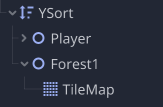
The player-node's sprite does not correctly sort based on the y-position with the sprite from the TileMap. If the player is instead made a child of the TileMap the y-sorting works correctly. Having to make separate sprites a child of a TileMap heavily inconviences the setup of scene especially if multiple TileMaps are used and need to sort correctly with each and other regular Sprites.
Steps to reproduce
- Create the above hierarchy
- YSort -- Sprite -- TileMap (with ysort enabled)
- Start game
- Move Sprite and observe it's not correctly sorting with the sprites of the TileMap
Minimal reproduction project
N/A


You need to enable ysort in TileMap layers too.
"TileMap layers"? Where can I find that? Tilemap itself has ysort enabled as I described above.
This remains a bug in 4 beta 7, at least in so far as scenes instantiated by the tilemap do not y-sort correctly with nodes unless those nodes are children of the tilemap. This is after turning y sort on everywhere it "should" be, including the root "World" node below, the tilemap, tilemap layer in question and the bush scene itself. (just covering all my bases)
Does not sort correctly:
World
 * Tilemap
   * @Bush1 <- Generated by tilemap Scene collection
 * Player
 * Objects
   * Bush
This makes it impossible to sort objects from two separate tilemaps together.

Actually, it may be fixed in b7. My Minimum project works correctly. My main project has required me to set my z ordering very wrong to what I expected, but now also works correctly. After reviewing my z settings I think b7 has this fixed.
I've uploaded a minimum project in 4b7 to prove this is no longer a bug.
The upside down logo is the "Normal" node, the top left and bottom right logo are on the tilemap, and instanced via the tilemap.
Potential note: I'm on gdscript, not mono.
SOLVED: In my case, it wasn't a bug, it was just fixing the sprite pivot on my character scene.
BTW, I'm having some issues with y-sorting as well.
v4.0.2.stable.mono.official [7a0977ce2]
Maybe some code sample. I'm trying to figure out if the issue is on my configuration or if it is really some bug. Anyway, here is the PR:
https://github.com/rluders/godot-simple-rpg/pull/15
In the project is possible to observe two separate usage:
- 1st - I'm using the scenes as tiles
- 2nd - I'm using the tilemap + scenes grouped by nodes2d

My scene tree currently looks like
* World
** Areas
*** Forest
**** TileMap
***** SceneCollection Sources
*** [More Areas]

** Player
The TileMap Layers are:
- Ground (Z-Index: 0, No Y-Sort)
- Breakables (Z-Index: 1, Y-Sort enabled)
- Environment Bottom (Z-Index: 0, No Y-Sort)
- Environment Middle (Z-Index: 1, Y-Sort enabled)
- Environment Top (Z-Index: 2, Y-Sort enabled)
The TileMap has Y-Sort enabled as well.
Y-Sort between Scene Collection Sources and normal Tiles seems to work. But the Player, Y-Sort enabled or not, doesn't sort into the TileMap nor the Scene Collection Sources.
Edit: I'm working around this right now by reparenting the Player to the current Area's TileMap. That first caused some hiccups because I have body_entered triggers to adjust the camera on Area enter and that triggered "twice" (read: infinitely) now. Checking whether the last entered area is the current area and stopping the trigger fixed that. I'm explaining that just to add some use-case context to the problem :)
