

 godotengine
TextureAtlas Mesh2D import fix
Fixes Importing of TextureAtlas in Mesh2D mode, adding settings for the generation of the triangulation which was not optimal, using the same options as used in Sprite2D editor
There is still a problem with gaps in the texture (see #68350) and if I find a way to solve that I will add that here but otherwise I will leave that for someone else I currently cannot see a solution.
Fixes #68350

Still seeing some issues so will test further before this is fully resolved
The bug is solved with a grow of 2 for the cases tested on
With that setting the MRP generates no degenerate polygons any longer
There could very well be some inherent bug in the BitMap code but as far as I can tell the current setup solves the bug
Edit: Sorry misread your initial comment about it being a good idea
With an alpha threshold of 0.0 grow is not needed, I'll change to using that while keeping the settings
But agreed there's absolutely something odd going on in BitMap, taking a deeper look
Edit: #31675 a direction for solutions I suspect
I have identified some errors in the marching squares behavior, and I have some ides for solutions, will investigate and open a separate PR for this issue
I have identified some errors in the marching squares behavior, and I have some ides for solutions, will investigate and open a separate PR for this issue
Hi. Is there a separate PR open?

Not yet, I think I'm getting close to a solution though and will see about implementing it soon
Great! Thank you so much.
So, I should merge this PR and #68732 to test it out?
Go ahead, note that I have yet to solve the gaps problem, will take that on when the BitMap stuff is done
Now that that is merged I'll get back to the triangle drawing soon hopefully
@LakshayaG73 not that I know of, I'm aiming to solve it as part of this PR but I haven't had time to look at it lately or right now, hopefully soon
Added a new triangle raster code, still tweaking with it and will see how it turns out, this method is probably less efficient than the original, but it works (as far as I can tell) with this input, no gaps, will experiment with one closer to the original that works over a smaller area, but I don't think this method is any problem from a performance perspective.
@LakshayaG73 it should work now for the drawing, check if you can see any errors with your work
What valalues should I use here?
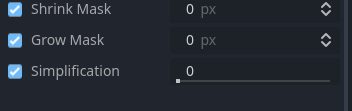
What is the purpose of those parameters?
As an end user, I prefer to have a working atlastexture. That's pretty much it. If tweaking that is going to give me a better result, I'd rather just stick to Region2D's instead of Meshes.
I tested this and running into a weird issue.
The frames are showing up properly in the spriteframes inspector, but when I try to play the same animation there are gaps where the sprite dissapears.
For the specific parameters you should just see what works for you, as with anything, the grow mask should be combined with the simplification as the simplification can otherwise clip into the visible area
I thought the issue for you was the loss of the space improvements with the mesh, but what ever works best with your workflow, there's really no difference between doing this and the way it was before other than you now have more control over the way it generates the meshes, it depends on the scale of the mesh and the details of your images. The setting of zero for all parameters results in a mesh that isn't clipped at all, but one that is possibly more complex than needed.
I fail to see your issue here with having to tweak with settings, if the default settings works then use them?
I can not replicate your gaps in the playing animation in your MRP, have you reimported the textures and reloaded the scene?
I am grossly unaware of what these settings do. My understanding was that only certain settings will enable me to use Mesh2D's for atlas textures, and if that is the case, finding the right settings will be cumbersome.
I also saw that these options were added to the .import file for all added group files, not sure if that is the plan.
I added new textures, created a new atlastexture, and created a new animation from the same. In the editor itself, you could see a frame erroring out. Let me try this again in a fresh project with your latest changes.
It is not the case that specific settings are required to make it work, that was mentioned as an issue above with the initial solution before the bugs with the polygon generation were fixed!
All settings are added like that, but good that you pointed out, could be looked into separately.
If the error persists please upload a MRP here that has the bug so I can investigate.
Hello! This does seem to fix it for the MRP provided.
If you could update this, I would love to try with the latest master?
It'd be best if you rebased it yourself, haven't worked on this lately and will come back to it when I've solved some other stuff and don't want to needlessly update the CI
Unless there are any conflicts, haven't checked
Can split off the new settings to a separate PR if desired, have split off a commit for convenience but won't push unless other relevant changes are made
Removed the new options and will possibly add them in a feature improvement PR, but keeping it simple for now
No worries! Been in my backlog and happy to see it merged!
My second to last 2022 PR, and the one remaining one will take some time but maybe some time in 4.2 lol
