

 godotengine
Add Code Block Guidelines to Script Editor & CodeEdit
Resurrects https://github.com/godotengine/godot/pull/20725, and https://github.com/godotengine/godot/pull/38833 somewhat.
In this PR, it's possible to enable code block guidelines in CodeEdit, appearing between the start and end of a foldable code block. The line is appropriately indented.

Multiples guidelines may stack on top of each other, within reason, and prefer to connect to a bottom parenthesis. The colour of the guideline becomes slightly more noticeable when the caret is inside the code block:
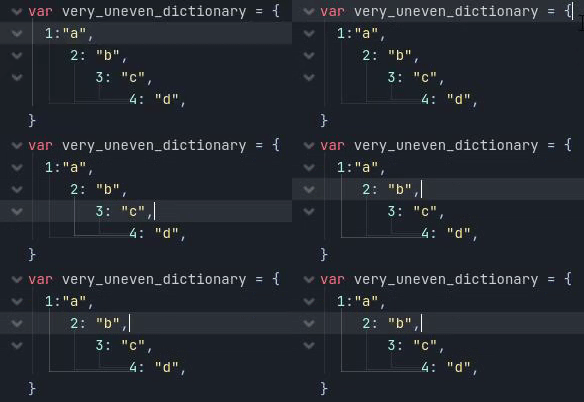
This is turned off by default. Its colors can be customised in the Editor Settings (good luck doing that without making master crash).
| Draw Tabs | Codeblock Guidelines |
|---|---|
 |
 |
Feedback is absolutely welcome.
Optional Todos(?)/Notes:
- Improve the way the caret is detected inside a code block. May require fetching all code blocks first, then drawing all line guides later. Currently, it is way too flashy, at least to my tastes. It may be worth removing this part outright.
- There's a desynchronisation issue when adding or removing lines at the end of the Script. This may likely not be addressed here. Rather, it seems like the v_scroll offset value is not updated properly.
- When this setting is enabled, possibly have "stray" leading tabs and spaces drawn regardless of their settings (uneven or not belonging in any code block?).
- Any issue with the folding detection being somewhat weird is not my doing, it's just the same function as it was before this PR. It can be improved upon another time.

This is turned off by default. Its colors can be customised in the Editor Settings (good luck doing that without making master crash).
I'd prefer this to be enabled by default, as it matches how other text editors look by default more closely.

I'd prefer this to be enabled by default, as it matches how other text editors look by default more closely.
I wanted to avoid alienating existing Godot users but if people love this a lot I have no problem turning this on by default!
How do the branches in the tree-like structure look when there's lots of nesting or when the editor is zoomed out?

Anyway, we have an editor setting to display spaces as little points, off by default. A setting to display tabs, right next to that setting, would be super fitting. I don't think it should be a toggle between displaying tabs or displaying this tree-like thingy, some might want both, after all tabs are valid whitespaces too.
How do the branches in the tree-like structure look when there's lots of nesting or when the editor is zoomed out?

Anyway, we have an editor setting to display spaces as little points, off by default. A setting to display tabs, right next to that setting, would be super fitting. I don't think it should be a toggle between displaying tabs or displaying this tree-like thingy, some might want both, after all tabs are valid whitespaces too.
The setting is available right here the Editor Settings, independent from tabs and spaces.
 Both can be enabled just f- Oh my God, the tab icon doesn't scale.

Major sidenote: While this is heavily inspired by https://github.com/godotengine/godot/pull/20725 and https://github.com/godotengine/godot/pull/38833, it's not the same, although in practice it accomplishes the same thing, just with more "finesse".
Those PRs were aiming to do what Visual Studio Code does, for example. Those implementations suit more when "open and close" brackets are involved, because the indent line would directly connect between the top and bottom brackets.

I mean like the uneven dictionary example, if there are 6+ of these little branches and the text is zoomed out, wouldn't they slip out on top?
There's an hard cap, at which point they just start stacking on top of one another (this should be proportional to the font size but it currently isn't yet, so technically yes, they do slip up right now at a small size)
Thanks for picking this feature again, it's a great one to have. Personal preference notes:
- I don't like how the vertical line starts in the middle of the first character. It should align to the start/left of the first character as that is where the block starts, not in the middle of it.
- this also causes the line to overlap the tab/space character when the visibility of them is switched on. If they were aligned to the left this would not happen (and would imo look cleaner)
- I personally am not a fan of the horizontal lines that indicate the closing of a block (looks like that's what they do?). Anyway, to me it clutters the visuals and is not necessary.

With these preferences, it sounds like you'd much love if that is how indents were symbolised (like https://github.com/godotengine/godot/pull/65757#issuecomment-1246593169), instead. I like the way the PR currently looks, minus minor tweaks, and one could argue it's a matter of getting used to, but I will keep this in mind. Perhaps theme overrides could be used for the minor adjustments.

@MewPurPur
I mean like the uneven dictionary example, if there are 6+ of these little branches and the text is zoomed out, wouldn't they slip out on top?
This is the worst case scenario now:

Not a fan of the horizontal lines. Could turn it into an
enumif there is a want for both styles.
I find it pretty nice. Godot doesn't have your classic closing brackets at the end of a block, which makes it a bit difficult to discern, were it not for the change of indentation. It could also be a matter of getting used to, but unfortunately you're not the only one expressing this opinion. A shame. Without it, and all of the detection required to figure out a code block, this PR would be little to no different than making all indents look like semi-transparent columns (like the "ancestor PRs", and Visual Studio Code do).
I could make it an enum. Perhaps, in the future, more styles could be added if requested (e.g. Visual Studio uses dashed lines).
This will not work if
foldingis disabled, whereas it should be independent of that setting, we can pull out the code into private methods if needs be.
This is true. This would require having CodeEdit detect code blocks beforehand and caching them, which could go hand-to-hand with the change required here https://github.com/godotengine/godot/pull/65757#discussion_r974171928.
Solved the majority of the requested changes so far. Here's a bonus image to further show the behavior. Any user reading this, it would be nice to get feedback from a visual standpoint.

Done the drawing optimisation. All that is missing is https://github.com/godotengine/godot/pull/65757#pullrequestreview-1112116327 which, for the gutters thing, may possibly prove tricky and admittedly janky.
EDIT: ~Requesting review for the method splitting, while working on an enum.~
The property is now an enum, and it has a new style that removes the closing horizontal line as @Paulb23 and @EricEzaM would prefer.

Might be worth seeing if there are other places to optimise, otherwise looks like it will require some form of caching.
I don't think there is much else to optimise. The issue right now is that the code blocks themselves are re-calculated every draw call. So maybe this feature may have to wait until CodeEdit can actually detect and store code blocks on its own (and not just code folding)?
Can we just modify the indent guidelines to use vertical lines instead of chevrons and not have the horizontal lines drawn? This should be much faster while suiting most use cases.
The horizontal lines can be left for a future PR as they're not essential.
@Calinou If I were to implement that in another PR, for the time being, should it be based on the indent amount (so that both spaces and tabulations will display them) or should it be outright replacing the tabulation symbol?
@Calinou If I were to implement that in another PR, for the time being, should it be based on the indent amount (so that both spaces and tabulations will display them) or should it be outright replacing the tabulation symbol?
I think it should be based on the indent amount, so that trailing whitespace does not show indent guides. This will also make indentation look the same when using spaces for indentation, which matches the behavior in most other editors. (We could display invisible characters when selected to make troubleshooting easier, like in VS Code.)


The PR is pretty old so it would be better be done from scratch. It's also not really performant. These are both because there was no existing methods to accomplish this PR, and little to no caching in between. Both of these may no longer be a problem now (?)