

 godotengine
Polygon2D texture "leaking"
Godot version: 3.2.dev.custom_build Commit: d111d59
This bug is also occuring in the Godot 3.1 stable version.
OS/device including version:
Windows 10
Issue description:
I don't know how else I can describe this issue besides "texture leaking". I hope someone has better description / title for this problem.
Any way as you see in this image below at the red arrows there is kind of a line of white pixels leaking towards a Polygon2D points.

At first I thought it was because my strange Polygon2D shape, but I tried with a simple Polygon2D shape and it's still behaving like that:

But even the default Godot square shaped sprite is leaking texture towards the Polygon2D points... even more actually than expected, so it's not my image fault either...

It's strange because in new project with simple sprites it works fine, but when I use complex shaped texture, the Polygon2D node seems to get bugged for the whole project?
Steps to reproduce:
- Create a Polygon around the odd shaped sprite like the pink hand.
- Sometimes it gets bugged.. sometimes no bug at all.
Minimal reproduction project:


@volzhs
Thank you, I now understand the problem a bit more.
I decreased the size of the white-border of pink hand in Affinity Designer, I get more "texture leaks". So then I deleted the white-borders completely, I had no more leaks. But then I increase the size of the white-border thick enough there are no more texture leaks.
So it looks like when the border is too small/thin, the texture gets leaked? Because changing opacity/transparent itself did not solve the problem for me.
I guess it's still a bug? Or is this expected behavior? Because I think leaking texture isn't good behavior.
Here a better showcase of the border issue...
Only the most left and most right arm are leaking texture lines. While middle-hand is doing fine. It seems like the border of the image is affecting it:
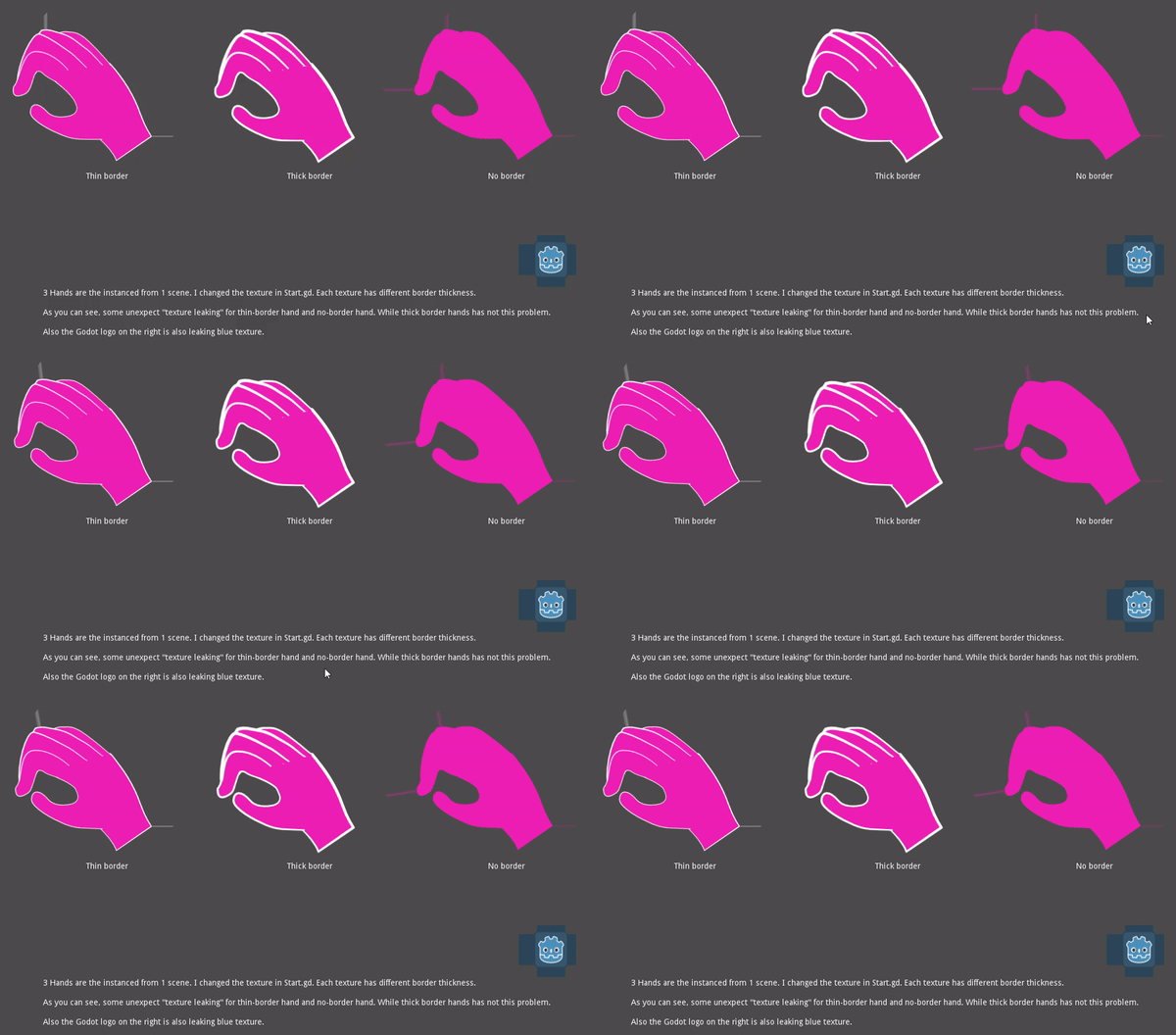
**Updated minimal reproduction project: ** Polygon2DLeakingBorderShowcase.zip
Probably calling it "draw overflow" would be better. It's present in some other parts too. But I think this is worse in Polygon2D because of the nature of it.


So it looks like when the border is too small/thin, the texture gets leaked? Because changing opacity/transparent itself did not solve the problem for me.
If you open the images in an image viewer/paint program, you'll notice the ones that leak have non-transparent pixels against the image edge. There's no inherent "border size - leak" correlation, it's just how your images are framed when being exported.
Probably related: #36059
You can mitigate the smear/leak by enabling repeat in your images' import settings (filesystem dock -> select image file, scene/import dock -> import tab -> flags header -> repeat: enabled, click Reimport).
You'll then need to tighten up the polygon around the hand to avoid the repeat artifacts (select AngryHand node, main screen header -> UV, points mode, adjust points, edit -> "polygon->UV").
Video (length 1m21s): https://youtu.be/1Eu0JyeqoKw

Awesome you found a solution within the engine...
Would be helpful if this was in the documentation if there is no real reason to "fix" this (as enhancement/user experience boost) through code.
you can fix it by having 1px transparent border for your asset.
i was making an importer to import inochi2D puppet in to godot, and don't have control on the asset people import using it, i think it is also beneficial to make things "just work" and follow reasonable expectations on the behaviour of the engine and make debug more easier, instead of relying on work-around
also i should add that it is mostly cause by having UV cordenet out side of the image and this will reliability produce the bug, this bug is also present on atlas texture that extend beyond the boundary of the original texture, i would propose to set all uv outside the image to transparent, or at least have a simple option to set the pixels to a colour of the user's choice, we already have the code to enable mirror and repeat on texture, and should not impact performance significantly
