

 godotengine
Project Settings : Autoload tab -- confusing layout, columns cut off, icon illegible
Godot version: 3.0.1
OS/device including version: Windows 10 / Microsoft Surface Pro 4
Issue description: 3 usability issues in the Autoload dialog (see accompanying screenshot)
-
the input fields for node name and path are reversed from the order they appear in the table. Recommend keeping same order so user's mental model - established during input matches the table shown on-screen.
-
the 'Singleton' column is cut-off and the table columns don't appear to be adjustable.
-
the toggle icon for a node in the Singleton column is illegible - cannot tell whether on or off
Steps to reproduce:
- open the settings dialog
- click the autoload tab
- add an autoload node


The AutoLoad editor looks like this in Godot 3.2.1:
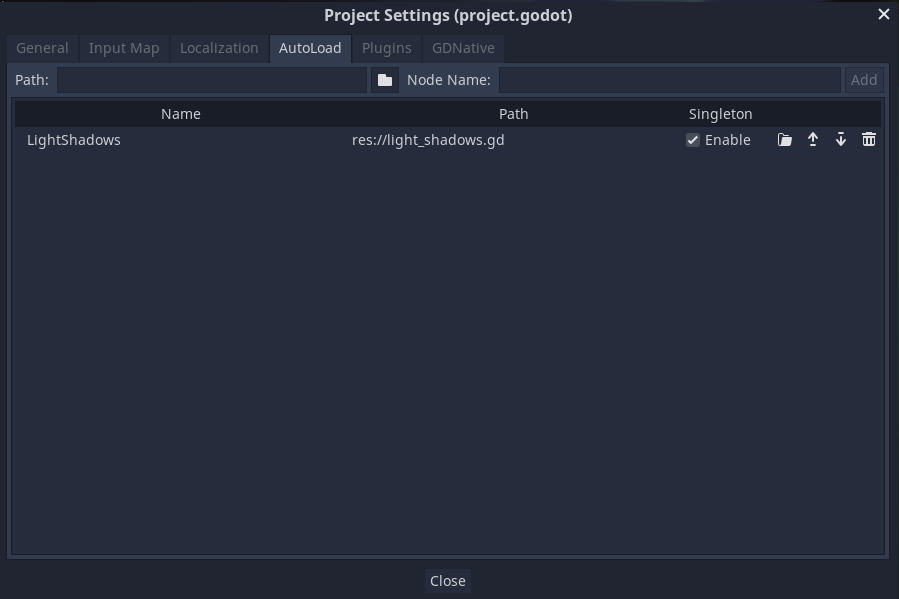
I'm not sure whether we should swap the two fields at the top (where you add new autoloads) or swap columns in the table below. The "Node" field will be filled in automatically when you specify a path, so I think it should be the second field, not the first one.

Everytime I add an autoload I use the Browse button to pick a script/scene, and then the path and node name are autofilled. Yet I still have to press "Add" to actually add it.
IMO we should remove this Path / Node Name / Add bar, and instead add a single button to add a new autoload by browsing files, and confirming the File Dialog would automatically add it.
Then the "Name" in the column, inferred from the scene/script name, could be edited by a click or double-click. Possibly the same for the path if we want to make it editable.

Turns out this dialog has a hidden functionality:
https://github.com/godotengine/godot/assets/2223172/c2598fac-63f5-4f4b-ad92-bd229ea23da7
I never used it, but seems quite handy 🤔 I think it would be enough if picking a file would automatically create an autoload. We could maybe rethink the layout, but there is lots of horizontal space here and it's used efficiently.
EDIT:
There is also hidden validation:
