

 godotengine
Add a completed project of the "Animating/Controlling thousands of fish with MultiMeshInstance" tutorial for the readers to download.
Your Godot version: 3.2.1 stable
Issue description: There are multiple places where it's hard to follow the tutorial, adding a link to a completed project for the tutorial like there is for the FPS tutorial would let the readers find the solution to any issues that arise by themselves.
URL to the documentation page (if already existing): https://docs.godotengine.org/en/stable/tutorials/3d/vertex_animation/animating_thousands_of_fish.html https://docs.godotengine.org/en/stable/tutorials/3d/vertex_animation/controlling_thousands_of_fish.html

This demo would probably be better added to the godot-demo-projects repository. We'd prefer not adding more ZIPs to version control: https://github.com/godotengine/godot-docs/issues/3390


Could you mention which sections are hard to follow?
-
"We will start with a single fish. Load your fish model into a MeshInstance and add a new ShaderMaterial."
 It's not clear where to add your new ShaderMaterial. If you add it in Material Override then the color of the whole surface gets overridden and the color of the fish becomes all wrong. I have yet to find a way to implement a vertex shader while preserving the color scheme of the fish when adding a new ShaderMaterial to Material Override. (I've read through the "Getting Started - Step by step", "3D" and "Shading" tutorials and asked for help in a Godot discord)
If you add it in the Material section of the MeshInstance then you need to add three new ShaderMaterials, (the wording of the tutorial implies that you only add one ShaderMaterial) each sharing a singular shader with a color uniform so that your vertex displacements affects all surfaces and so that you can set the colors to match the original fish object. There are issues with this approach that I'll mention further down. -
float body = (VERTEX.z + 1.0) / 2.0; //for a fish centered at (0, 0) with a length of 2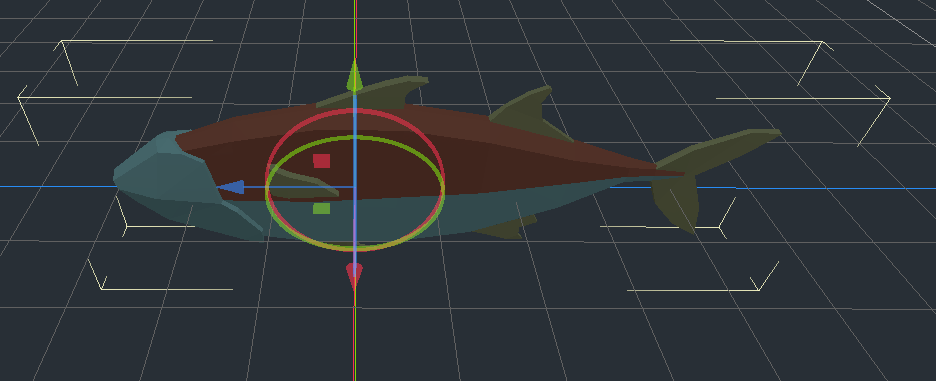 The fish seems to be 7-8 units long out of the box, there's no mention of the mesh being scaled down in the editor. It makes the reader worried that the tutorial or the model might not be up-to-date or that the reader did a mistake somewhere or is lacking key knowledge.
 -
"Putting the four motions together gives us the final animation." The animation of my fish did not match the one shown in the tutorial. When the default values for the uniforms used in the code are left out then you can't use the same values to see if the results match and verify that you implemented the code correctly. It would also be nice to have a small section with the finished code at the end to compare with your own implementation, but having a completed project of the tutorial that you can download would serve the same purpose.
-
"The second is to loop over all the instances and set their transforms in code. Below, we use GDScript to loop over all the instances and set their transform to a random position." It does not specify where to write the code, I assumed that you were meant to put it in the
_ready()function. -
"Running this script will place the fish in random positions in a box around the position of the MultiMeshInstance."
 There's no Material section for the MultiMeshInstance node. (This is the issue I was talking about earlier about adding my ShaderMaterials to the Material section of MeshInstance) So I had to add my ShaderMaterials to the Surface sections of the mesh in the MultiMeshInstance node but when I run the scene my fish aren't animating. My guess is that because I'm adding the ShaderMaterials directly on my mesh's surfaces, the changes are not saved when I run the game. (I'm thinking about that big "Changes may be lost!" warning when I open the surfaces default SpatialMaterial.)
This is as far as I got, I haven't read the tutorial past this point since my fish are currently not animating correctly when I run the scene. I could set the transforms of the fishes purely through the editor as they mention in the tutorial, but then the position of the fishes won't be random every time you run the scene, compared to if you were to use the code the tutorial presented and place it in the _ready() function of your script.

Did anyone ever successfully completed this manual? I am hanging on the same points as @Waranoi. Basically at the very first step: and add a new ShaderMaterial
I would love to complete this tutorial and update the manual accordingly but I just cannot get it to work without a LOT of changes, which seems strange to me.

Still incomplete sadly. It's a just a bit strange to think that someone spent the time to put together this tutorial, which seems helpful, and didn't have the theory of mind to realize how incomplete it is for someone trying to follow, and didn't bother to include a example projects, very strange?
