
python-devcontainer-template
 python-devcontainer-template copied to clipboard
 godatadriven
Shows you how to use a Devcontainer for your Python project 🐳♡🐍
python-devcontainer-template
An example repo for using a Devcontainer + Python 🐳🐍.
Devcontainers help us:
- 🔄 Get a reproducible development environment
- ⚡️ Instantly onboard new team members onto your project
- 👨👩👧👦 Better align the environments between team members
- ⏱ Keeping your dev environment up-to-date & reproducible saves your team time going into production later
(📝 Note: Devcontainers are a relatively new concept. For now, Devcontainers are only properly supported by VSCode.)
This template
This template demonstrates how you can build a Devcontainer with the following set up:
- Python 3.10
- Java (OpenJDK 11.0.16)
pyspark,mypy,pytestandblack
Usage
First, make sure you have the Remote Development extension installed and have Docker running.
Then, there's 2 options:
Using the template
-
Click Use this template to create a new repo.
-
Clone the repo and open it in VSCode.
-
You should see the following notification:
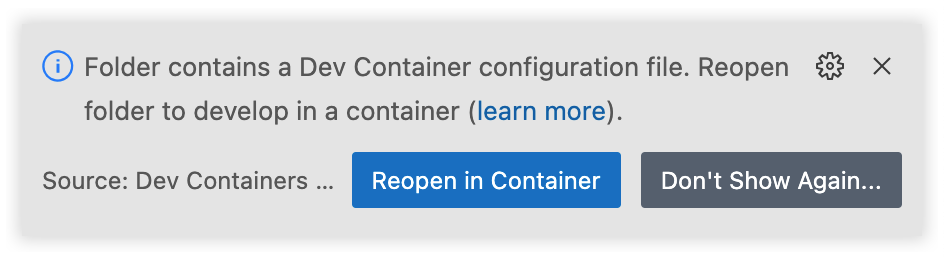
Press Reopen in Container and you the Devcontainer will be loaded.
That's it 🙌🏻 Enjoy developing.
Using the button
Another option is to open this repo in VSCode using a special link. Press the following button:

🚀 This clones this repo and opens it in a Devcontainer right away.
- 💡 To now have this repo push to your own repo, add a different Git remote using
git remote add.
About
Media
This repo was mentioned at the following places:
- Talk @ GoDataFest, 26th of October [talk slides]
- Blogpost @ godatadriven.com, 21st of November
- Talk @ PyData Eindhoven
Created by Jeroen Overschie, working at Xebia Data. A leading Data and AI consultancy company in The Netherlands.
Metadata
Owner
 godatadriven
Metadata
Shows you how to use a Devcontainer for your Python project 🐳♡🐍