
authentik
 authentik copied to clipboard
 goauthentik
LDAP Authentication with duo authentication proxy does not prompt for MFA
Describe your question/ In my environment I have previously setup duo authentication proxy to project application that support the use of LDAP or RADIUS authentication with MFA via duo push notifications. Specifically, I have both Grafana and Portainer specifically protected in this manner in my environment already. When I login to each of those services after entering my user credentials the login process with wait until the authentication proxy has received confirmation that I have approved the sign-in process via the push notification.
The issue I'm experiencing is that with an LDAP sync'd user in Authentik the application does not seem to send the request to the duo authentication proxy and immediately logs me in after entering my credentials. I also don't notice any logs in the duo auth proxy so I suspect Authentik is just locally authenticating an LDAP user, is this correct or am I completely missing something here? Is it even possible to use Authentik and the duo auth proxy together like this?
Version and Deployment (please complete the following information):
- authentik version: 2022.8.2
- Deployment: docker-compose

Yes, when using an LDAP Source, after the first successful authentication, authentik will hash and save the password into its own database, this is mostly done to speed up further logins and reduce the dependency on the LDAP backend.
I would recommend to use the Duo integration in authentik as that can do pretty much the same thing as their proxy (i.e. be MFA for Web based and LDAP based logins), except you can further control it in authentik. In the current version importing devices is a bit annoying, but in 2022.9 this will be a lot easier (especially if you're using Duo MFA, Access or Beyond)

Actually, and I keep forgetting about this, you can configure the password stage of the authentication flow and only select the LDAP backend, in that case it will always try to bind as the authenticating user
Actually, and I keep forgetting about this, you can configure the password stage of the authentication flow and only select the LDAP backend, in that case it will always try to bind as the authenticating user
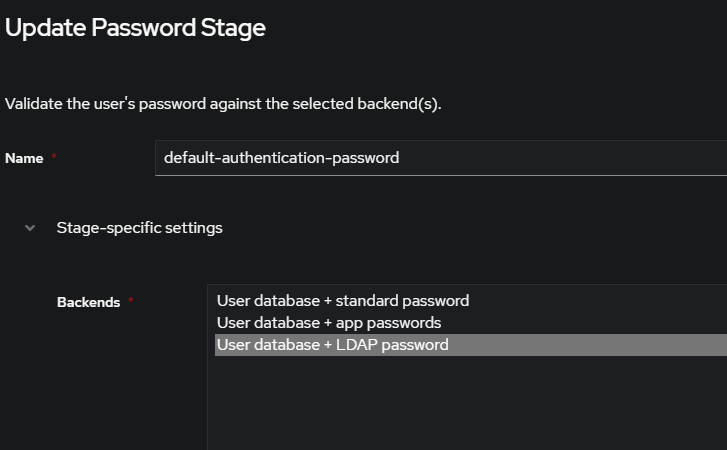 Would this be the setting that you're referring to?
I would recommend to use the Duo integration in authentik as that can do pretty much the same thing as their proxy (i.e. be MFA for Web based and LDAP based logins), except you can further control it in authentik. In the current version importing devices is a bit annoying, but in 2022.9 this will be a lot easier (especially if you're using Duo MFA, Access or Beyond)
On that note, is there a process that can be used for Duo Free? From what I've seen so far it seems like the method I described above would be the most viable method to use Duo with.
Indeed that is the option I was thinking of
Sadly not as it requires the Duo Admin API which can only be used on non-free Duo plans.
I see, worth mentioning that using the above setting did not work for the use case described above, not sure if I'm doing something wrong.
There was some previous discussion about this setup that required always binding to LDAP in a GitHub issue I cant find, and there was also the reasoning why even when selecting that backend it won't bind always (hence I probably also forgot to mention that option previously)