

 glushchenko
Toggled Menu Items should be two menu items or change title to reflect the current state
Description
Curently, in the menu bar of the mac app, toggled items are combined into only one item: "Hide/show note list" and "Hide/show sidebar".
According to the HIG, these should be two different menu items, or only one item that changes the title to reflect current state.
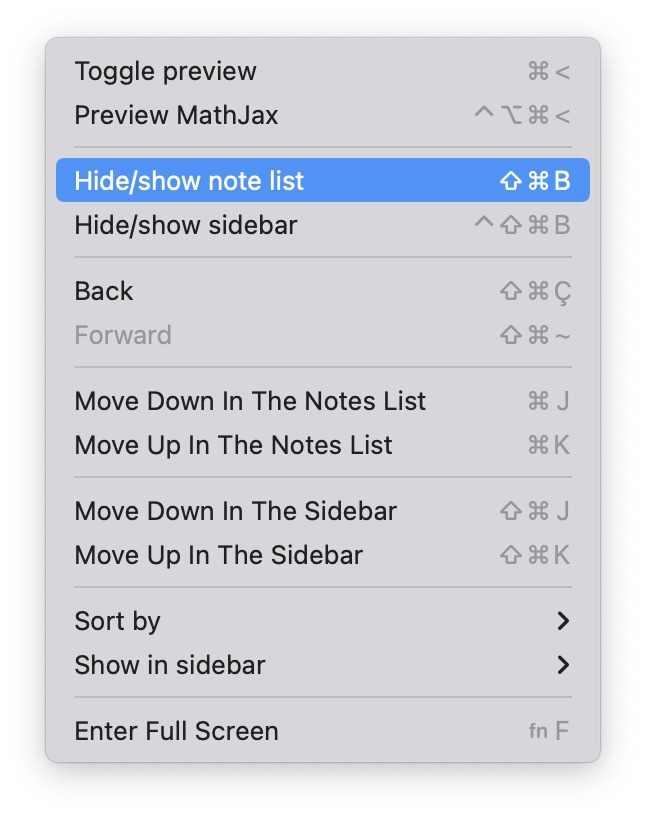
To Reproduce
- Go to "View" in the menu bar
Expected behavior
The menu bar item should only show what the expected behaviour should be. E.g.: When the Note list is visible, it should only say: "Hide Note List", and vice-versa.
This is what is implemented in first-party macOS apps (see, for example, Show or Hide Favorite Bar" in Safari.

FSNotes version
v5.4.1 build 523
macOS/iOS version
macOS 12.3
Additional context
Menu Anatomy - Menus - macOS - Human Interface Guidelines - Apple Developer
Toggled Menu Items A toggled menu item switches between two states when chosen. There are three types of toggled menu items:
- A set of two menu items with titles that indicate opposite actions or states; for example, Grid On and Grid Off. People know which menu item is currently in effect because it displays a checkmark or appears disabled.
- A menu item whose title changes to reflect the current state; for example, Show Ruler and Hide Ruler.
- A menu item that has a checkmark next to it when in effect; for example, a text attribute like Bold.
