
scenebuilder
 scenebuilder copied to clipboard
 gluonhq
Error Custom StyleableProperty In SceneBuilder
Expected Behavior
Current Behavior
Steps to Reproduce
Your Environment
Screenshots
Welcome
I encountered a problem while creating a custom property in scene builder where I can't get this property, so please give me a solution to this problem as soon as possible if possible
You can watch this picture in order to understand what I want to say
Currently this property
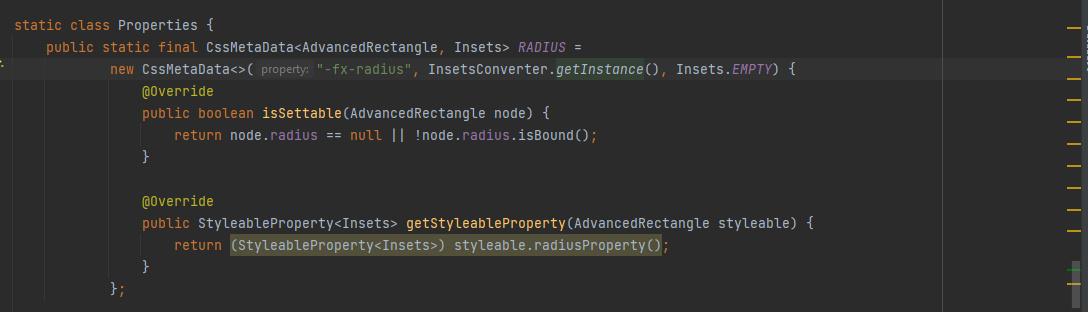
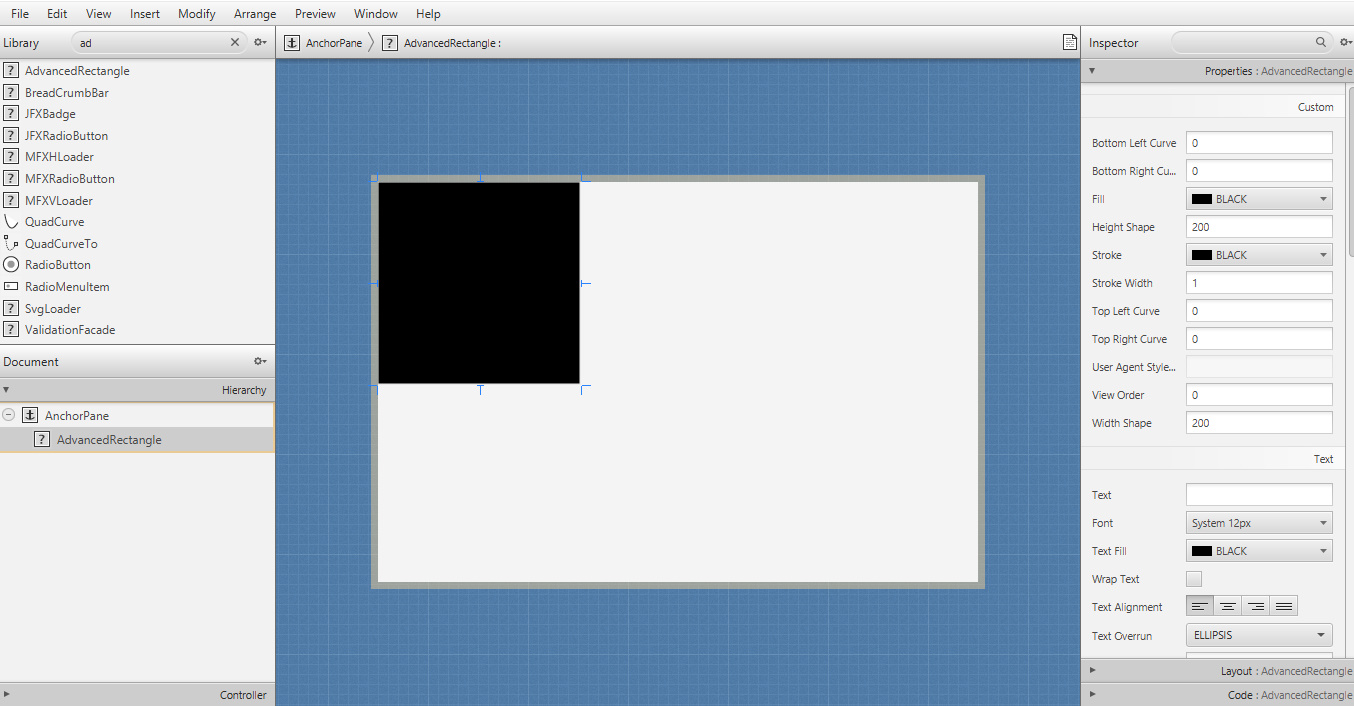
And here this property does not appear in scene builder
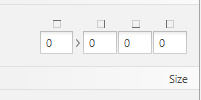
I wanna get like this in scene builder

@HiouaniHalim I'll advise you to ask @abhinayagarwal or @AlmasB as they take care of this project, not me.


Hi @HiouaniHalim , I found a solution for this. There will be a PR soon which will enable use of the already available Insets editor with custom defined insets. It took me a while to figure out how this works. It is now about writing a test case and preparing the PR. My Insets and My Paint are properties of a custom control.
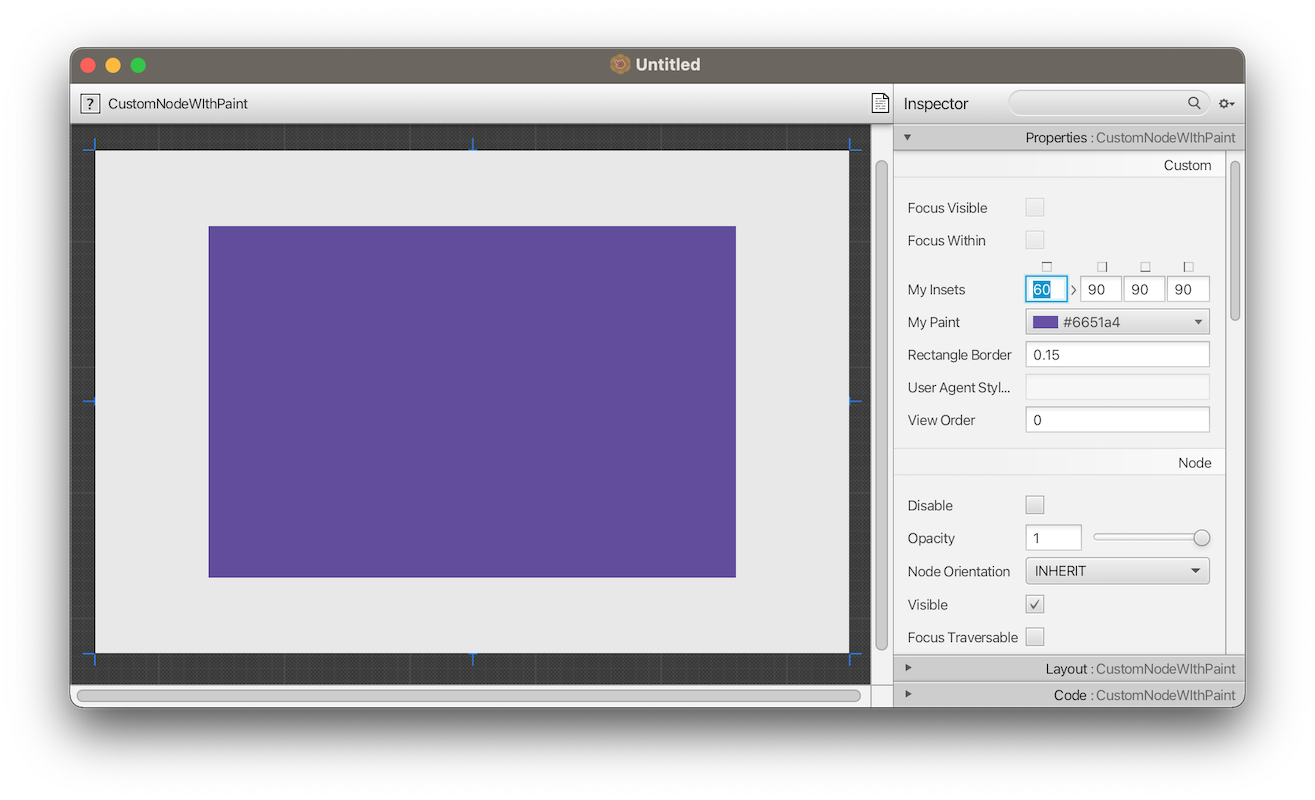
The responsible class here is the MetadataIntrospector in com.oracle.javafx.scenebuilder.kit.metadata package. This one owns a method PropertyMetadata makePropertyMetadata(PropertyName name, PropertyDescriptor propertyDescriptor, Object sample) which collects the required meta data so that later the correct editor is loaded in the properties editor pane.
The necessary change is actually to insert another condition in the decision chain which figures out which meta data to collect on which property type. The cool thing is, all required building blocks such as the type InsetsPropertyMetadata already exist.
 else if (propertyType == javafx.geometry.Insets.class) {
            	result = new InsetsPropertyMetadata(name, readWrite, Insets.EMPTY, inspectorPath);
            }
What's missing now is a test so that we can verify the function during build.
Hi @HiouaniHalim, please try out the leading-edge branch of Scene Builder at https://github.com/Oliver-Loeffler/scenebuilder.git. This one already allows editing of Insets - beware, its not the official one yet - but good for testing.
I ran my tests with the following example control:
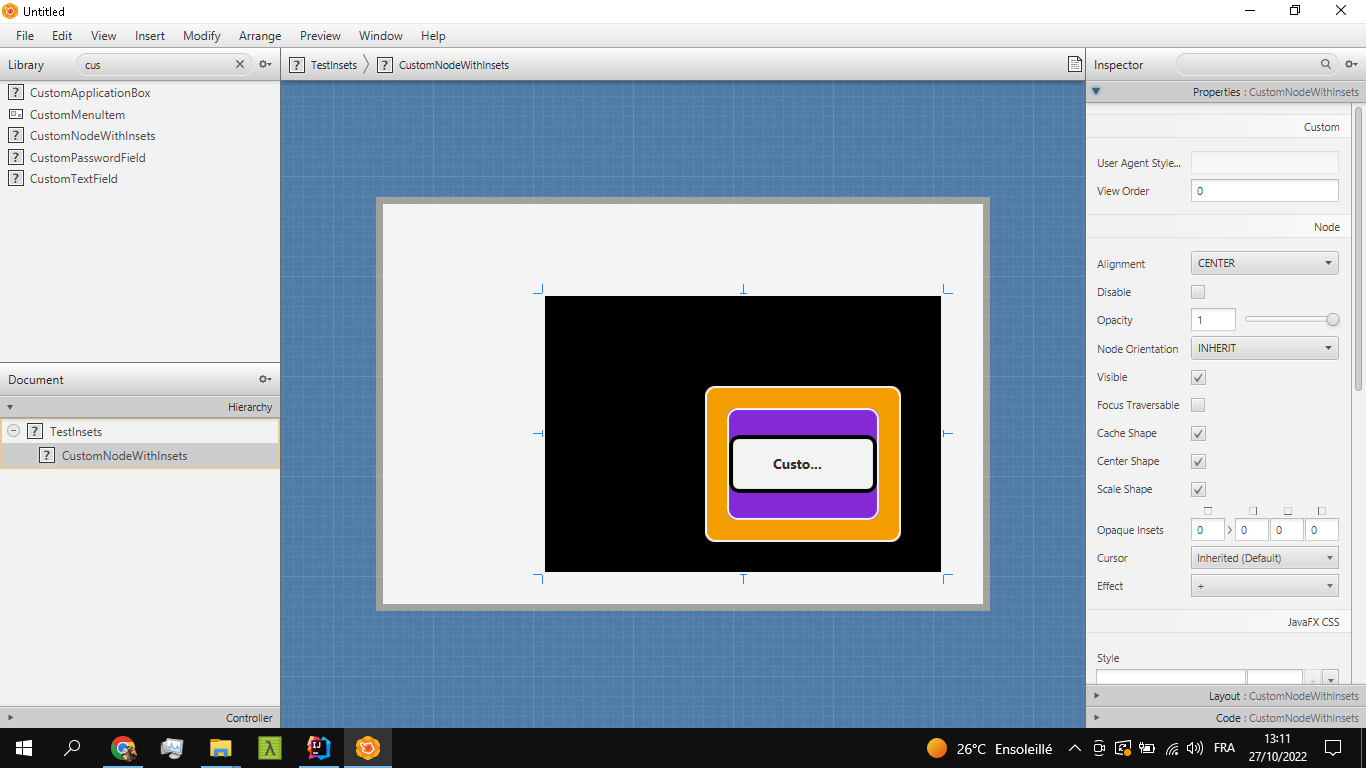
The cool thing is, that Scene Builder can import individual classes. Compile the following class in default package and import it into Scene Builder. The demo is basically a label in on a StackPane on a StackPane. There are Outer Frame and Inner Frame insets as well as text padding. All 3 inset controls appear in the Inspector. The defaults are read from the control itself.
Hope this works for you!
Should look like following:

import javafx.beans.property.ObjectProperty;
import javafx.beans.property.SimpleObjectProperty;
import javafx.geometry.Insets;
import javafx.scene.control.Label;
import javafx.scene.layout.Background;
import javafx.scene.layout.BackgroundFill;
import javafx.scene.layout.Border;
import javafx.scene.layout.BorderStroke;
import javafx.scene.layout.BorderStrokeStyle;
import javafx.scene.layout.BorderWidths;
import javafx.scene.layout.CornerRadii;
import javafx.scene.layout.StackPane;
import javafx.scene.paint.Color;
import javafx.scene.text.Font;
import javafx.scene.text.FontWeight;

public class CustomNodeWithInsets extends StackPane {

    private final StackPane innerPane;

    private final StackPane centerPane;

    public CustomNodeWithInsets() {
        setBackground(new Background(new BackgroundFill(Color.BLACK, CornerRadii.EMPTY, Insets.EMPTY)));
        setBorder(new Border(new BorderStroke(Color.WHITE, BorderStrokeStyle.SOLID, CornerRadii.EMPTY, new BorderWidths(2))));
        innerPane = new StackPane();
        innerPane.setBackground(new Background(new BackgroundFill(Color.ORANGE, new CornerRadii(10), Insets.EMPTY)));
        innerPane.setBorder(new Border(new BorderStroke(Color.WHITE, BorderStrokeStyle.SOLID, new CornerRadii(10), new BorderWidths(2))));
        innerPane.setMinSize(100, 100);
        innerPane.setMaxSize(590, 590);
        innerPane.setPrefSize(590, 380);
        innerPane.paddingProperty().bind(innerFrameProperty());

        centerPane = new StackPane();
        centerPane.setBackground(new Background(new BackgroundFill(Color.BLUEVIOLET, new CornerRadii(10), Insets.EMPTY)));
        centerPane.setBorder(new Border(new BorderStroke(Color.WHITE, BorderStrokeStyle.SOLID, new CornerRadii(10), new BorderWidths(2))));
        centerPane.setMinSize(100, 100);
        centerPane.setMaxSize(580, 570);
        centerPane.setPrefSize(580, 360);

        Label label = new Label("Custom Control Insets Demo");
        label.setBorder(new Border(new BorderStroke(Color.BLACK, BorderStrokeStyle.SOLID, new CornerRadii(8), new BorderWidths(4))));
        label.paddingProperty().bind(textPaddingProperty());
        label.setBackground(new Background(new BackgroundFill(Color.WHITE, new CornerRadii(10), Insets.EMPTY)));
        label.setFont(Font.font(label.getFont().getFamily(), FontWeight.BLACK, 14));
        centerPane.getChildren().add(label);
        innerPane.getChildren().add(centerPane);

        getChildren().add(innerPane);
        setMinSize(100, 100);
        setMaxSize(600, 600);
        setPrefSize(598, 396);
        setWidth(600);
        setHeight(400);

        paddingProperty().bind(outerFrameProperty());
    }

    private ObjectProperty<Insets> outerFrame;

    public void setOuterFrame(Insets value) {
        this.outerFrameProperty().setValue(value);
    }

    public Insets getOuterFrame() {
        return this.outerFrame == null ? new Insets(90, 40, 30, 160) : outerFrameProperty().getValue();
    }

    public ObjectProperty<Insets> outerFrameProperty() {
        if (this.outerFrame != null) {
            return this.outerFrame;
        }
        this.outerFrame = new SimpleObjectProperty<>(new Insets(90, 40, 30, 160));
        return this.outerFrame;
    };

    private ObjectProperty<Insets> innerFrame;

    public void setInnerFrame(Insets value) {
        this.innerFrameProperty().setValue(value);
    }

    public Insets getInnerFrame() {
        return this.innerFrame == null ? new Insets(20) : innerFrameProperty().getValue();
    }

    public ObjectProperty<Insets> innerFrameProperty() {
        if (this.innerFrame != null) {
            return this.innerFrame;
        }

        this.innerFrame = new SimpleObjectProperty<>(new Insets(20));
        return this.innerFrame;
    };

    private ObjectProperty<Insets> textPadding;

    public void setTextPadding(Insets value) {
        this.textPaddingProperty().setValue(value);
    }

    public Insets getTextPadding() {
        return this.textPadding == null ? new Insets(15, 40, 15, 40) : textPaddingProperty().getValue();
    }

    public ObjectProperty<Insets> textPaddingProperty() {
        if (this.textPadding != null) {
            return this.textPadding;
        }
        this.textPadding = new SimpleObjectProperty<>(new Insets(15, 40, 15, 40));
        return this.textPadding;
    };
}
H @HiouaniHalim,
please re-open the issue, I will continue working on that. Thanks!
On Windows, the following steps are needed to get it working (having Java and Maven installed): The important thing is to clone the "leading-edge" branch and to run "mvn install" with it.
git clone --branch leading-edge [email protected]:Oliver-Loeffler/scenebuilder.git
cd scenebuilder
mvn install
mvn javafx:run -f app
Go SceneBuilder library manager and add app\target\classes location as root folder with class files.
There should be a class file custom.CustomNodeWithInsets.class.
If this fails again, I'll publish an MSI file. The custom control example class is now part of the branch.
@AlmasB Can we reopen this one? I think this is a very good feature request.
Hi @HiouaniHalim ,
Did you get a chance to review PR https://github.com/gluonhq/scenebuilder/pull/594 ?

@HiouaniHalim, this Scene Builder release will allow to test this. https://www.jdeploy.com/~scenebuilder-leading-edge
Scene Builder 19 does not support this yet, it must be one of the 20.0.x / 20.0.x-SNAPSHOT versions.
For testing, there is a sample control with 3 layers of insets. After the project is built, it is available in scenebuilder\kit\target\classes directory. One can add this directory to Scenebuilder to import control from using the JAR/FXML Manager aka. Library Manager. The following video shows how the inset editor works and how it is enabled for the custom control. The control lives at this moment inside the test module in `kit/src/test/java/com/example/app/view/CustomNodeWithInsets.java.
https://user-images.githubusercontent.com/22102800/227802576-49b0fae2-d27f-4737-812f-a8a83e030a82.mp4
Im using scene builder 2019.msi and I have same problem for that problem I hope there is an update for the problem in the urgent team, thanks
On Wed, Mar 29, 2023, 20:12 Oliver Löffler @.***> wrote:
I've updated the insets editing PR as the demo class was missing.
— Reply to this email directly, view it on GitHub https://github.com/gluonhq/scenebuilder/issues/532#issuecomment-1489160514, or unsubscribe https://github.com/notifications/unsubscribe-auth/AI7S2J3OEXRUVNQLPMEJ47LW6SCSRANCNFSM5RXNX6EQ . You are receiving this because you were mentioned.Message ID: @.***>
As of now this only works with Scenebuilder LE where the PR is already integrated.
https://www.jdeploy.com/~scenebuilder-leading-edge
The source code of LE is available at: https://github.com/Oliver-Loeffler/scenebuilder
The related PR has not yet been merged into Scene Builder main line.
Ok, thanks for the update.
On Mon, Apr 10, 2023, 11:15 Oliver Löffler @.***> wrote:
As of now this only works with Scenebuilder LE where the PR is already integrated.
https://www.jdeploy.com/~scenebuilder-leading-edge
The source code of LE is available at: https://github.com/Oliver-Loeffler/scenebuilder
The related PR has not yet been merged into Scene Builder main line.
— Reply to this email directly, view it on GitHub https://github.com/gluonhq/scenebuilder/issues/532#issuecomment-1501645438, or unsubscribe https://github.com/notifications/unsubscribe-auth/AI7S2J3DFYU6ZRS5IXIJ5LDXAPMSLANCNFSM5RXNX6EQ . You are receiving this because you were mentioned.Message ID: @.***>