
glpi
 glpi copied to clipboard
 glpi-project
RAM is not accurate between glpi-agent and GLPI
Bug reporting acknowledgment
Yes, I read it
Professional support
No response
Describe the bug
RAM is not accurate between glpi-agent and GLPI
To reproduce


Expected behavior
my laptop 16GB of RAM but only display 8GB of RAM. im using latest glpi 10 and using glpi-agent 1.2 (glpi-agent 1.4 still same result)
Operating system
Windows
GLPI Agent version
1.2
GLPI version
10.0.1
GLPIInventory plugin or FusionInventory for GLPI plugin version
1.0.1
Additional context
No response


Or at least the output of the following command run from an administrative console and into the GLPI-Agent installation folder:
glpi-inventory --debug --partial memory

Hi,
C:\Windows\system32>cd "c:\Program Files\GLPI-Agent"

c:\Program Files\GLPI-Agent>glpi-inventory --debug --partial memory
[info] New inventory from xxx.xxx.com-2022-07-13-14-42-06 for local0
[debug] Running GLPI::Agent::Task::Inventory::Generic
[debug] Running GLPI::Agent::Task::Inventory::Win32
[debug] Running GLPI::Agent::Task::Inventory::Win32::Bios
[debug] Running GLPI::Agent::Task::Inventory::Win32::Hardware
[debug] Running GLPI::Agent::Task::Inventory::Vmsystem
[debug] Running GLPI::Agent::Task::Inventory::Win32::Chassis
[debug] Running GLPI::Agent::Task::Inventory::Win32::Memory
{
   "action": "inventory",
   "content": {
      "bios": {
         "assettag": "",
         "bdate": "2022-05-17",
         "biosserial": "JP05BL3",
         "bmanufacturer": "Dell Inc.",
         "bversion": "1.13.0",
         "enclosureserial": "JP05BL3",
         "mmodel": "0818KM",
         "msn": "/JP05BL3/CNCMC001CH0767/",
         "smanufacturer": "Dell Inc.",
         "smodel": "Vostro 15 3510",
         "ssn": "JP05BL3"
      },
      "hardware": {
         "chassis_type": "Notebook",
         "memory": 16118,
         "name": "xxx",
         "uuid": "4C4C4544-0050-3010-8035-CAC04F424C33",
         "vmsystem": "Physical",
         "winlang": "1033",
         "winowner": "xxx",
         "winprodid": "00331-10000-00001-AA726",
         "winprodkey": "W269N-WFGWX-YVC9B-4J6C9-T83GX",
         "workgroup": "xxx"
      },
      "memories": [
         {
            "capacity": 8192,
            "caption": "Physical Memory",
            "description": "Physical Memory",
            "formfactor": "SODIMM",
            "numslots": 0,
            "removable": "0",
            "serialnumber": "25477B84",
            "speed": "3200",
            "type": "Unknown"
         },
         {
            "capacity": 8192,
            "caption": "Physical Memory",
            "description": "Physical Memory",
            "formfactor": "SODIMM",
            "memorycorrection": "None",
            "numslots": 1,
            "removable": "0",
            "serialnumber": "190020CB",
            "speed": "3200",
            "type": "Unknown"
         }
      ],
      "versionclient": "GLPI-Inventory_v1.2"
   },
   "deviceid": "xxx.com-2022-07-13-14-42-06",
   "itemtype": "Computer"
}

c:\Program Files\GLPI-Agent>
Importing this partial inventory gives me 2 memory modules:

I can see none of the 2 modules have the same 2571D829 serial from your first screenshot. This means you run the command on another computer. So can you run the command on the computer you have the problem ? Or show us you don't have the same memory inventory than me ?
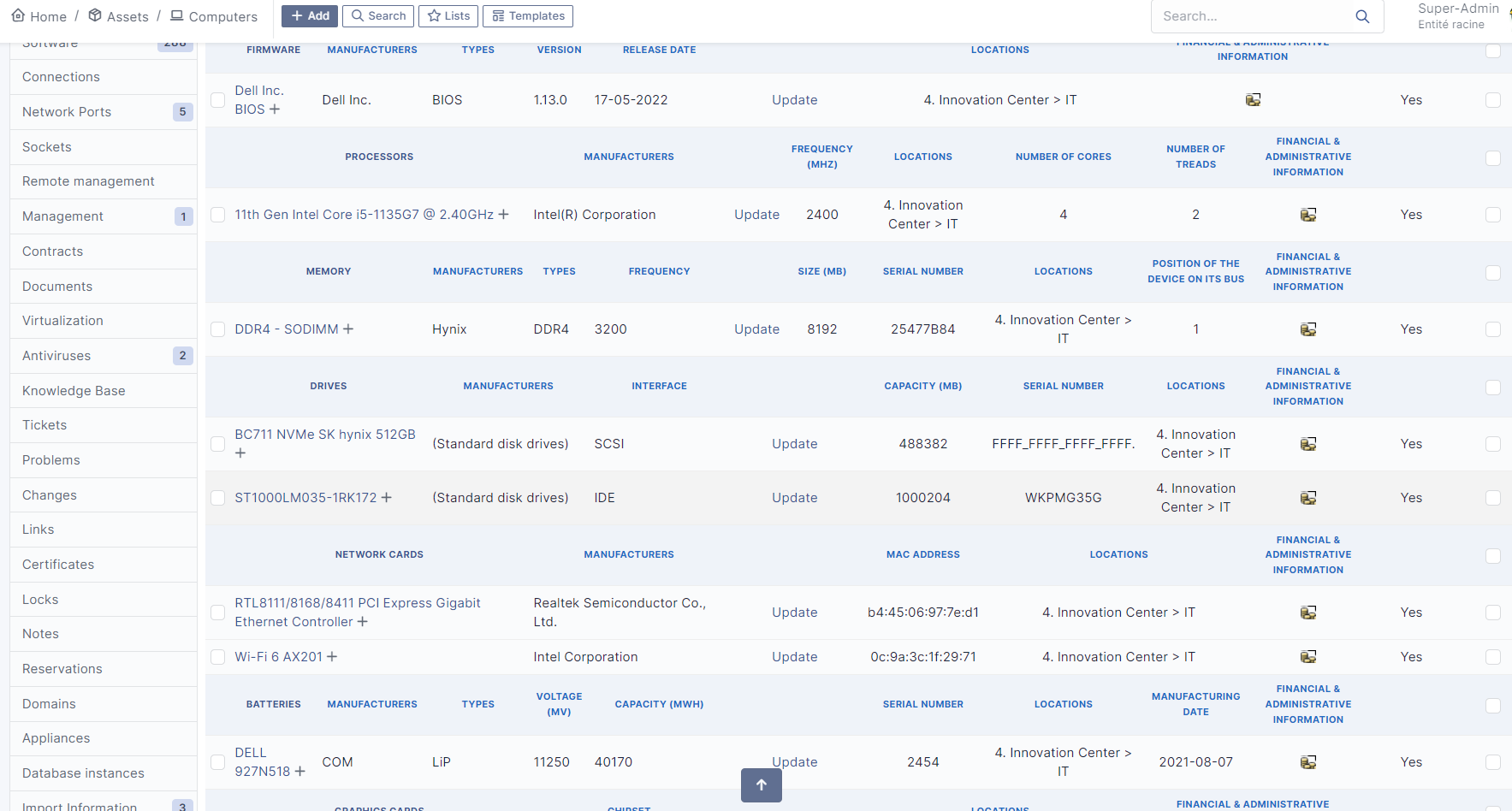
For some reason, it seems glpi-inventory command doesn't use installed dmidecode. This should be a minor bug.
Okay then, can you better run the following commands on the computer and report its output, always from an administrative console and from the glpi-agent installation folder ?
cd perl\bin
glpi-agent.exe glpi-inventory --debug --partial memory
glpi-agent.exe is indeed perl.exe which has been renamed for the GLPI-Agent usage. So running the glpi-inventory perl script from the same folder where dmidecode is installed should report the same output than the one sent to GLPI.
So this should be more accurate.
hi,
C:\Program Files\GLPI-Agent\perl\bin>glpi-agent.exe glpi-inventory --debug --partial memory
[info] New inventory from xxxxx-2022-07-13-16-17-10 for local0
[debug] module GLPI::Agent::Task::Inventory::Win32::Bios disabled because of GLPI::Agent::Task::Inventory::Generic::Dmidecode::Bios
[debug] module GLPI::Agent::Task::Inventory::Win32::Memory disabled because of GLPI::Agent::Task::Inventory::Generic::Dmidecode
[debug] Running GLPI::Agent::Task::Inventory::Generic
[debug] Running GLPI::Agent::Task::Inventory::Generic::Dmidecode
[debug] Running GLPI::Agent::Task::Inventory::Generic::Dmidecode::Bios
[debug] Running GLPI::Agent::Task::Inventory::Generic::Dmidecode::Hardware
[debug] Running GLPI::Agent::Task::Inventory::Win32
[debug] Running GLPI::Agent::Task::Inventory::Win32::Hardware
[debug] Running GLPI::Agent::Task::Inventory::Vmsystem
[debug] Running GLPI::Agent::Task::Inventory::Generic::Dmidecode::Memory
[debug] Running GLPI::Agent::Task::Inventory::Win32::Chassis
{
   "action": "inventory",
   "content": {
      "bios": {
         "bdate": "2022-05-17",
         "bmanufacturer": "Dell Inc.",
         "bversion": "1.13.0",
         "mmanufacturer": "Dell Inc.",
         "mmodel": "0818KM",
         "msn": "/JP05BL3/CNCMC001CH0767/",
         "skunumber": "0AB2",
         "smanufacturer": "Dell Inc.",
         "smodel": "Vostro 15 3510",
         "ssn": "JP05BL3"
      },
      "hardware": {
         "chassis_type": "Notebook",
         "memory": 16118,
         "name": "xxx",
         "uuid": "4C4C4544-0050-3010-8035-CAC04F424C33",
         "vmsystem": "Physical",
         "winlang": "1033",
         "winowner": "xxx",
         "winprodid": "00331-10000-00001-AA726",
         "winprodkey": "W269N-WFGWX-YVC9B-4J6C9-T83GX",
         "workgroup": "xxxx.com"
      },
      "memories": [
         {
            "capacity": 8192,
            "caption": "DIMM A",
            "description": "SODIMM",
            "manufacturer": "Hynix",
            "model": "HMAA1GS6CJR6N-XN",
            "numslots": 1,
            "serialnumber": "25477B84",
            "speed": "3200",
            "type": "DDR4"
         },
         {
            "capacity": 8192,
            "caption": "DIMM B",
            "description": "SODIMM",
            "manufacturer": "832500008325",
            "model": "GSOG42F-18----------",
            "numslots": 2,
            "serialnumber": "190020CB",
            "speed": "3200",
            "type": "DDR4"
         }
      ],
      "versionclient": "GLPI-Inventory_v1.2"
   },
   "deviceid": "xxx.xxxx.com-2022-07-13-16-17-10",
   "itemtype": "Computer"
}

C:\Program Files\GLPI-Agent\perl\bin>
Okay, thank you @hagianghi for your efforts ;-)
I can now reproduce the case with the last json you provides.
When importing manually, I obtain an error message "Mémoire élément : Un identifiant d'appareil est obligatoire" (in french sorry, but the glpi team will understand).
But I also see an error in the sql-errors.log file which is directly related to the missing component:
[2022-07-13 11:19:26] glpisqllog.ERROR: DBmysql::query() in /srv/glpi/src/DBmysql.php line 370
  *** MySQL query error:
  SQL: INSERT INTO `glpi_devicememories` (`frequence`, `devicememorytypes_id`, `manufacturers_id`, `designation`, `date_creation`, `date_mod`) VALUES ('3200', '5', '832500008325', 'DDR4 - SODIMM', '2022-07-13 11:19:23', '2022-07-13 11:19:23')
  Error: Out of range value for column 'manufacturers_id' at row 1
  Backtrace :
  src/DBmysql.php:1312
  src/CommonDBTM.php:705                             DBmysql->insert()
  src/CommonDBTM.php:1304                            CommonDBTM->addToDB()
  src/CommonDevice.php:512                           CommonDBTM->add()
  src/Inventory/Asset/Device.php:115                 CommonDevice->import()
  src/Inventory/Asset/MainAsset.php:811              Glpi\Inventory\Asset\Device->handle()
  src/Inventory/Asset/MainAsset.php:731              Glpi\Inventory\Asset\MainAsset->handleAssets()
  src/RuleImportAsset.php:945                        Glpi\Inventory\Asset\MainAsset->rulepassed()
  src/Rule.php:1510                                  RuleImportAsset->executeActions()
  src/RuleCollection.php:1591                        Rule->process()
  src/Inventory/Asset/MainAsset.php:550              RuleCollection->processAllRules()
  src/Inventory/Inventory.php:697                    Glpi\Inventory\Asset\MainAsset->handle()
  src/Inventory/Inventory.php:331                    Glpi\Inventory\Inventory->handleItem()
  src/Inventory/Request.php:360                      Glpi\Inventory\Inventory->doInventory()
  src/Inventory/Request.php:90                       Glpi\Inventory\Request->inventory()
  src/Agent/Communication/AbstractRequest.php:325    Glpi\Inventory\Request->handleAction()
  src/Agent/Communication/AbstractRequest.php:237    Glpi\Agent\Communication\AbstractRequest->handleJSONRequest()
  src/Inventory/Conf.php:246                         Glpi\Agent\Communication\AbstractRequest->handleRequest()
  src/Inventory/Conf.php:187                         Glpi\Inventory\Conf->importContentFile()
  front/inventory.conf.php:47                        Glpi\Inventory\Conf->importFile()
  {"user":"2@glpi-10-0-2"}
It seems the manufacturer string, which is set to 832500008325 in the inventory is the source of the problem.
Just to complete the issue and check if we can do something regarding 832500008325 as manufacturer string which is clearly wrong, can you report the output of the following command run from the agent installation folder:
perl\bin\dmidecode -t 17
This is what the agent analyses to report memory module components.
hi,
c:\Program Files\GLPI-Agent\perl\bin>dmidecode -t 17
# dmidecode 3.3-update-1
SMBIOS 3.2 present.

Handle 0x1100, DMI type 17, 92 bytes
Memory Device
        Array Handle: 0x1000
        Error Information Handle: Not Provided
        Total Width: 64 bits
        Data Width: 64 bits
        Size: 8 GB
        Form Factor: SODIMM
        Set: None
        Locator: DIMM A
        Bank Locator: Not Specified
        Type: DDR4
        Type Detail: Synchronous
        Speed: 3200 MT/s
        Manufacturer: 80AD000080AD
        Serial Number: 25477B84
        Asset Tag: 02214200
        Part Number: HMAA1GS6CJR6N-XN
        Rank: 1
        Configured Memory Speed: 2667 MT/s
        Minimum Voltage: Unknown
        Maximum Voltage: Unknown
        Configured Voltage: 1.2 V
        Memory Technology: DRAM
        Memory Operating Mode Capability: Volatile memory
        Firmware Version: Not Specified
        Module Manufacturer ID: Bank 1, Hex 0xAD
        Module Product ID: Unknown
        Memory Subsystem Controller Manufacturer ID: Unknown
        Memory Subsystem Controller Product ID: Unknown
        Non-Volatile Size: None
        Volatile Size: 8 GB
        Cache Size: None
        Logical Size: None

Handle 0x1104, DMI type 17, 92 bytes
Memory Device
        Array Handle: 0x1000
        Error Information Handle: Not Provided
        Total Width: 64 bits
        Data Width: 64 bits
        Size: 8 GB
        Form Factor: SODIMM
        Set: None
        Locator: DIMM B
        Bank Locator: Not Specified
        Type: DDR4
        Type Detail: Synchronous
        Speed: 3200 MT/s
        Manufacturer: 832500008325
        Serial Number: 190020CB
        Asset Tag: 41220300
        Part Number: GSOG42F-18----------
        Rank: 1
        Configured Memory Speed: 2667 MT/s
        Minimum Voltage: Unknown
        Maximum Voltage: Unknown
        Configured Voltage: 1.2 V
        Memory Technology: DRAM
        Memory Operating Mode Capability: Volatile memory
        Firmware Version: Not Specified
        Module Manufacturer ID: Bank 4, Hex 0x25
        Module Product ID: Unknown
        Memory Subsystem Controller Manufacturer ID: Unknown
        Memory Subsystem Controller Product ID: Unknown
        Non-Volatile Size: None
        Volatile Size: 8 GB
        Cache Size: None
        Logical Size: None


c:\Program Files\GLPI-Agent\perl\bin>
Hi @hagianghi
on the agent side, we have code to support reading "Part Number", but the manufacturer here is not recognized. Do you know which manufacturer produced that memory module ? If yes, it would be possible to update the agent to report the right manufacturer. And so, can you open a dedicated issue to support that memory module manufacturer on the glpi-agent project ?
Anyway, there's still a bug in GLPI as it tries to use 832500008325 number as manufacturers_id in a SQL request.
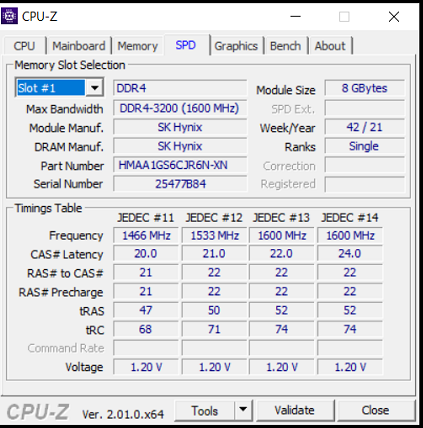
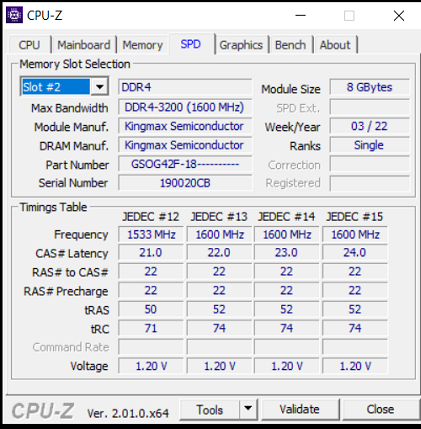
Hi @hagianghi I implemented a work-around in glpi-agent and you should have the KingMax module inventoried using the next glpi-agent nightly build. GLPI still have to be fixed to not convert a manufacturer string made of digits to a number.
Hi @hagianghi,
This issue should be fixed now. Do you have a test server that you could use to validate that problem has been solved on latest GLPI 10.0 nightly build?
