

 glin
glin
Concise display of expanded parent-child hierarchies
First of all, thanks for creating such an amazing package with great documentation. The nice table formatting provided by reactable has encouraged me to transition much of my dashboard work from Power BI/Tableau to Shiny.
A use case which I am yet to be able to replace, is the concise display of hierarchical data with many metrics. With reactable, a 2-level hierarchy generates two columns with the default settings for groupBy.

Product hierarchies can often have 3 or more levels where this approach takes up a lot of width in the tables. Power BI has the ability to expand child rows directly underneath the parent row.

This leaves more space for adding adding additional columns to the tables.
I have made some attempts to recreate this with reactable, but have not made any significant progress. I would be really grateful to get your first thoughts on whether this is possible with reactable, and how you would approach it.
Thanks again for your awesome work.

Doing a bit more research, I see that this question is similar to the following posts on Stackoverflow: https://stackoverflow.com/questions/65722241/is-there-a-way-of-making-aggregated-drop-downs-in-reactable-which-doesnt-leave https://stackoverflow.com/questions/66000137/expand-and-collaps-variables-in-a-single-column-using-reactable-in-r
This isn't possible today, but similar ideas come up often as feature requests (#123, #112, #33). I would love to make this possible, but I can't say when or if it'll be worked on, unfortunately. These feature requests do help though, so thanks for opening this and linking those SO questions as well.

I encountered exactly the same issue. That would be extremely useful feature. Moreover, that would solve one more issue I'm struggling for some time - filtering rows in expanded rows. Of course you can use groupBy and then filter data in all expanded rows but the problem is as @thohan88 mentioned above - if you have many grouping levels table gets wider and wider and it looks and works not good. I tried to use nested table (in every row) but unfortunately this nested table is not filtered anymore when you search for some value/text (only main table rows are filtered). So it's not useful in my case. I touched this topic in issue #144.
Summing up, if you make this feature possible then we could expand rows and show next grouping levels right under the main rows and additionally we would be also able to filter those expanded rows. That would be stunning enhancement.

You can pass a second level reactable to the details argument of the first reactable as demonstrated here in my blog.

@vkatti the issue is that you can not filter nested tables using search bar placed in the main table:
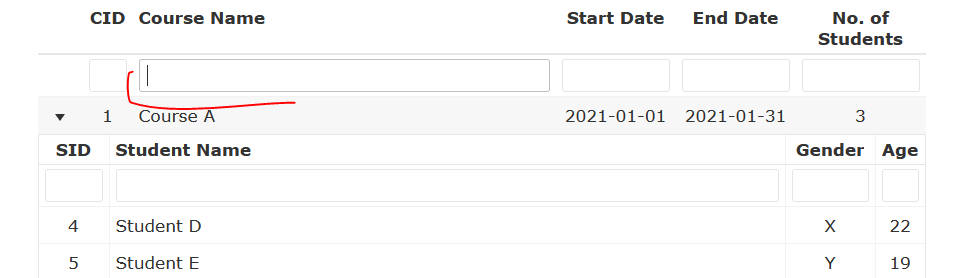
If you type 'Student D' then no rows are found. The only option is to search data in nested tables' filters (as shown in your example). If you have any workaround please let us know.