

 giuspen
Ctrl+Z "Jumps" The View
After fix #961, the issue of ctrl+z "jumping" the display is MUCH better - but does still have a peculiarity.
If you're scrolled down in a note that fills more than a full view, and you undo, it seems to "jump" the view upwards, then re-scroll back to where you were. In other words, the view does end up at the same place - but it temporarily moves the view back & forth (i.e. rather than just remaining where it was, & just undoing the text).
Here's a video to illustrate: I type a little text, then ctrl+z. You can see the window jump back & forth vertically:
https://user-images.githubusercontent.com/1877409/130188377-f5bf7581-bff1-49a2-8e64-2d783c101f37.mp4
This is obviously a simple example, but with a more complex note it can be a bit disorienting - the real issue, however, is because given https://github.com/giuspen/cherrytree/issues/701, it's important to be able to keep an eye on what actually changed (since 'undo' often undoes quite a bit more than you might expect). This "jumping" back & forth during the undo makes it very difficult for the eye to follow what has changed.

I'd also like to request this fix. I tend to make long notes and it can be a bit dizzying when I need to undo/redo something.
OS: Windows 10
Version: 0.99.16 from the Windows installer
note that scrolls > undo or redo > CT scrolls to the very top of the note then back down to where the cursor is
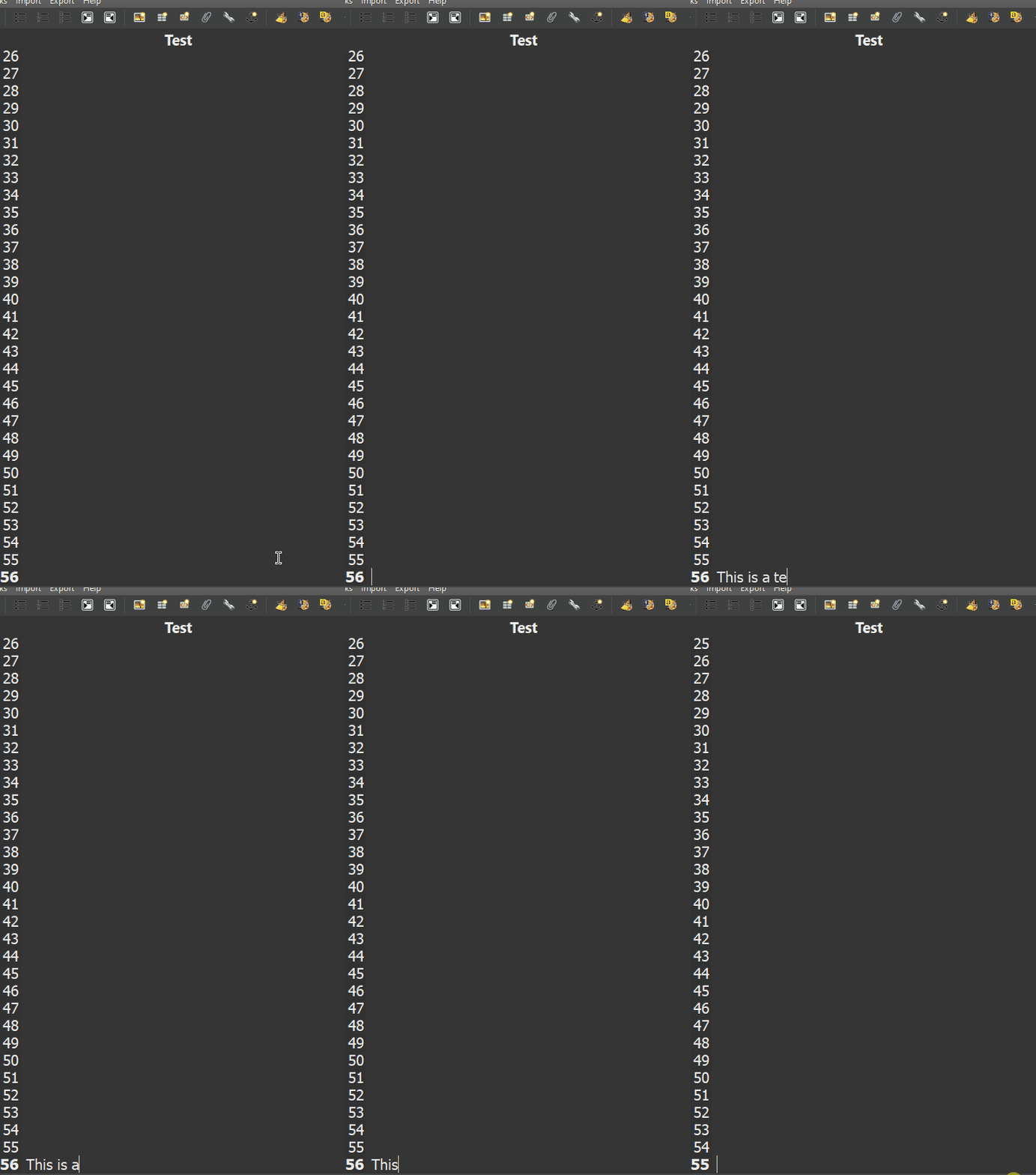

I've observed that this is much more extreme with more complex notes. i.e. I have a note that a good number of pages, with various text formats, different color highlights, attachments, indents, etc. When scrolled to the end, the double-jump up & down on every undo/redo is actually measurably slow, to the point where you need to wait for it each time (so if you need to undo a decent number of steps & keep an eye on when you get to where you intend, it takes quite a while, since you have to wait for the double-scroll & redraw each time, then "re-orient" yourself to figure out what step it's on).
If we have to do undo 3-4 times then scrolling with large pages is so annoying. I have to make sure that my undo worked or not. And some time it feels like, it gonna crash now.

I've ended up accidentally losing changes due to this some times, because 'undo' went back farther than I expected (batched some operations together), but I coudlnt notice it because of the view jumping around. Jumping around definitely been an issue for me.

It is also confusing that it moves the view to where the view was, rather than where the undo was. This is different from standard behavior of text editors.
Example 1:
- Have a document that's i.e. 3 pages long
- Scroll to Page 2, and make an edit
- Scroll to Page 3
- Ctrl+Z
- The view will "jump" to the top of the document, then quickly jump back to page 3. It should jump to page 2, to reveal where the undo took place.
Example 2:
- Have a document that's i.e. 3 pages long
- Scroll to Page 2, and make an edit
- Ctrl+Z
- The view will "jump" to the top of the document, then jump back to page 2. It should not jump at all in this case, since the text was already on-screen when pressing Ctrl+Z.

@Drkmstr310 I should have fixed the "...moves the view to where the view was, rather than where the undo was"

Looks like it now works on 'undo,' but on 'redo', it jumps to the very top of the document.
The redo should not jump to the top of the document anymore in upcoming 0.99.37
This is a horribly disruptive and jarring issue that needs immediate attention. It makes undo useless because you can't see immediately what exactly was undone and you get very disoriented and are not sure what state you are in. I just want to undo the last thing I did and see it undone. Seems simple. I have lost so many comments this way to the point I no longer trust undo/redo and do not use it, with much inconvenience.

I completely agree. It's so problematic that I've actually changed my workflow just to get around it - what I basically do is, any of my notes that have any length/complexity I write in a separate text file as an attachment (& I stick some search terms in the actual CherryTree content, just for the purpose of searching). By editing the attachment in an external text editor, I can undo/redo properly. But yeah, undo/redo with long notes directly in CherryTree I've found to be too disorienting to use because of this jumping the view back & forth :/
I've tested 0.99.38 and it still jumps to the top if the page is longer than the screen size before returning to where the cursor was, Why? This is very jarring especially when you are trying to focus on correcting the mistake you just made. Please just simply undo before our eyes and stop moving things around to perform this simple operation?
By the way, Cherry Tree is otherwise great, but this issue has prevented me from donating.
It is not that I enjoy disorienting the user, I simply haven't found yet a way to load a state without this annoying effect
As it's been a few years just wanted to circle back & see if there's any hope of looking at this one again? Unfortunately the jumping around still causes headaches on a near-daily basis
I have in mind to improve the undo/redo machine that currently is eating up an enormous quantity of RAM. At that point I should be able to improve this issue too in particular when only a change of text happened (not Images/tables/codeboxes). I will try and work on this for 0.99.57
That would be great. It is so much more noticeable and intolerable on really long pages, possibly with images that use up memory. I have been avoiding undo because it is so disorienting and hard to trust exactly what it did without immediate visual feedback of the action being undone before your eyes,.

I have in mind to improve the undo/redo machine that currently is eating up an enormous quantity of RAM. At that point I should be able to improve this issue too in particular when only a change of text happened (not Images/tables/codeboxes). I will try and work on this for 0.99.57
Was there any progress on this? I just lost data again because of the jumping around issue - looks like we're quite a bit past 0.99.57 ;)
Wanted to chime in once more as I just lost data again because of this. Wish we could get rid of this odd jumping back-and-forth behavior 😢
Unfortunately I don't trust the undo as this has happened to me also - so I am afraid to use it.. So the workaround is just not to use it and backup (duplicate) important nodes, in case something gets so messed up that it needs to be "undone". It would be nice if the undo was more localized so only the area that is being undone is refreshed instead of the entire node, that might avoid the disruptive redraw of the entire screen, perhaps save memory, and hence the jumping for long nodes. It would be more assuring if the undoing occurred before your eyes to confirm that it was undone correctly. When it jumps you lose track of what you were undoing to check that it was undone right. But @giuspen has a lot on his plate and his working hard to please us all! Donations always help speed things up! He seems to have at least one other mouth to feed.
I have not forgotten this issue, it certainly is an important one. Soon with the help of @m1k3s0 we will create and make public a kanban board so that there will be better visibility of what is:
- selected for development (but not yet started)
- in progress
- ready for test