

 gitkraken
GitLens preventing VS Code 1.70.2 from running code
GitLens Version
v12.1.2
VS Code Version
Version: 1.70.2 (user setup) Commit: e4503b30fc78200f846c62cf8091b76ff5547662 Date: 2022-08-16T05:35:13.448Z Electron: 18.3.5 Chromium: 100.0.4896.160 Node.js: 16.13.2 V8: 10.0.139.17-electron.0 OS: Windows_NT x64 10.0.22000
Git Version
git version 2.34.1
Description
- Update VS Code to the latest version (1.70.2). This issue only appeared for me after updating.
- Have GitLens and Remote Development extension pack installed.
- Have Launch configuration for Node.js or PHP (These are the two languages I have launch configurations set up for. Neither works). Example:
    "configurations": [
        {
            "name": "Bidder Local",
            "type": "node",
            "args": [
                "8000",
                "7999"
            ],
            "env": {
                "NODE_ENV": "development"
            },
            "request": "launch",
            "program": "${workspaceFolder}/src/App.js",
            "cwd": "${workspaceFolder}/src",
            "stopOnEntry": false,
            "autoAttachChildProcesses": true
        },
- Press the green arrow button (Start Debugging) or F5 or CTRL+F5 (Run without debugging). Nothing happens. No activity from the editor and no error message in any of the output tabs (Problems, Output, or Debug Console).
- Disable GitLens. Run button now successfully executes my Node program.
Logs, Screenshots, Screen Captures, etc
I enabled GitLens debugging logging, but I'm not seeing any output in my output pane. Not sure what's going on there.

I don't understand how GitLens could be impacting running/debugging. Is this a public repository that I can try out?

@eamodio I'm afraid not. I can try finding a public repo to clone and reproduce in. In the meantime, is there any diagnostics I can turn on and send you or anything like that?
I noticed a few other issues where people have reported the same thing, but with no resolution. https://github.com/gitkraken/vscode-gitlens/issues/2075 https://github.com/gitkraken/vscode-gitlens/issues/1760 https://github.com/gitkraken/vscode-gitlens/issues/1753

@crmccar Thanks -- yeah, any reproducible case that we can use to debug this would be extremely helpful.
It is back with the latest. If I go back to V11 I can debug again. With v12 after various tweaks (codelens enabled/disabled, reboots, restarts) it just started working and had been working fine until V13 came out. Tried so many different tweaks I have no idea which, if any, made it start working again.
BTW: I doubt this had anything to do with it but I see two things with V13:
- The vscode Extensions tab never stops trying to see if any updates (just stays busy)
- and see this (in V11 the runtime status is just Activation time):
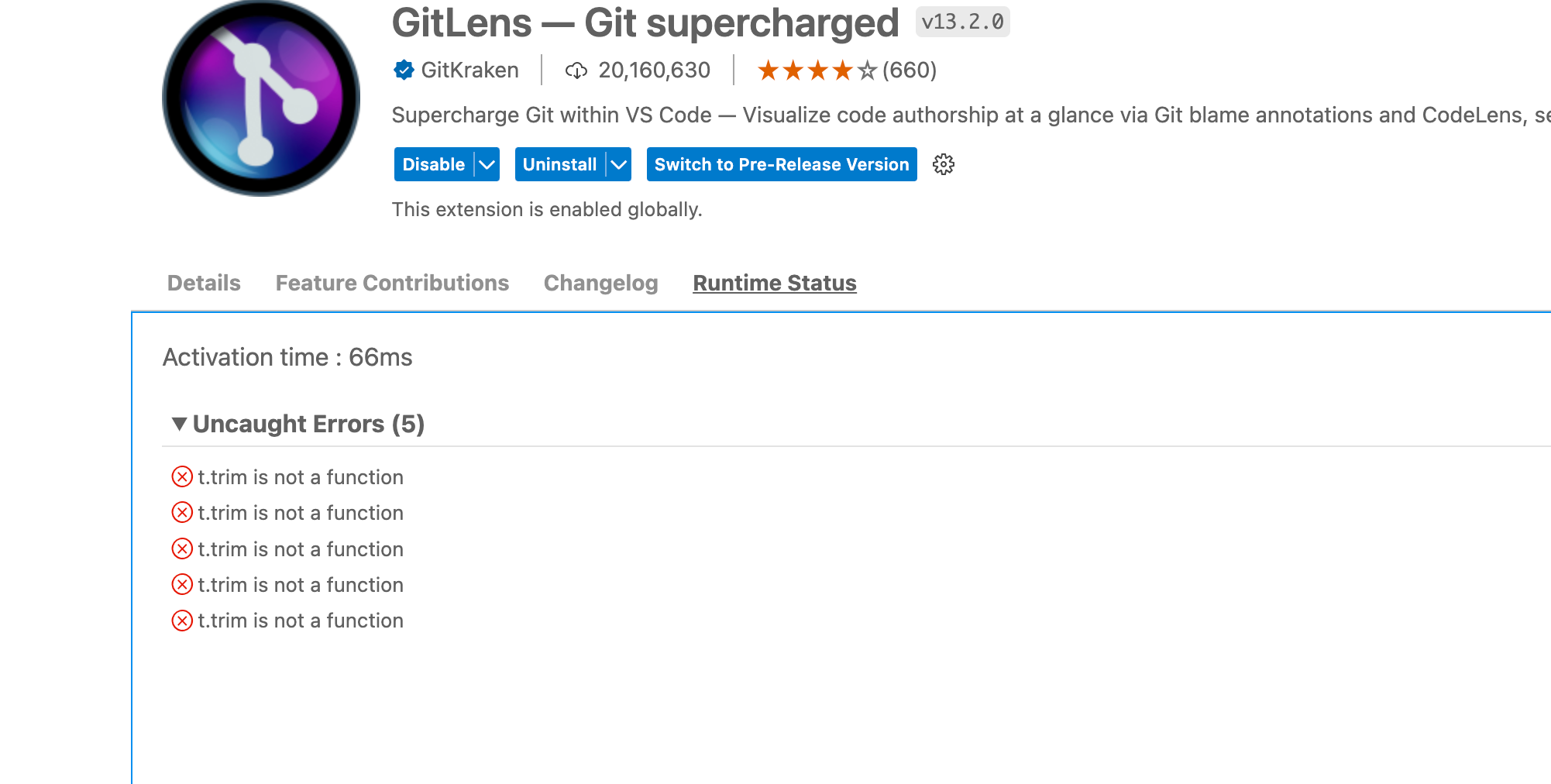

Have the same issue with GitLens v12.2.2 Stops debug. Click on the green debug arrow button does nothing for both VsCode v1.70.0-insider and v1.74.3
11.6.1 works fine
That happens in NodeJs / Typescript ENV, debug of PHP works fine.

Please make sure you are using the latest version of GitLens (or ideally the latest pre-release). And then can you please add more detail as to the issue you are experiencing and the steps to reproduce it? We need a lot more detail on this as this is not reproducible for us (nor should it actually be possible for GitLens to interfere with VS Code debugging -- though we've seen some VS Code bugs when you open a workspace that has a virtual GitLens folder -- using the Browse feature). A video of the issue could also help understand the problem too.
Also, if this issue is reproducible, can you please enable debug logging by running from GitLens: Enable Debug Logging from the Command Palette (F1 or ctrl/cmd+shift+p). This will enable logging to the GitLens and GitLens (Git) channel in the Output pane.
Once enabled, please reproduce the issue, and attach the log from the both GitLens and GitLens (Git) channels.
Thank you!
This issue needs more information and has not had recent activity. Please provide the missing information or it will be closed in 7 days. Thanks!
![github-actions[bot] avatar](https://avatars.githubusercontent.com/in/15368?v=4 "Published by a pub.dev verified publisher")
Closing this issue because it needs more information and has not had recent activity. Please re-open this issue if more details can be provided. Thanks!
This issue has been automatically locked since there has not been any recent activity after it was closed. Please open a new issue for related bugs.