
vscode-gitlens
 vscode-gitlens copied to clipboard
 gitkraken
gitlens.amod.io opens on install?
GitLens Version
12.1.2
VS Code Version
Version: 1.70.0-insider (user setup) Commit: 13ba7bb446a638d37ebccb1a7d74e31c32bb9790 Date: 2022-07-22T05:17:00.353Z Electron: 18.3.5 Chromium: 100.0.4896.160 Node.js: 16.13.2 V8: 10.0.139.17-electron.0 OS: Windows_NT x64 10.0.22000
Git Version
Description
The extension tries to open a URL on install which results in the trusted domains dialog and a bad first use experience. It also seems totally redundant considering you open a "Welcome to GitLens" editor
Logs, Screenshots, Screen Captures, etc
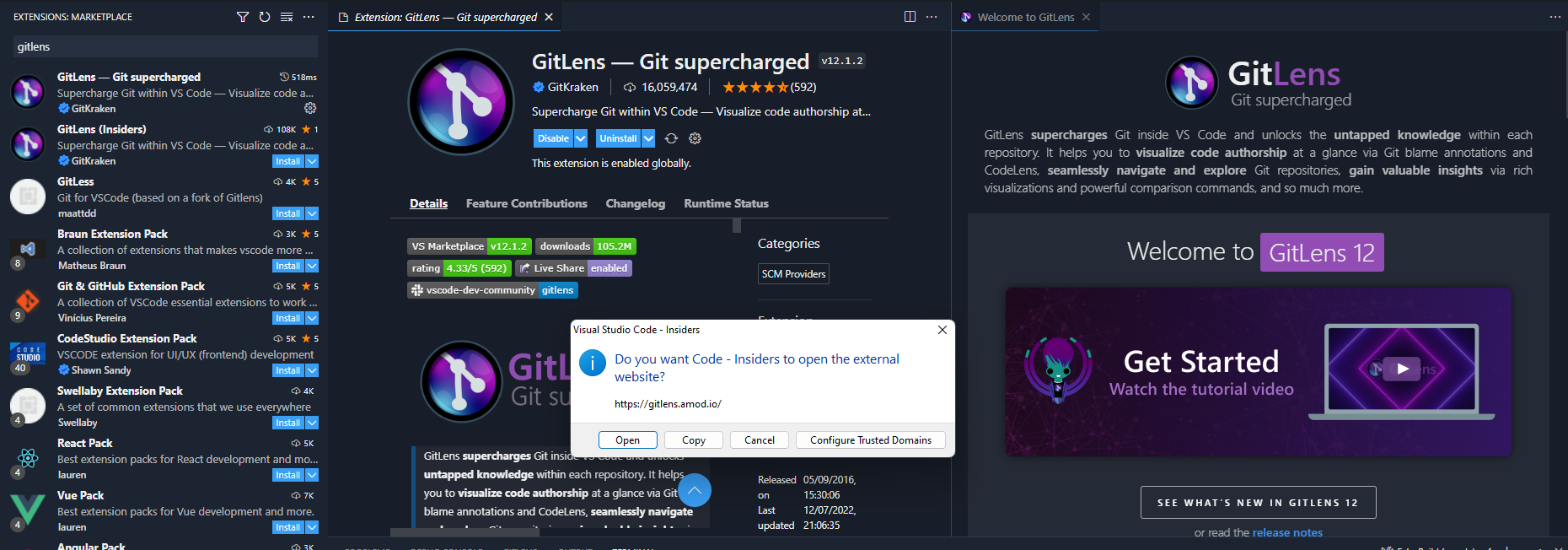

That is 100% not intentional nor desired -- AND I have no idea where that would be coming from (I never try to open any URL automatically) -- and I searched the code an the only place where that URL shows up are links in the web. Can you reproduce this? Do you have steps?

No repro, but the welcome page doesn't open there either so I'm assuming there's some caching. My steps were just search for gitlens and press install after not having it installed for several months
Hrm, I'll do some more digging, but at a loss as to how this would happen. Unless you accidentally clicked on the What's new link or something.
I was thinking maybe an accidental click but I don't know how that would happen, not even sure what link points at that. The What's new link points at https://www.gitkraken.com/blog/gitlens-12-1
The release notes link right below the bigger button goes to the gitlens.amod.io URL
The screenshot shows the state of the window when it happened, so that button is off screen 🤷
Pretty certain I didn't double click and that's so far from the install button. Seems like there's no repro so something weird must have happened, feel free to close
This issue has been automatically locked since there has not been any recent activity after it was closed. Please open a new issue for related bugs.
![github-actions[bot] avatar](https://avatars.githubusercontent.com/in/15368?v=4 "Published by a pub.dev verified publisher")