

 gitkraken
Interactive rebase editor not opening git-rebase-todo properly
Issue Type: Bug
About every other time I start an interactive rebase (from a terminal) the editor comes up empty (No commits to rebase). However, the editor tab has an unsaved-indicator and if I inspect the contents of .git/rebase-merge/git-rebase-todo by other means, the file looks OK.
When aborting the rebase from the editor, the editor closes but I get an error notification stating
Failed to save 'git-rebase-todo': The content of the file is newer. Please compare your version with the file contents or overwrite the content of the file with your changes.
which I dismiss by choosing Overwrite. This finally aborts the rebase with the usual terminal message "error: nothing to do".
The GitLens log only outputs a line at the very end of this process:
[~/example/.git/rebase-merge] Git Command failed: /usr/bin/git -c core.quotepath=false -c color.ui=false rev-parse --show-toplevel • this operation must be run in a work tree • 16 ms
To me, this seems like a race condition. Like GitLens is reading the contents of the file before git finished writing or something like that. I could not reproduce this problem when using the plain text editor.
Extension version: 11.2.1 VS Code version: Code 1.53.2 (622cb03f7e070a9670c94bae1a45d78d7181fbd4, 2021-02-11T11:48:44.518Z) OS version: Linux x64 5.4.0-65-generic snap
System Info
| Item | Value |
|---|---|
| CPUs | AMD Athlon(tm) II X4 635 Processor (4 x 800) |
| GPU Status | 2d_canvas: enabled gpu_compositing: enabled multiple_raster_threads: enabled_on oop_rasterization: disabled_off opengl: enabled_on protected_video_decode: unavailable_off rasterization: disabled_software skia_renderer: enabled_on video_decode: disabled_software vulkan: disabled_off webgl: enabled webgl2: enabled |
| Load (avg) | 1, 1, 1 |
| Memory (System) | 11.70GB (0.29GB free) |
| Process Argv | . --no-sandbox --crash-reporter-id d34e3cdb-1dc7-4dd6-8553-78926379d0e2 |
| Screen Reader | no |
| VM | 0% |
| DESKTOP_SESSION | ubuntu |
| XDG_CURRENT_DESKTOP | Unity |
| XDG_SESSION_DESKTOP | ubuntu |
| XDG_SESSION_TYPE | x11 |

@raphinesse Are you still seeing this? Does it happen every time? Are you using Linux directly or via remote?

Yes, I'm still seeing this. I work on a local Linux host.
Regarding the frequency: the behavior above occurs almost every time I start a given interactive rebase for the first time. If I try it a second time right after that it always works.
I also see this issue when I type:
git rebase -i <commit-id>
But when I use the UI and choose a Commit in "Commits" and the option "Rebase Current Branch onto Commit..." and I select "Interactive Rebase" it works as expected. But the command issued is this:
git -c sequence.editor="code --wait --reuse-window" rebase --interactive <commit-id>
If I issue the same command manually it also works

This issue needs more information and has not had recent activity. Please provide the missing information or it will be closed in 7 days. Thanks!
![github-actions[bot] avatar](https://avatars.githubusercontent.com/in/15368?v=4 "Published by a pub.dev verified publisher")
I think the requested information has been provided. This is still very much an issue for me.
Is there anything I can do to move this forward?
This issue needs more information and has not had recent activity. Please provide the missing information or it will be closed in 7 days. Thanks!
This seems to be related to my issue on macOS with missing "unsaved" tabs after a duplicate git-rebase-todo tab: https://github.com/microsoft/vscode/issues/118556

Another symptom of this problem (only happens in projects where I use the interactive rebase editor):
When I want to start an interactive rebase, I sporadically get this error:
fatal: It seems that there is already a rebase-merge directory, and
I wonder if you are in the middle of another rebase.  If that is the
case, please try
    git rebase (--continue | --abort | --skip)
If that is not the case, please
    rm -fr ".git/rebase-merge"
and run me again.  I am stopping in case you still have something
valuable there.
Where the only solution is rm -fr ".git/rebase-merge" since git rebase --abort will abort with the error
warning: could not read '.git/rebase-merge/head-name': No such file or directory
@mnoorenberghe @raphinesse Can you provide steps for how to reproduce this? I can't seem to get it to happen.
I might be onto something. After initiating a rebase with git rebase -i something and making the desired changes in the editor, I usually start the rebase like I always have done with the regular text editor too: using save & close (i.e. Ctrl-S, Ctrl-W). This triggers the described problem and leaves open git-rebase-todo editors behind, as described by @mnoorenberghe.
If I start the rebase using the provided buttons or their respective shortcuts, this does not seem to happen. I'll report back after some more testing.
My testing up until now seems to confirm that this problem only occurs on an interactive rebase when the editor for the interactive rebase preceding it had been closed using Ctrl-S, Ctrl-W.
So maybe all we need is an onclose handler that does something similar to whatever is being done on Ctrl-Enter.
Ah, I do use (Command/Ctrl-S +) Command/Ctrl-W to close the tab so that's probably the cause. I have to close the tab this way since the UI seems broken for noop rebases (a rebase where there is nothing new upstream). I wish Git wouldn't open the git-rebase-todo at all in that case but when it does open in GitLens the buttons are disabled IIRC.
This seems to be related to my issue on macOS with missing "unsaved" tabs after a duplicate git-rebase-todo tab: microsoft/vscode#118556
I encountered the same thing today, yeah, the duplicate tab is the cause for me, after i closed the tab, the rebase UI finally appears.

It's also happening on Mac.
The interactive rebase does not work, unless I already had a tab open before running git rebase -i. It seems like the bug is triggered only when there aren't any active windows open.


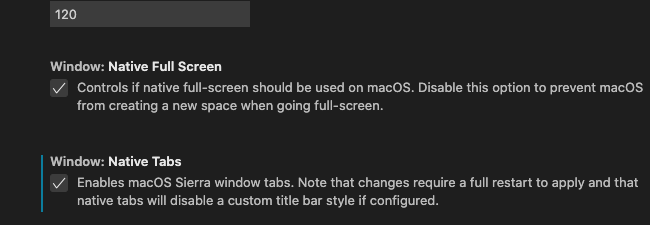
In case it's relevant, I have native windows and tabs enabled. I tried disabling them, but got the same issue.

Try setting VSCode as your default git editor. Worked for me. In your .gitconfig: [core] -- editor = code -n -w

Try setting VSCode as your default git editor. Worked for me. In your .gitconfig: [core] -- editor = code -n -w
i use
[core]
	editor = vim

[core] editor = code -n -w
This worked for me but if I remove -n then I get the same issue: Unable to open 'git-rebase-todo'
I'm not using GitLens for this btw, so I don't really think it's a GitLens issue.


I have the same problem when using GitHub codespaces, I have no way of editing past commits due to this.

[core] editor = code -n -w
This works. However it opens the git-rebase-todo file in a new window due to the -n argument.
Changing this to [core] editor = code -r -w works without opening a new window. Also, when an interactive rebase is started from any terminal without an existing VSCode window open, then this opens a new window.
A more generic way to set this is via the git CLI using git config --global core.editor "code -r -w". Omit the --global if you do not want VSCode to be the editor for all git repositories system-wide.

[core] editor = code -n -w
Changing this to
[core] editor = code -r -wworks without opening a new window.
Sadly -n work for me but not -r

[core] editor = code -n -w
Changing this to
[core] editor = code -r -wworks without opening a new window.Sadly
-nwork for me but not-r
Faced same problem. Restart of VS Code solved issue

[core] editor = code -n -w
Changing this to
[core] editor = code -r -wworks without opening a new window.Sadly
-nwork for me but not-r
This worked for me as well (BUT NOT the -r)

This worked for me 👇 I see the list of commits in the interactive rebase editor within VS Code.
git config --global sequence.editor "code --wait --reuse-window"
https://stackoverflow.com/a/67531714

I had this issue on Ubuntu 22.04 and git 2.34.1 after typing git rebase -i --root (or any other commit id) when the default editor was gedit.
Once I switched to Kate, the error disappeared.

This worked for me 👇 I see the list of commits in the interactive rebase editor within VS Code.
git config --global sequence.editor "code --wait --reuse-window"https://stackoverflow.com/a/67531714
Thanks for this!
In general, it seems the GitLens rebase editor continues to run into limitations, inconsistencies, and issues compared to vanilla git. 😢
If it's going to enable itself by default (when the extension is installed), it would really be nice if stuff like this was rock-solid and compatible with the vanilla git "UI" out of the box.
(As for myself, I'm probably going to disable it again. After this many issues, I'd rather just stick with the vanilla text editing experience.)
For anyone who runs into a similar issue, switching to the Pre-release Version for the GitLens extension fixed my issues.
Running on MacOS.
In my .gitconfig I have:
[core]
  editor = code --wait
Attempting to change the .gitconfig using any of the commands above resulted in some wonky behavior i.e. interactive editor opening in new window, not showing any commits (blank screen), or an error saying Unable to open 'git-rebase-todo' .... File not found

The Unable to open 'git-rebase-todo' .... File not found error started showing up with the latest version (13.5.0).
Downgrading to 13.4.0 solved the issue. It's possible that the solution was the downgrade in combination with adding the core and sequence configs mentioned in this thread, as I have't tried without those configs in place.

For anyone who runs into a similar issue, switching to the
Pre-release Versionfor the GitLens extension fixed my issues. Running on MacOS.
I encountered exact same problem and your solution truly works. Thanks much.

Nothing worked for me except downgrading the git lens version to 13.4.0. Thanks @GAV1N
