
docs
 docs copied to clipboard
 github
Add necessary bits to install and enable copilot.
No need to send users down the rabbit hole of how many legacy ways to install vim plugins... Simply direct them to use the new builtin nvim plugin support.
Why:
Closes 19579
What's being changed (if available, include any code snippets, screenshots, or gifs):
add necessary steps to docs
Check off the following:
- [x] I have reviewed my changes in staging (look for the "Automatically generated comment" and click the links in the "Preview" column to view your latest changes).
- [x] For content changes, I have completed the self-review checklist.
Writer impact (This section is for GitHub staff members only):
- [ ] This pull request impacts the contribution experience
- [ ] I have added the 'writer impact' label
- [ ] I have added a description and/or a video demo of the changes below (e.g. a "before and after video")

Thanks for opening this pull request! A GitHub docs team member should be by to give feedback soon. In the meantime, please check out the contributing guidelines.
![welcome[bot] avatar](https://avatars.githubusercontent.com/in/4141?v=4 "Published by a pub.dev verified publisher")
Automatically generated comment ℹ️
This comment is automatically generated and will be overwritten every time changes are committed to this branch.
The table contains an overview of files in the content directory that have been changed in this pull request. It's provided to make it easy to review your changes on the staging site. Please note that changes to the data directory will not show up in this table.
Content directory changes
You may find it useful to copy this table into the pull request summary. There you can edit it to share links to important articles or changes and to give a high-level overview of how the changes in your pull request support the overall goals of the pull request.
| Source | Preview | Production | What Changed |
|---|---|---|---|
copilot/getting-started-with-github-copilot/getting-started-with-github-copilot-in-neovim.md |
fpt ghec |
fpt ghec |
fpt: Free, Pro, Team ghec: GitHub Enterprise Cloud ghes: GitHub Enterprise Server ghae: GitHub AE
![github-actions[bot] avatar](https://avatars.githubusercontent.com/in/15368?v=4 "Published by a pub.dev verified publisher")
Is the failing test working properly? I forked the docs repo to create a pull request which does not contain any new repo reference and my fork is public https://github.com/georgalis/docs yet,
FAIL tests/meta/repository-references.js (17.464 s, 537 MB heap size)
  ● check if a GitHub-owned private repository is referenced › in file content/copilot/getting-started-with-github-copilot/getting-started-with-github-copilot-in-neovim.md
what repository reference does the failing test refer to?
@georgalis Thanks so much for opening a PR! I'll get this triaged for review ✨

@djensenius @janiceilene just curious, this documentation fixup, and revision per feedback, has been open over 5 weeks? seems a long time for low hanging fruit?
@georgalis Thanks for checking in on this one. Your PR is on the board and waiting for review. A writer will get eyes on it soon. 👀
We appreciate your patience as we catch up on the summer backlog. 💛

Hi @georgalis 👋🏻 I've made a couple of small changes to simplify the language and apply the changes across all 3 operating systems. I've got a follow up PR for the install-copilot-in-neovim reusable, which - once it's merged - will read:
- To use {% data variables.product.prodname_copilot %} in Neovim, install the {% data variables.product.prodname_copilot %} plugin. You can either install the plugin from a third party plugin manager or from Neovim's built in plugin manager. For more information on third party plugin managers, like vim-plug or packer.nvim, see the documentation for the plugin manager. For example, you can see the documentation for vim-plug or packer.nvim.
Which will then be followed by your updated installation step:
- To install {% data variables.product.prodname_copilot %} with a plugin manager, enter the following command in Terminal.
  ```
  mkdir -p ~/.config/nvim/pack/github/start
  git clone https://github.com/github/copilot.vim \
           ~/.config/nvim/pack/github/start/copilot.vim
  ```
If that sounds okay to you, I'll go ahead and get those changes merged?

Hi @jules-p that explicitly reverts the key language of my change. Neovim has a built in plugin manager. Keep it simple, use that, and indicate alternate managers will also work if they are preferred.
If you suggest a 3rd party plugin manager first, anyone that doesn't know how to use one already will research and find a ton of options and began an evaluation process. Which one is best? How best to implement? All the integration options don't help new users. Fine to keep that door open but there is no reason to send new users down that road.
The neovim solves the world of vim plugin manages with a built in one. There is no need to introduce new copilot users to legacy plugin manager options of vim.
Guide new users onto the simple path. If they want a different plugin manager, let it be their prerogative.
Hi @georgalis, I see what you're saying. I'm happy to highlight the built-in plug-in manager first, although I don't think we want to entirely obscure the other paths. Would something like this 👇🏻 address your concerns?

Hi @jules-p, in your revision, method 1 and 3 are the same thing.
...there are so many other plugin managers that will work (for example pathogen is what I use for vim), you are more likely to exclude a user's first choice than include it. With vim, users need to know what they want for plugin managers, choosing one is an entire project. So, I recommend offering to use the neovim method directly and just offer the option of using a 3rd party plugin manager, too.
Hi @georgalis, how does the below work for you? I'll make suggested changes to align with this, if you're on board, feel free to commit those suggestions.
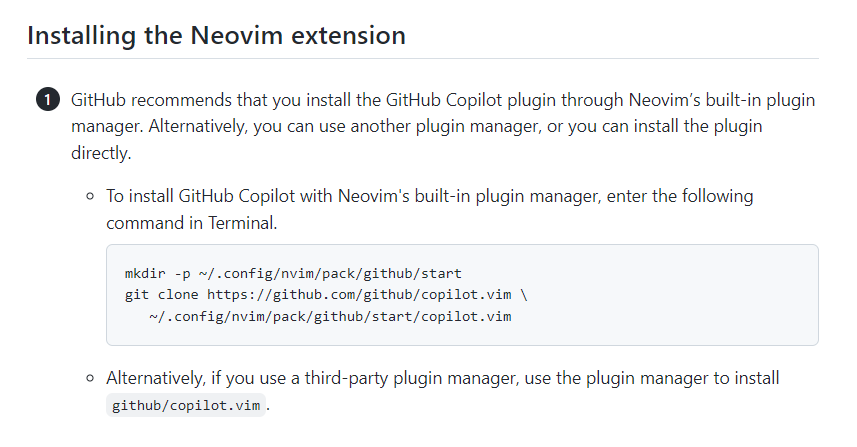
Hi @georgalis, I've commited the necessary changes, except for the updates to the {% data reusables.copilot.install-copilot-in-neovim %}, which I can't access in your fork, and which currently contains the introduction to the first step, and the first sub bullet point (which is no longer required). If you could please update this file, replacing the current content with the following content, that would be great:
1. {% data variables.product.prodname_dotcom %} recommends that you install the {% data variables.product.prodname_copilot %} plugin through Neovim’s built-in plugin manager. Alternatively, you can use another plugin manager, or you can install the plugin directly.
If you look at the article in staging you'll see that it has automatically detected the code block, and the fence posts are not required in this instance.
Hi @jules-p, thanks for clearing that up. Hopefully this refactor will cover all the bases. In the macro you asked about, I removed specific plugin managers (search for best vim plugin manager for why), and added another macro for the config/enable text. 🎉
No need to send users down the rabbit hole of how many legacy ways to install vim plugins... Simply direct them to use the new builtin nvim plugin support.
I'd be remiss not to point out most users do not consider plugin managers to be legacy. They handle a lot more than the Neovim built-in—namely installation and upgrading—and indeed some of them were created after the built-in support was added. But I think the one sentence acknowledgement here is sufficient.
Note that since the creation of this PR, copilot.vim gained support for vanilla Vim in addition to Vim, and that necessitates the use of different installation paths. But I wouldn't let that delay shipping this; we can circle back on that later.

Thanks very much for contributing! Your pull request has been merged 🎉 You should see your changes appear on the site in approximately 24 hours. If you're looking for your next contribution, check out our help wanted issues :zap: