

 github
Bring back the GitHub Copilot in the CLI commands to not break workflows
Describe the feature or problem you'd like to solve
The Copilot in the CLI has been a regular part of my workflow, always useful for getting very quickly a command on the fly or explaining one. Bringing it back here would be a massive W.
Proposed solution
You could add the old features through either a command (/suggest, /explain), or directly with flags. The further behavior (copy/execute/refine) should be ideally kept.
Example prompts or workflows
Here are some prompts I did use :
copilot --suggest "in powershell, how to reload the profile ?"
copilot --suggest "pwsh 7, windows, from the current directory and going recursively, list all folders containing files ending in '.fxp', echo the full path"
copilot --suggest "pwsh 7, recursively list all file extensions"
copilot --explain "ls -Ahosp --color=always --group-directories-first"
Additional context
No response

Thanks for the feedback! I totally agree we should bring slash commands/quick flags to explain/suggest commands.
I would also like to plumb up smaller, more focused models to service these requests without consuming premium requests!

I was puzzled that this was no longer working anymore but indeed it's one core productivity gain that is gone. What I did was use zsh-github-copilot plugin and then create a simple binding
bindkey '^\' zsh_gh_copilot_suggest
What does this do?
I can type: gcloud give me all vm's that have the following tag - press keyboard shortcut and I get the question replaced by the response.
I honestly don't care about all the fluff of what it does - just the command. Hopefully this is something we can bring back!

@RyanHecht bumping this since https://github.com/github/gh-copilot/releases/tag/v1.2.0
Now that we've shipped custom agents, you can technically implement this yourself: https://docs.github.com/en/copilot/how-tos/use-copilot-agents/coding-agent/create-custom-agents
Would you mind taking a look and letting me know if this is sufficient?

@EvanBoyle
Now that we've shipped custom agents, you can technically implement this yourself
Maybe I am missing something but I did not find out how to:
- Use small LLM models which do not consume premium requests.
- Remove the requirement of
copilotfor access to the current working directory. I need a mode which does not depend on the current working directory and which will not access my local files. - An option to not show the LLM usage summary after the answer would be useful.
Also it is disappointing that GitHub said (https://docs.github.com/en/copilot/how-tos/use-copilot-agents/coding-agent/create-custom-agents):
We’re announcing the scheduled deprecation of the GitHub Copilot in the CLI extension for GitHub CLI (i.e., gh-copilot) which will stop working on October 25, 2025. This extension’s capabilities are being replaced by the new GitHub Copilot CLI, a fully agentic AI assistant that provides the full power of Copilot’s coding agent locally in your terminal.
but GitHub Copilot CLI is a very different tool for different use cases and it does not replace the capabilities of gh-copilot. The depreciation statement is simply wrong. Also gh-copilot was discontinued even before GitHub Copilot CLI was really released. It is still just a preview.

Got it, so you want a mode that just does a 1-shot call to the model, and does not do anything agentic?
Got it, so you want a mode that just does a 1-shot call to the model, and does not do anything agentic?
exactly said, i just want to see only the command, and be able to suggest changes copy to clipboard, or run the command (if shell function is used)
also a faster model instead of defaulting to sonnet 4.5, maybe grok code fast 1 instead, or whatever model the copilot extension used

+1 to this. I don't care how it's implemented - maybe Github just makes a custom agent or something for simple tasks and bundles it with everything - but a simple way to do ghcs/ghce type stuff would be great.

I had a fun little code session two days ago to sort of replicate the things I'm looking for, but with a local LLM. It is quite slow (the video sped up some parts) since I don't have a dedicated GPU, but this is how I hope perhaps it could look like? (yes this does depend on batcat for syntax highlighting, and rich-cli for markdown rendering)
https://github.com/user-attachments/assets/801b83a6-51e7-41c2-b460-7e7773e36b7b
thank you! it's just a fun project i did back in May
the powershell functions are available in my dotfiles, i did get some help from codex because i didn't know how to make the selector buttons
https://github.com/NSPC911/dotfiles/blob/38b158cd03140348309358cb63d452f9b0ed2b7b/readonly_Documents/PowerShell/Microsoft.PowerShell_profile.ps1#L363-L517


Am i correct to guess that free github users are not be able to use github cli?

Am i correct to guess that free github users are not be able to use github cli?
Nope, GitHub themselves stated this in their post about the extension being archived. Free users should switch to VSCode's Ask Mode for it instead, which obviously isn't the best choice for those who are always in the terminal.
~ https://github.blog/changelog/2025-09-25-upcoming-deprecation-of-gh-copilot-cli-extension/
I made a small replacement in bash using the new copilot cli command. It only covers my workflow, but maybe it can be of use for someone else while waiting for an official solution:
#!/bin/bash
set -e

REQUEST="$*"

PROMPT="\
Return a bash command line that does this: '$REQUEST'. Don't do anything else, \
just translate it to a command line. No other text, just the command line. \
No formatting, no nothing. Just the command line in one line of text.\
"

# Make sure npm is installed
npm --version >/dev/null 2>&1 || { echo "npm is required but not installed. Aborting." >&2; exit 1; }

# Make sure copilot is installed
if ! command -v copilot >/dev/null 2>&1; then
    echo "The 'copilot' command is not installed. Do you want to install it now?"
    read -rp "(y/N): " INSTALL_CONFIRMATION
    if [[ "$INSTALL_CONFIRMATION" == "y" || "$INSTALL_CONFIRMATION" == "Y" ]]; then
        npm install -g @github/copilot
        echo "'copilot' has been installed."
    else
        echo "Cannot proceed without 'copilot'. Exiting."
        exit 1
    fi
fi

# Get the command from copilot
COPILOT_COMMAND=$(copilot --deny-tool 'shell(*)' -p "$PROMPT" 2>/dev/null | head -n 1)

# Offer to run the command
echo "Do you want to run '$COPILOT_COMMAND'?"
read -rp "(y/N): " CONFIRMATION
if [[ "$CONFIRMATION" == "y" || "$CONFIRMATION" == "Y" ]]; then
    eval "$COPILOT_COMMAND"
else
    echo "Command not executed."
fi
Run like this for example: bash scriptname.sh convert all files in this directory to word files

I'm so sad this got removed, this was an excellent feature.
Apparently the only feature I was using with the old copilot cli

I found made free* alternatives for gh copilot suggest and gh copilot explain.
Old answer
Replacing gh copilot suggest
@ricklamers's Shell-AI is my replacement for gh copilot suggest:
declare -A shai_aliases
shai_aliases=(
	['??']=''
	['git?']='git: '
)

for shai_alias in "${!shai_aliases[@]}"; do
	prefix="${shai_aliases[$shai_alias]}"
	func_name="_shai_${shai_alias//[^a-zA-Z0-9]/_}"
	eval "
		${func_name}() {
			uv tool run --from shell-ai shai \"${prefix}\$*\"
		}
		alias '${shai_alias}'='${func_name}'
		"
done
Sample outputs:
-
$ ?? 'fio 20K random write QD64 test in /var/lib/mongo' ? Select a command: ❯ fio --name=mongotest --rw=randwrite --bs=4k --size=10G --time_based --runtime=60 --numjobs=1 --iodepth=64 --directory=/var/lib/mongo Generate new suggestions Enter a new command Dismiss -
$ git? 'show tags, sorted decending version'
? Select a command:
❯ git tag -l --sort=-v:refname
  Generate new suggestions
  Enter a new command
  Dismiss
Replacing gh copilot explain
If you're looking for a replacement for gh copilot explain, I got Claude Opus 4.5 and Gemini 3 Pro to write a pretty good and possibly better alternative to it:
#!/usr/bin/env bash
# explain - Break down a shell command's arguments using an OpenAI-compatible API
#
# Usage:
#   Source:  source explain.sh  (defines the `explain` function)
#   Direct:  ./explain.sh <command>

explain() {
	# Configuration (override via environment)
	: "${EXPLAIN_API_BASE:=${OPENAI_BASE_URL:-${OPENAI_API_BASE:-https://api.groq.com/openai}}}"
	: "${EXPLAIN_API_KEY:=${OPENAI_API_KEY:-${GROQ_API_KEY:-}}}"
	: "${EXPLAIN_MODEL:=${OPENAI_MODEL:-openai/gpt-oss-120b}}"

	# Clean up API Base (remove trailing /v1 if present, as we append it later)
	EXPLAIN_API_BASE="${EXPLAIN_API_BASE%/v1}"
	# Remove trailing slash if present
	EXPLAIN_API_BASE="${EXPLAIN_API_BASE%/}"

	# Colors
	local CYAN='\033[0;36m'
	local WHITE='\033[1;37m'
	local RESET='\033[0m'
	local DIM='\033[2m'

	_explain_usage() {
		echo "Usage: explain <command>" >&2
		echo "       explain -h | --help" >&2
		echo "" >&2
		echo "Environment variables:" >&2
		echo "  EXPLAIN_API_BASE  API base URL" >&2
		echo "  EXPLAIN_API_KEY   API key" >&2
		echo "  EXPLAIN_MODEL     Model to use" >&2
		return 1
	}

	if [[ $# -eq 0 ]] || [[ "$1" == "-h" ]] || [[ "$1" == "--help" ]]; then
		_explain_usage
		return $?
	fi

	if [[ -z "${EXPLAIN_API_KEY:-}" ]]; then
		echo "Error: EXPLAIN_API_KEY is not set" >&2
		return 1
	fi

	local command_to_explain="$*"

	# JSON Schema for structured output (prefix before segment for natural token order)
	local schema
	read -r -d '' schema <<'EOF' || true
{
  "type": "object",
  "properties": {
    "synopsis": {
      "type": "string",
      "description": "A one-line description of what the overall command does"
    },
    "explanations": {
      "type": "array",
      "items": {
        "$ref": "#/$defs/explanation"
      }
    }
  },
  "required": ["synopsis", "explanations"],
  "additionalProperties": false,
  "$defs": {
    "explanation": {
      "type": "object",
      "properties": {
        "prefix": {
          "type": ["string", "null"],
          "description": "Optional text before the segment that forms the start of a sentence"
        },
        "segment": {
          "type": "string",
          "description": "The exact token from the command (direct quote, will be highlighted)"
        },
        "suffix": {
          "type": "string",
          "description": "Text after the segment that completes the sentence"
        },
        "children": {
          "type": "array",
          "items": {
            "$ref": "#/$defs/explanation"
          },
          "description": "Nested explanations for sub-components"
        }
      },
      "required": ["prefix", "segment", "suffix", "children"],
      "additionalProperties": false
    }
  }
}
EOF

	# Prompt template (command will be inserted by jq)
	local prompt_template
	read -r -d '' prompt_template <<'EOF' || true
Explain this shell command by breaking it down into its components.

Command:
```
%s
```

Output format: Each explanation has prefix, segment, suffix, and children.
The output renders as: "{prefix} {segment} {suffix}" where segment is highlighted.
This MUST form a natural phrase or sentence.

IMPORTANT: The "segment" field must contain the EXACT characters from the command above.
Do not escape quotes or special characters differently than they appear in the command.
For example, if the command contains "--force-overwrite", the segment should be exactly "--force-overwrite", not \"--force-overwrite\".

Examples of CORRECT explanations:
  {"prefix": null, "segment": "rsync", "suffix": "is a utility for efficiently transferring files.", "children": []}
  → Renders: "rsync is a utility for efficiently transferring files."

  {"prefix": "The", "segment": "&&", "suffix": "operator runs the next command only if the previous one succeeds.", "children": []}
  → Renders: "The && operator runs the next command only if the previous one succeeds."

  {"prefix": null, "segment": "-v", "suffix": "enables verbose output.", "children": []}
  → Renders: "-v enables verbose output."

  {"prefix": "It transfers files to", "segment": "user@host:/path", "suffix": "via SSH.", "children": []}
  → Renders: "It transfers files to user@host:/path via SSH."

Examples of INCORRECT explanations (do NOT do this):
  ✗ {"prefix": "With", "segment": "-avz", "suffix": "the following options:"}
    → Renders awkwardly: "With -avz the following options:"

  ✗ {"prefix": "Copies", "segment": "file.txt", "suffix": "the local file."}
    → Renders incorrectly: "Copies file.txt the local file."

  ✗ {"prefix": "to", "segment": "host:/tmp/", "suffix": "the remote destination."}
    → Renders incorrectly: "to host:/tmp/ the remote destination."

Rules:
1. "segment" MUST be an exact substring from the command, with no added escaping.
2. "{prefix} {segment} {suffix}" must read as a complete phrase or sentence.
3. Use "children" to break down combined flags (e.g., "-avz" into "-a", "-v", "-z") or control flow (e.g., "for i in {1..10}; do echo $i; done").
4. Keep explanations concise.
EOF

	# Build the prompt using jq to handle escaping properly
	local prompt
	prompt=$(jq -n --arg tpl "$prompt_template" --arg cmd "$command_to_explain" \
		'$tpl | gsub("%s"; $cmd)')

	# Build the request payload (jq handles all JSON escaping)
	local payload
	payload=$(jq -n \
		--arg model "$EXPLAIN_MODEL" \
		--arg prompt "$prompt" \
		--argjson schema "$schema" \
		'{
            model: $model,
            messages: [{ role: "user", content: $prompt }],
            temperature: 0.1,
            response_format: {
                type: "json_schema",
                json_schema: {
                    name: "command_explanation",
                    strict: true,
                    schema: $schema
                }
            }
        }')

	# Make the API request
	local response
	response=$(curl -sS "${EXPLAIN_API_BASE}/v1/chat/completions" \
		-H "Authorization: Bearer ${EXPLAIN_API_KEY}" \
		-H "Content-Type: application/json" \
		-d "$payload")

	# Check for errors
	if echo "$response" | jq -e '.error' >/dev/null 2>&1; then
		echo "API Error: $(echo "$response" | jq -r '.error.message // .error')" >&2

		if echo "$response" | jq -e '.error.failed_generation' >/dev/null 2>&1; then
			echo "" >&2
			echo "Failed generation:" >&2
			echo "$response" | jq -r '.error.failed_generation' >&2
		fi

		return 1
	fi

	# Extract the content
	local content
	content=$(echo "$response" | jq -r '.choices[0].message.content')

	if [[ -z "$content" ]] || [[ "$content" == "null" ]]; then
		echo "Error: Empty response from API" >&2
		echo "Raw response: $response" >&2
		return 1
	fi

	# Render an explanation item
	_explain_render() {
		local json="$1"
		local indent="$2"
		local bullet="$3"

		local segment prefix suffix children

		prefix=$(echo "$json" | jq -r '.prefix // empty')
		local raw_segment
		raw_segment=$(echo "$json" | jq -r '.segment')

		# Workaround: The model sometimes double-escapes the segment (e.g. \"foo\" instead of "foo").
		# If the raw segment isn't found in the original command, try JSON-decoding it again.
		if [[ "$command_to_explain" == *"$raw_segment"* ]]; then
			segment="$raw_segment"
		else
			local decoded_segment
			decoded_segment=$(printf '"%s"' "$raw_segment" | jq -r '.' 2>/dev/null || true)

			if [[ -n "$decoded_segment" ]] && [[ "$command_to_explain" == *"$decoded_segment"* ]]; then
				segment="$decoded_segment"
			else
				segment="$raw_segment"
			fi
		fi

		suffix=$(echo "$json" | jq -r '.suffix')
		children=$(echo "$json" | jq -c '.children // []')

		# Build the line
		local line="${indent}${bullet} "
		if [[ -n "$prefix" ]]; then
			line+="${prefix} "
		fi
		line+="${CYAN}${segment}${RESET} ${suffix}"

		echo -e "$line"

		# Render children
		local child_count
		child_count=$(echo "$children" | jq 'length')
		if [[ "$child_count" -gt 0 ]]; then
			local i=0
			while [[ $i -lt $child_count ]]; do
				local child
				child=$(echo "$children" | jq -c ".[$i]")
				_explain_render "$child" "${indent}  " "•"
				i=$((i + 1))
			done
		fi
	}

	# Render the full output
	echo ""
	echo -e "${WHITE}Explanation:${RESET}"
	echo ""

	# Synopsis
	local synopsis
	synopsis=$(echo "$content" | jq -r '.synopsis')
	echo -e "  ${DIM}${synopsis}${RESET}"
	echo ""

	# Explanations
	local explanations explanation_count
	explanations=$(echo "$content" | jq -c '.explanations // []')
	explanation_count=$(echo "$explanations" | jq 'length')

	local i=0
	while [[ $i -lt $explanation_count ]]; do
		local explanation
		explanation=$(echo "$explanations" | jq -c ".[$i]")
		_explain_render "$explanation" "  " "•"
		i=$((i + 1))
	done

	echo ""
}

# Run directly if not being sourced
if [[ "${BASH_SOURCE[0]}" == "${0}" ]]; then
	set -euo pipefail
	explain "$@"
fi
Sample outputs:
Setup
*Since I don't have a powerful GPU of my own to run local LLMs, I'm using the free tier of GroqCloud. (This is not a sponsored comment; neither Groq, Inc. nor its affiliates have contacted me to influence this post.)
I got an API key and followed the Shell-AI instructions to hook it up with Groq. My explain command above uses the same environment variables.
Shell-AI and explain should be compatible with any OpenAI-compatible API, though, so one may also use a local model with something like Ollama.
* See my comment below for a much more capable and complete replacement for GitHub Copilot in the CLI.

+1 Please bring this feature back.
The old Copilot CLI commands were very useful

+1 Please i really like the suggest to do quick bash commands that i forgot, i dont wanna to run a full CLI Code Tool for that

With the new mistral-vibe tool, I find the models available to be quite fast, so I will try integrating it with my current PowerShell function. I will update this if successful (or not)
Also Mistral is free for 200k tokens, so you don't really need a Copilot subscription for this

Hey everyone!
I took some time to recreate the gh copilot suggest (ghcs) and gh copilot explain (ghce) experience that we're all missing.
Introducing… shell-ai suggest and shell-ai explain!
Pre-compiled binaries are on the releases page, and all you need to get started is an OpenAI-compatible API provider. For example, if you already have Ollama installed, you can run something like env SHAI_API_PROVIDER=ollama OLLAMA_MODEL=gpt-oss:120b-cloud shell-ai suggest -- get system boot time in UTC without further configuration:
deltik@andie2 [~]$ env SHAI_API_PROVIDER=ollama OLLAMA_MODEL=gpt-oss:120b-cloud shell-ai suggest -- get system boot time in UTC
Select a command:
  [1] date -u -d "@$(($(date +%s) - $(awk '{print int($1)}' /proc/uptime)))" +"%Y-%m-%d %H:%M:%S %Z"
   2  date -u -d @$(awk '/btime/ {print $2}' /proc/stat)
   g  Generate new suggestions
   n  Enter a new command
   q  Dismiss

↑↓/jk navigate • key/Enter select • Esc cancel
It's a mostly-compatible drop-in replacement for @ricklamers's Shell-AI with lots of extra enhancements that I hope make it better than both ghcs and ghce.
Showcase
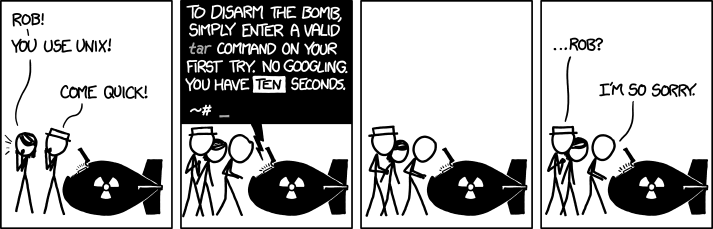
Suggest: XKCD #1168 (tar)
 |
|---|
 |
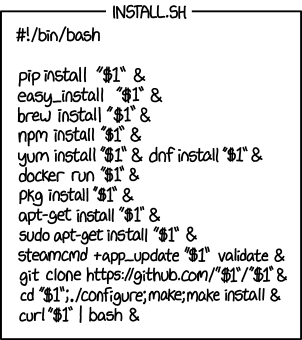
Explain: XKCD #1654 (Universal Install Script)
 |
|---|
 |
Multilingual: Danish Skills (Flersproget: Danskkundskaber)

Challenging Tasks
| Suggest | Explain |
|---|---|
 |
 |
CC: the interested parties @franzbischoff, @vbrozik, @EDM115, and @Brayozin