

 github
Indent issue after commit and pushing changes to remote
Hello! Please read the contributing guidelines before submitting an issue regarding the GitHub Extension for Visual Studio.
- GitHub Extension for Visual Studio version: latest
- Visual Studio version: 2017
I have a connection in VS2017 to a repository in github, in this case I pulled the master, created a local branch and then pushed this branch to remote and the performed a commit > pull > push to get my changes into the remote branch.
Then I asked a colleague to review a pull request and he found indent issues yet when I compared the suspect file github was reporting I found the source file indentation is correct (see the screenshot provided).
I am on Windows 10 Enterprise, Visual Studio 2017 with CodeRush, Codemaid and Roslynator2017 add-ins.


Hi Vurso,
To clarify, when you view the file in Visual Studio the indentation is correct, but when you view it on GitHub.com or your colleague views it in the PR within Visual Studio it is incorrect?
When you are in your Visual Studio, are there any changes still outstanding that might have gotten rid of that extra indentation after the last commit/push on accident?
It doesn't seem like the GitHub for Visual Studio extension would have any effect on indentation within a code file. Was this the only change you made? It looks like from your screen shot there were others?

I noticed this today as well. The indentation on the pull request is off on dotcom, but in Visual Studio it appears just fine.
I also notice when I do a git diff from the command prompt before pushing changes that the indentation is off, so this is happening before changes even get to GitHub which is making me think this is a Visual Studio issue.


@grokys I noticed this while reviewing changes in this PR: https://github.com/github/ghfvs-ui-automation/pull/18/files#diff-936a51a4872ed2a515d0ba485eb88345
The diff view here is different than it appears in Visual Studio.
doctom

VS

This appears to be a tabs vs spaces issue. GitHub is showing tabs as 8 chars but I'm guessing in VS they're only 4. In @meaghanlewis's example spaces appear to have been replaced with tabs. I wonder if that's a VS defaults setting?

Sorry for the late response having this issue again.
meaghanlewis screenshot is exactly what I get; Investigating this further.

Found this StackOverflow answer not sure how relevant it is going to try it anyhow:
https://stackoverflow.com/a/14759913/4826364
I resolve this by selecting the offending lines and then going to VS 2017 menu > Edit > Advanced > Untabify option.
Its still a pain in the bum'ole because I have to do a PR and then review the github comparison to see if everything looks cool prior to a merge.
@tahirk-atos,
I'd definitely recommend the Format document on Save extension by @mynkow:
https://marketplace.visualstudio.com/items?itemName=mynkow.FormatdocumentonSave
I have it enabled for .cs files and it saves my PRs from many formatting related inconsistencies. 😉 It should also work for turning tabs into spaces (or whatever settings you use).
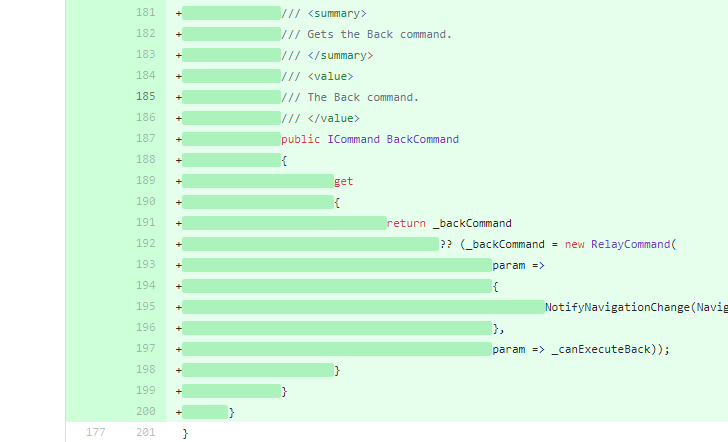 Just made things a lot worse for me. Going to look into that extension later when I have some time for now going to stick to the manual Untabify method.
@vurso, @tahirk-atos,
Then I asked a colleague to review a pull request and he found indent issues yet when I compared the suspect file github was reporting I found the source file indentation is correct (see the screenshot provided).
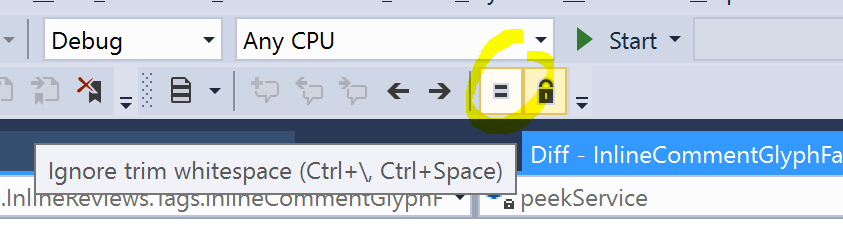
There's an option in Visual Studio's diff view to ignore whitespace. This option is on by default. You might want to turn it off if you want to catch unintended whitespace changes.
I have the same basic issue. When I look at the file locally, it is indented correctly (2 spaces). A colleague doing a fresh install, also sees the correct indentation locally. However, when I look at the same file in gitlab while reviewing the MR, it is indented incorrectly (8 spaces), and the web IDE indents it 4 spaces.
https://screencast.com/t/H8ZABZ4AzDOM

I'm also having this issue. Any solutions that don't involve converting tabs to spaces?

Hi all, I'm a little bit confused. Some of these issues relate to Visual Studio, some to GitHub.com, some to other editors and some even to GitLab(!!) so I'm having a hard time working out what the problem actually is.
When displaying files on GitHub.com, tabs will display as 8 spaces. when displaying them in Visual Studio, they should display as whatever your tab spacing is set to. The example @meaghanlewis posted appears to be a case of this.
Is this not what is happening? Could someone send me a link to a PR that demonstrates their problem?
@grokys I filed this issue and got a response that it's the result of using tabs and not spaces. Thank you though for following up and offering your help. Mystery solved 👍

And now you know why Apple, Google, Mozilla, Facebook, AirBnb, and other big engineering companies all use spaces instead of tabs in their style guides 😉
PS: this is joke. The real point of this post is to demonstrate a design issue in github which I'm sure many of you will run into in a moment.

So what is the solution to this problem? Can anyone guide me to a quick fix to this problem? As I am facing the same problem? In my ide indentation is 4 spaced, but when I type git diff, indentation appears to be of space 8

Any updates on this? Just experienced this issue myself (exactly how @umang-rapido described it)

just open command palette [ctrl + shift + p] > type and select "convert indentation to spaces" that's it

I had the same issue. I can solve this changing the tabs to spaces and re indent every line!

Faced the same issue just now.
Here are vscode specs: Version: 1.49.0 (user setup) Commit: e790b931385d72cf5669fcefc51cdf65990efa5d Date: 2020-09-10T13:22:08.892Z Electron: 9.2.1 Chrome: 83.0.4103.122 Node.js: 12.14.1 V8: 8.3.110.13-electron.0 OS: Windows_NT x64 10.0.19041

Hello Everyone, Think I have found a walk around for this issue.
So far haven't succeed to find the way to do whole project at once yet But file by file - it can be done, directly from GitHub.
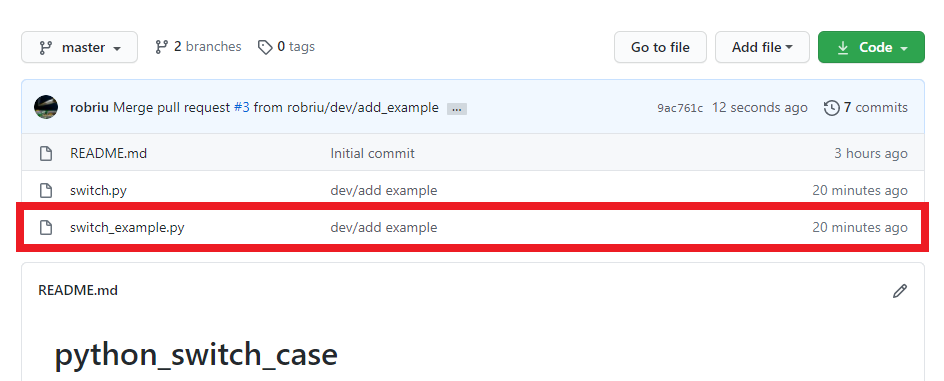
- Navigate to your repo and select a file.
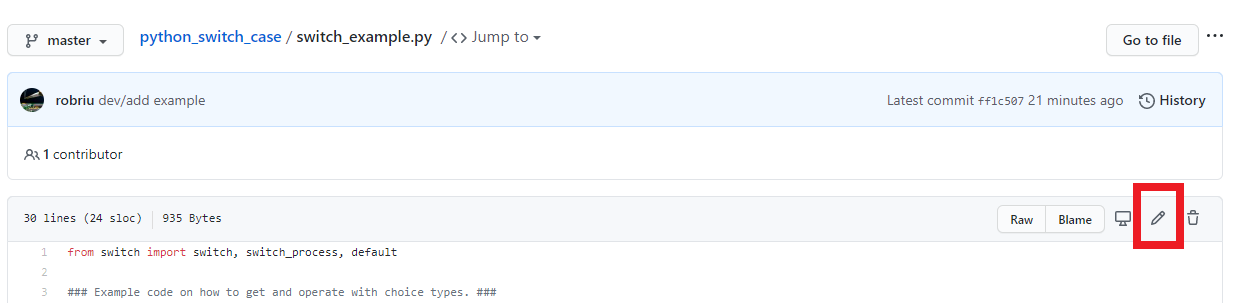
- Press a pen icon to change the file.

- You can find a menu to fix the formatting issue.
Hope that will help somebody out!
If anyone is having the same issue, according to this similar issue, you can change indent from your personal settings and in the file and in the PR it will show correct indent as you set it to be.


I came across this thread while trying to solve a similar issue with Xcode.
It turns out issue is not only with the number of spaces, but if those spaces are spaces OR true "tabs" ie, there is a settings in Xcode which says:
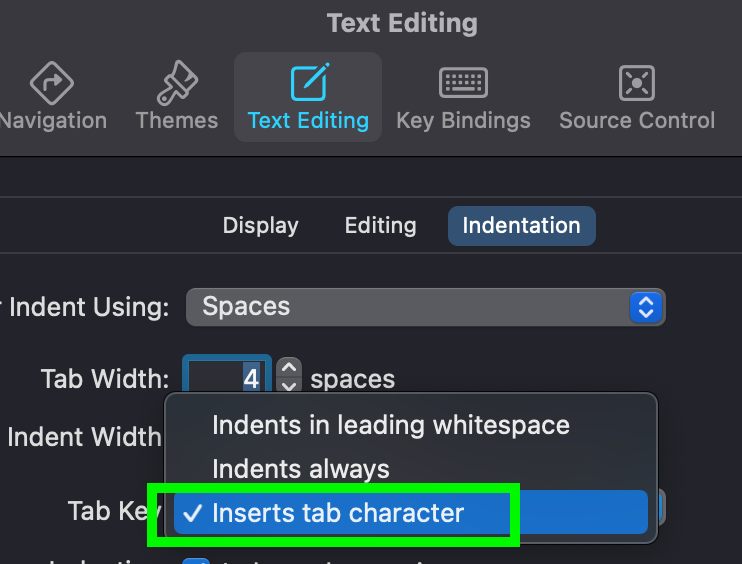
Wrong setting was "indents in leading whitespace"
This can also be seen if you include "invisibles" in your editor options.

You can clearly see the difference in encoding of spaces or full tabs :)
I know this is a different IDE but hope this helps as issue seems to be identical.

@roblack I also have the same issue but Xcode behaviour does not change whether I chose "indents in leading.." "indents always" or "inserts tab char"
I still get the same crap!
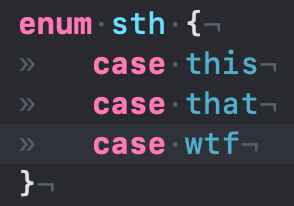
any idea?

I had the same issue for a few days when I turned off this setting, when it is unchecked, and you press tab it doesnt add spaces for your tab, so when you push to github it appears like 8 spaces, but if you check it then every tab has will have spaces, so in github there will be no issue, just go to VScode preferences and search for "Insert Spaces" and check it


https://stackoverflow.com/a/14759913/4826364
This really helped, thanks!
