

 gitextensions
GPG Improvemments
Feature description
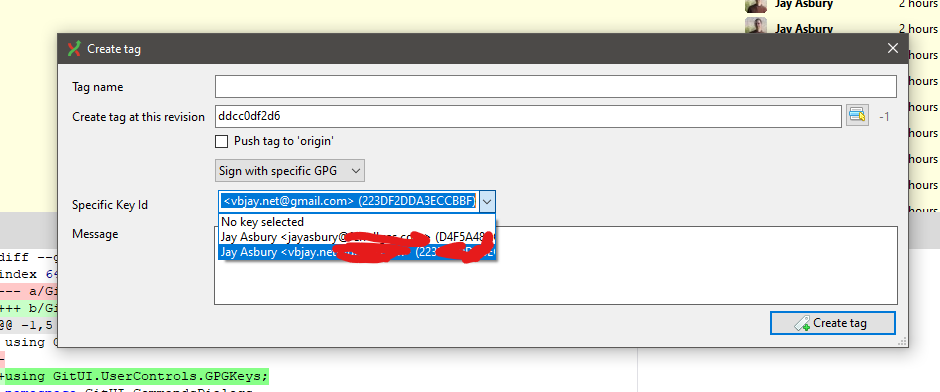
- Make a control that allows the user to pick a gpg key from the result of
gpg -K --with-colons- Create Tag Form
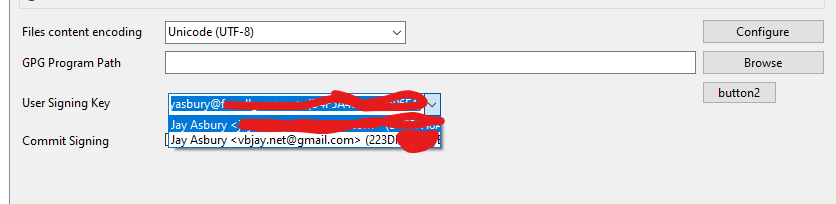
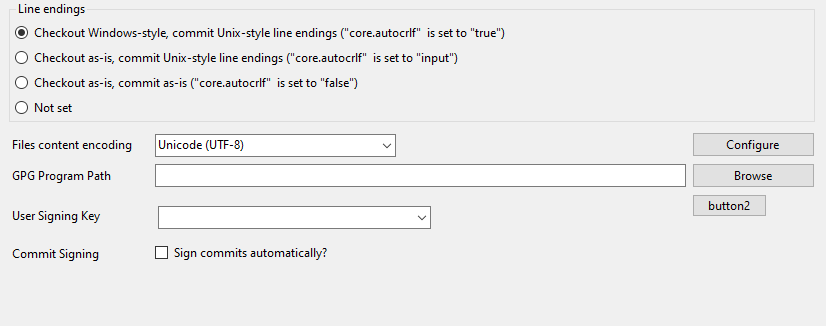
- Git config settings page
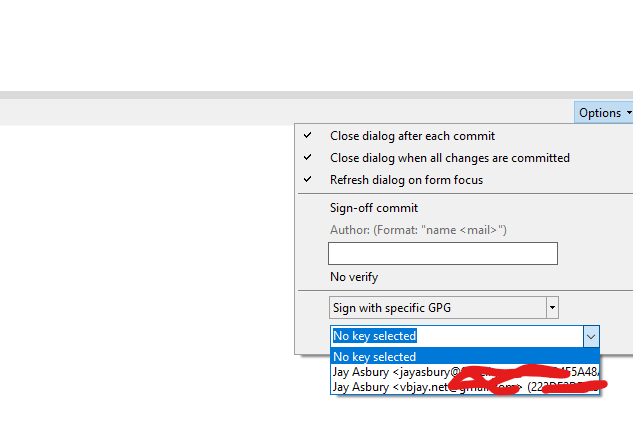
- commit dialog
- Allow user to configure git signing configurations in settings ui
-
git config commit.gpgsign -
git config user.signingkeyUse mentioned control above here -
git config gpg.program
-
- In commit dialog default the signing ui in options drop down to sign with default key if user has commit.gpgsign set to true
Environment
- Git Extensions 3.3.1.7897
- Build 5a97671645532bcedc443bac7b727f40db47cb5c
- Git 2.24.0.windows.2
- Microsoft Windows NT 10.0.18363.0
- .NET Framework 4.8.4075.0
- DPI 96dpi (no scaling)

gpg -K --with-colons parsing proved by https://gist.github.com/vbjay/5d671be6228553baebb087c0241db730 with a little improvement on getting the correct fpr still needed. I will be able to implement this to gather the needed info. User will be able to select from a dropdown the key they want and the key id will be used.
See https://github.com/gpg/gnupg/blob/master/doc/DETAILS for reference on the format of the output.
@mstv @RussKie @gerhardol
Wanted to check in on this.
The below settings would be really great to have.
Allow user to configure git signing configurations in settings ui
git config commit.gpgsign
git config user.signingkey Use mentioned control above here
git config gpg.program

@vbjay Has done some work in #10473 , not trivial Need reviewing by GPG users.

@vbjay Has done some work in #10473 , not trivial Need reviewing by GPG users.
https://github.com/gitextensions/gitextensions/pull/10473#issuecomment-1488441213
Been swamped with major projects at work. I still plan on continuing. Just time and energy.
@mstv @RussKie @gerhardol
Wanted to check in on this.
The below settings would be really great to have.
Allow user to configure git signing configurations in settings ui
git config commit.gpgsign
git config user.signingkey Use mentioned control above here
git config gpg.program
That's the plan for part 2. see GitSigningv2 branch on my fork. I plan on getting settings taken care of after all the ui and doing something like it with what I have currently developed and using the current controls and such I already built up.
Rebased work minus rebase form work to get current. Rebase from was changed a lot so I will need to rework that form. I'll see if I can work on this on the weekend.
Kick tires time. Everyone wanting to try it out try #10473 the build there. What is out of scope with part 1 is settings manipulation. I plan on building that next after that is merged.
In addition to GPG, @vbjay, specifying a SSH profile https://github.com/gitextensions/gitextensions/issues/11094 would accompany GPG quite nicely. Figured I would bring it to your attention since you are working on this.
We support ssh through putty or openssh. Look in settings.
Ya I see what you mean, however that is not the ssh I am referring too as I am looking at Git SSH for authentication to repo's. I would look at the #11094 I posted and if you wanted to know more comment in there.
I'm starting to use this feature. Is it possible to have a configuration to make all commits signed with the default GPG key?

@AnakinPt set the git setting to do it automatically https://stackoverflow.com/a/20628522/717372

Thank you for your help, but after configuring, the option to sign the commit is not active, so Git Extensions doesn't sign my commits:
How can I configure to make this always active?
It does work you also have to set
- user.signingKey
- gpg.program
- commit.gpgSign
- tag.gpgSign To make sure gpg signing works
I have these configurations:
user.name=<My Name>
user.email=<My Email>
user.signingkey=<My GPG Key ID>
commit.gpgsign=true
tag.gpgsign=true
gpg.program=gpg
Am I missing something?
I have to manually tick the "Sign-off commit" and change the drop down to Sign with GPG
- Git Extensions 5.2.1.18061
- Build 0d74cfdc312df90114a0cf8d6c8a30ca4213e2ff
- Git 2.50.1.windows.1
- Microsoft Windows NT 10.0.26100.0
- .NET 8.0.18
- DPI 96dpi (no scaling)
- Portable: False
- Microsoft.WindowsDesktop.App Versions
    Microsoft.WindowsDesktop.App 6.0.36 [C:\Program Files\dotnet\shared\Microsoft.WindowsDesktop.App]
    Microsoft.WindowsDesktop.App 8.0.18 [C:\Program Files\dotnet\shared\Microsoft.WindowsDesktop.App]
    Microsoft.WindowsDesktop.App 9.0.7 [C:\Program Files\dotnet\shared\Microsoft.WindowsDesktop.App]
Gpg.program should be full path to gpg program and user.signingKey can be fun. Sign off has nothing to do with gpg. With every thing configured correctly you just commit. It's git that dies it for you not GE.
There's one difference:
If I don't select the "Sign-off commit" option GE executes this command:
"C:\Program Files\Git\bin\git.exe" commit --amend -F "
And in GitHub my commit appears as "Unverified".
But if I select the "Sign-off commit":
"C:\Program Files\Git\bin\git.exe" commit --amend --signoff -F "
p.s. I changed the gpg.program to have the full path.
I believe the main difference is the --signoff argument that I would like to have always on if I want to sign all my commits.
There's one difference:
If I don't select the "Sign-off commit" option GE executes this command: "C:\Program Files\Git\bin\git.exe" commit --amend -F "
" --allow-empty And in GitHub my commit appears as "Unverified".
But if I select the "Sign-off commit": "C:\Program Files\Git\bin\git.exe" commit --amend --signoff -F "
" --allow-empty And now, in GitHub appears as Verified. p.s. I changed the gpg.program to have the full path.
I believe the main difference is the --signoff argument that I would like to have always on if I want to sign all my commits.
Sign off is not related to gpg signing at all. Sign off is this https://git-scm.com/docs/git-commit/2.50.0#Documentation/git-commit.txt---signoff