

 gitbrent
Merge cells and apply cell coloring to full colspan?
Hi, I am trying to let a row span over three cols - this works but my cell coloring is only applied to the first cell, the other two seem to fallback to the default cell coloring. Can I somehow combine a custom cell border coloring with colspan?
Here my code snippet how I am trying to do that currently:
	var arrBorder = [
					  {color: '0000FF',pt: 2},
					  {color: 'FFFFFF',pt: 2},
					  {color: '0000FF',pt: 2},
					  {color: 'FFFFFF',pt: 2},
					];

	rows.push([
		{text: name.toUpperCase(),
			options: {bold: true, fontSize: fs, fontFace: ff,
					  border: arrBorder,
					  colspan: 3
				      }},

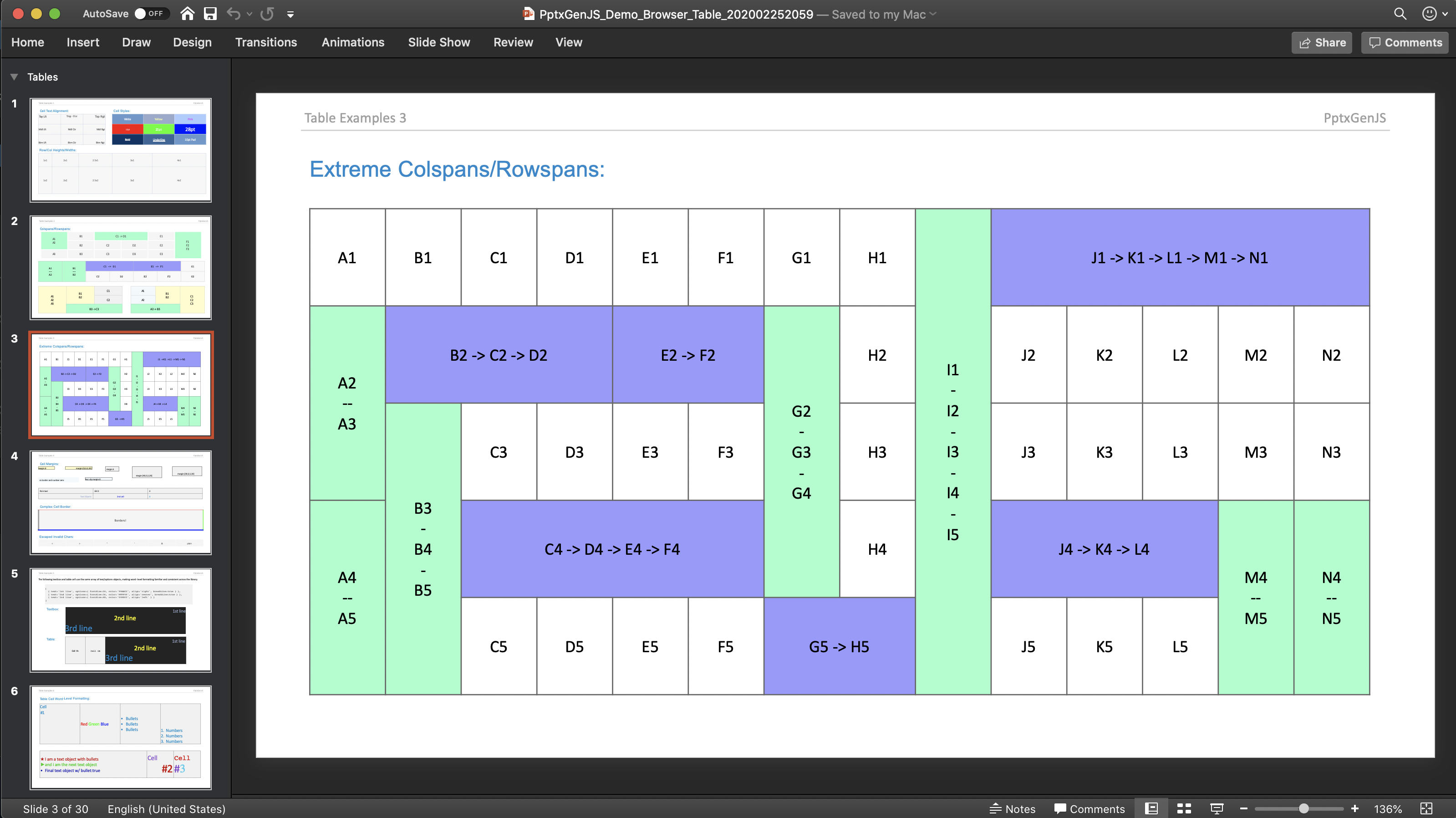

Yes, I actually have :). The examples you have there don't use the cell border coloring in combination with ´colspan´. They do just colspan with fill-color (this seems to work).
The array boundary colors seem to be applied to the first cell only if used in combination with colspan, or what what do you mean?
The code for the slide you posted is this one (no cell boundary colors, just fill?):
		var tabOpts2 = { x:0.5, y:3.3, w:12.4, h:1.5, fontSize:14, fontFace:'Courier', align:'center', valign:'middle', fill:'F9F9F9', border:{pt:'1',color:'c7c7c7'}};
		var arrTabRows2 = [
			[
				{ text:'A1\n--\nA2', options:{rowspan:2, fill:'99FFCC'} },
				{ text:'B1\n--\nB2', options:{rowspan:2, fill:'99FFCC'} },
				{ text:'C1 -> D1',   options:{colspan:2, fill:'9999FF'} },
				{ text:'E1 -> F1',   options:{colspan:2, fill:'9999FF'} },
				'G1'
			],
			[ 'C2','D2','E2','F2','G2' ]
		];
		slide.addTable( arrTabRows2, tabOpts2 );
btw. I circumvented my problem by letting the row below/above color the merged cell. This wouldn't work if they were merged cells, too.
This is still happening. If I have a table cell with a colspan > 1 and a bottom border. The border is only rendered under the first cell of the span. Unfortunately I can't use the workaround of setting the top border of the following row since that also has multi-column spanning cells.

Here's a quick and dirty example. (I just inserted this into your jsFiddle.)
let cells = [];
cells.push( {
	text: 'Spanning header',
	options: {
		color: 000000,
		bold: true,
		align: 'center',
		border: [
			{ pt: 0, color: 000000 },
			{ pt: 0, color: 000000 },
			{ pt: 2, color: 000000 },
			{ pt: 0, color: 000000 },
		],
		colspan: 2
	}
} );
let rows = [];
rows.push(cells);
cells = [];

cells.push( {
	text: 'Content 1',
	options: {
		color: 000000,
		border: [
			{ pt: 0, color: 000000 },
			{ pt: 0, color: 000000 },
			{ pt: 0, color: 000000 },
			{ pt: 0, color: 000000 },
		],
		colspan: 1
	}
} );

cells.push( {
	text: 'Content 2',
	options: {
		color: 000000,
		border: [
			{ pt: 0, color: 000000 },
			{ pt: 0, color: 000000 },
			{ pt: 0, color: 000000 },
			{ pt: 0, color: 000000 },
		],
		colspan: 1
	}
} );
rows.push(cells);

let tableOptions = {
	x: 0,
   	y: 0,
	w: 3,
	h: 2
};

slide.addTable(rows, tableOptions);
And this is the result. Notice the border is only on the first half of the spanning cell.
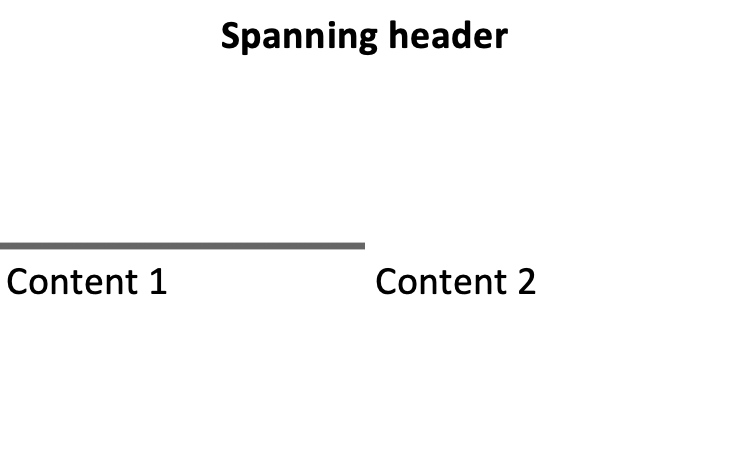 Also, I just noticed, the border is dark grey and not black. Perhaps this is just an anti-aliasing result but it looks odd.